Freedom251 › School Communication Software

Schoolvoice
What Schoolvoice is
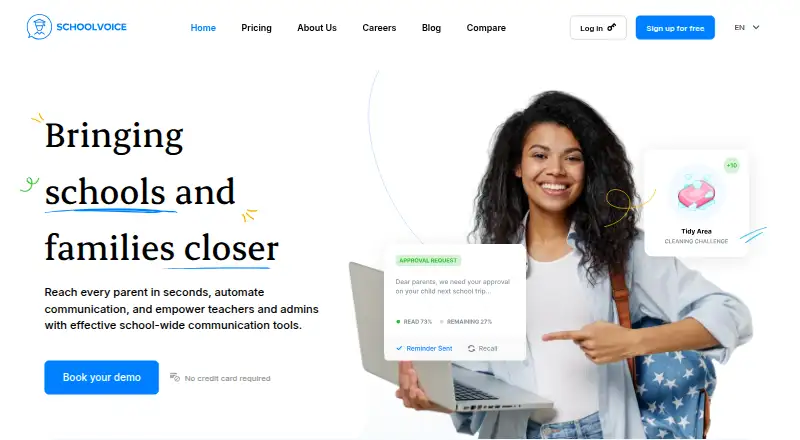
Schoolvoice is a communication and engagement platform for schools connecting parents, teachers, and students. Its tools include chat, voice messages, school channels, stories, teacher drive, and live broadcasts. Messages can prompt recipients to acknowledge, approve, reply, or submit absence and tardiness notes. The platform also lists scheduling, smart reminders, recall, approval workflows, delivery reports, and personalization. If parents remain unreachable, Schoolvoice says it can send an automatic SMS after an interval selected by the school. It names PowerSchool, OneRoster, and Excel as onboarding integrations, and is available on Android, iOS, and the web. The Free plan costs nothing, billed Free Forever, and includes core features and unlimited parent messaging; emergency alerts and payment requests are excluded. The Advanced plan costs $15 a year per student, billed once per year, and adds district-level and multi-school management, AI-powered reports and insights, and priority support. Parent-to-teacher voice calls, call recording, and transcripts are add-ons on both plans.
Who it suits
Schoolvoice suits schools that need to coordinate messages among staff, families, and students. Its Advanced plan adds district and multi-school controls, while its free tier covers core features and parent messaging.
What it does well
- Offers chat, voice messages, channels, stories, and broadcasts.
- Messages can request acknowledgements, approvals, and attendance notes.
- Can send SMS to unreachable parents after a chosen interval.
- Integrates with PowerSchool, OneRoster, and Excel.
- Available on Android, iOS, and the web.
What to know first
- Free excludes emergency alerts and payment requests.
- Calls, call recording, and transcripts are add-ons on both plans.
- Advanced costs $15 a year per student.
- The privacy policy cannot guarantee information safety.
Limits
The Free plan excludes emergency alerts and payment requests. Parent-to-teacher voice calls, call recording, and call transcripts are add-ons on both plans.
Plans
| Plan | Billed and limits | Price |
|---|---|---|
| Free plan | Free Forever · For every student · unlimited parent messaging · core features | Free |
| Advanced plan | Billed once per year · per student · Everything in Free · district-level management and multi-school control · AI-powered reports and insights · priority support | $15 a year |
As schoolvoice.com lists them, read 30 Sept 2026. The maker's own page has the final word.
Getting started
- Visit the Schoolvoice website.
- Choose the Free plan or Advanced plan at $15 a year per student.
- Use the web platform or download the Android or iOS app.
- Connect onboarding systems such as PowerSchool, OneRoster, or Excel.
Schoolvoice is a school-family communication platform for schools, teachers, parents, and students. It is a strong fit for schools that need messages to prompt responses, not just share announcements. The free plan covers core communication; district management and AI-powered reports are reserved for the paid plan.
Overview
Alongside chat, voice messages, school channels, stories, teacher drive, and live broadcasts, Schoolvoice supports messages that ask families to acknowledge, approve, reply, or submit absence and tardiness notes. That makes it more useful for routine school-family follow-up than a channel focused only on announcements. Automatic SMS fallback can reach parents who are unreachable after a chosen interval.
Staff get scheduling, smart reminders, message recall, approval workflows, delivery reports, and personalization. PowerSchool, OneRoster, and Excel integrations support onboarding. The platform offers practical training for administrators, teachers, and parents, and the Free plan includes continuous support and assistance.
Key features
- Action-oriented messages: Acknowledgements, approvals, replies, and attendance notes give schools a way to ask for specific responses. This is useful for routine permissions and attendance communication.
- Multiple communication formats: Chat, voice messages, channels, stories, teacher drive, and live broadcasts give schools several ways to communicate with families and staff.
- Message controls: Scheduling, reminders, recall, approvals, delivery reports, and personalization help staff manage communications and follow-up.
- SMS fallback and integrations: Automatic SMS can reach unreachable parents after a chosen interval, while PowerSchool, OneRoster, and Excel support onboarding.
- Translation and mobile access: Schoolvoice supports 8 translation languages and provides Android and iOS apps, alongside web access.
- Privacy considerations: Its privacy policy describes security measures intended to protect personal information, but does not guarantee safety and disclaims responsibility for breaches beyond its reasonable control.
Pricing
| Plan | Price | What it includes |
|---|---|---|
| Free plan | free; billed Free Forever | Core features and unlimited parent messaging, for every student. |
| Advanced plan | $15 a year; billed once per year, per student | Everything in Free, plus district-level management, multi-school control, AI-powered reports and insights, and priority support. |
The Free plan is a sensible starting point for schools that need core messaging without a subscription. Its key trade-offs are the exclusion of emergency alerts and payment requests. Advanced is the relevant step up for districts or organizations managing multiple schools and seeking reports and priority support. Parent-to-teacher voice calls, call recording, and call transcripts are add-ons on both plans, so neither tier includes those capabilities by default.
Platforms
Schoolvoice runs on Android, iOS, and the web, with mobile apps for families and staff. Two-way messaging, voice messaging, SMS notifications, and SIS integrations support communication across school and family roles.
Who it's for
Schoolvoice suits schools that want to combine announcements and direct communication with structured requests for family responses. Its free plan can serve schools looking to start with core messaging; Advanced is better suited to district teams that need multi-school control. Schools that require emergency alerts or payment requests should account for their absence from Free, while those needing calls or call records should consider the add-on terms.
Pros and cons
- Pro — Responses are part of the workflow: Requests for approvals, acknowledgements, replies, and attendance notes support follow-up beyond one-way updates.
- Pro — Free includes unlimited parent messaging: Schools can use core features without a per-student subscription, with Free Forever billing.
- Pro — District controls are available: Advanced adds multi-school management and AI-powered reports for $15 a year per student.
- Con — Free omits emergency alerts and payment requests: Those exclusions may matter to schools seeking a single channel for urgent notices or payments.
- Con — Voice calls and related records cost extra: Calls, recording, and transcripts are add-ons on both plans.
- Con — Privacy protections are not a guarantee: The policy disclaims responsibility for breaches beyond the company's reasonable control.
Alternatives
Consider ClassDojo if a free teacher messaging and class-story experience with class points is a closer fit; its free plan is available on Android, iOS, and web. Choose Remind for free two-way text messaging with a stated cap of 10 classes and 150 participants per class, plus app integrations. School Stream may suit schools that want free family access and an annual school subscription with one simple fee.
Skool Loop is another free option for schools and parents on Android and iOS. For free individual-teacher access with two-way translated family messaging, consider TalkingPoints. Schoolzine SZapp is free to download and use for parents through participating schools. Bloomz offers a $3 a year Essentials plan with 250+ language translation and unlimited messaging; annual minimums apply to smaller schools and districts. Choose BrightArrow if a paid automated messaging service with usage limits set at purchase is a better fit.
Browse more options in School Communication Software.
Verdict
Schoolvoice is a compelling choice for schools that want family communication to collect acknowledgements, approvals, and attendance responses, with a free core plan and a clear district upgrade. Look elsewhere if emergency alerts or payment requests must be included in the free tier, or if voice calls and call records need to come standard.
Verdict
Schoolvoice brings school-family communication and actionable messaging together across mobile and web. The Free plan excludes emergency alerts and payment requests, while Advanced adds district and multi-school management for $15 a year per student.
Questions
Is Schoolvoice free?
Yes. The Free plan costs nothing, billed Free Forever, and includes core features and unlimited parent messaging.
How much does Advanced cost?
Advanced is $15 a year per student, billed once per year.
What platforms does Schoolvoice support?
Schoolvoice is available on the web, Android, and iOS.
What systems does it integrate with?
Schoolvoice names PowerSchool, OneRoster, and Excel as onboarding integrations.
Are emergency alerts included in the Free plan?
No. Emergency alerts and payment requests are excluded from Free.
Are voice calls included?
Parent-to-teacher voice calls, call recording, and call transcripts are add-ons on both plans.
Facts from Schoolvoice's own pages
- Actionable messages
- Messages can request actions such as acknowledgements, approvals, replies, absence notes, and tardiness notes. · schoolvoice.com, 30 Sept 2026
- Audience
- The platform focuses on communication among schools, teachers, parents, and students. · schoolvoice.com, 30 Sept 2026
- Communication tools
- The platform includes chat, voice messages, school channels, stories, teacher drive, and live broadcasts. · schoolvoice.com, 30 Sept 2026
- Company leadership
- The About page identifies Ali Bin Yahia as founder and CEO and Eyad Salamin as co-founder and CTO. · schoolvoice.com, 30 Sept 2026
- Integrations
- The maker names PowerSchool, OneRoster, and Excel as systems it integrates with for onboarding. · schoolvoice.com, 30 Sept 2026
- Message controls
- The pricing comparison lists message scheduling, smart reminders, recall, approval workflows, delivery reports, and personalization. · schoolvoice.com, 30 Sept 2026
- Mobile apps
- The maker links to Schoolvoice apps on the Apple App Store and Google Play. · schoolvoice.com, 30 Sept 2026
- Notable limits
- Emergency alerts and payment requests are excluded from Free, while parent-to-teacher voice calls, call recording, and call transcripts are listed as add-ons on both plans. · schoolvoice.com, 30 Sept 2026
- Privacy and security
- Its privacy policy says it uses data collection, storage, processing practices, and security measures intended to protect personal information against unauthorized access, alteration, disclosure, or destruction. · schoolvoice.com, 30 Sept 2026
- Product
- Schoolvoice describes itself as a communication and engagement platform connecting schools with parents. · schoolvoice.com, 30 Sept 2026
- Security limitation
- The privacy policy says it cannot guarantee personal information's safety and disclaims responsibility for breaches beyond its reasonable control. · schoolvoice.com, 30 Sept 2026
- SMS fallback
- Schoolvoice says it can send automatic SMS messages to unreachable parents after a chosen interval. · schoolvoice.com, 30 Sept 2026
- Support and training
- The pricing FAQ says Schoolvoice provides practical training for administrators, teachers, and parents, and the free plan lists continuous support and assistance. · schoolvoice.com, 30 Sept 2026
Where Schoolvoice stands on Freedom251
- School Communication Software#6 of 29