Freedom251 › Rich Text Editor Software
SCEditor
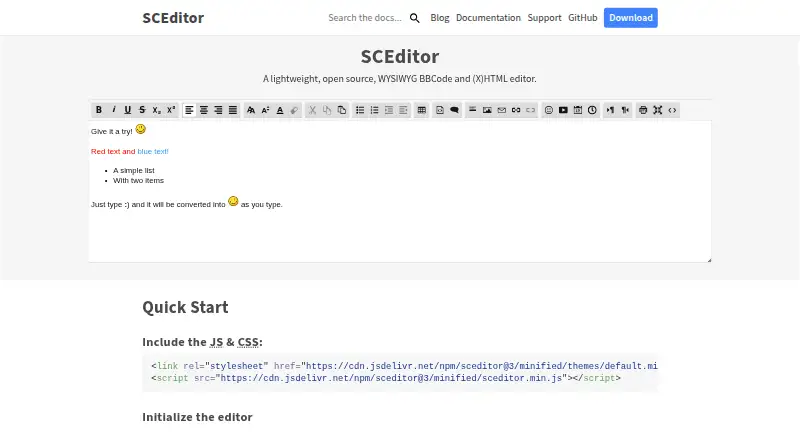
What SCEditor is
SCEditor is a free, open-source WYSIWYG editor for composing BBCode and (X)HTML content in webpages. Its two formats convert editor input and output. To add it to a page, load its JavaScript and CSS files and initialize the editor in place of a textarea. Listed plugins add autosaving to localStorage, YouTube link embedding, drag and drop, emoji insertion, paste-formatting removal, and undo and redo. Downloadable themes include default, dark, modern, Office, and square; the files page also lists a core build with jQuery integration. The MIT license permits commercial and non-commercial use. Listed forum integrations cover MyBB, phpBB 3.1.x, PunBB, Question2Answer, and SMF, though some are described as premium or paid. The compatibility list includes desktop Chrome/Chromium, Safari, Firefox, Edge, and Opera, plus mobile browsers including iOS 5+ and Android Browser on Android 4.0+. On browsers without WYSIWYG support, the editor is disabled by default and leaves the plain textarea; source mode can be enabled with an option. The documentation advises server-side BBCode conversion and sanitizing submitted HTML to prevent XSS.
Who it suits
SCEditor suits developers adding formatted BBCode or (X)HTML editing to a webpage, especially where a textarea-based integration fits. Its MIT license permits commercial and non-commercial use, and it includes listed forum integrations and plugins.
What it does well
- Free, MIT-licensed software for commercial or non-commercial use.
- Supports BBCode and (X)HTML formats.
- Plugins include autosave, emoji, and undo/redo.
- Downloadable files include five themes.
- Compatibility list includes desktop and mobile browsers.
What to know first
- Some listed forum integrations are premium or paid.
- WYSIWYG is disabled by default where browsers lack support.
- Submitted HTML requires server-side sanitization.
Plans
| Plan | Billed and limits | Price |
|---|---|---|
| SCEditor | MIT licensed software · commercial and non-commercial use permitted | Free |
As sceditor.com lists them, read 7 Oct 2026. The maker's own page has the final word.
Getting started
- Open the SCEditor website.
- Load the editor's JavaScript and CSS files in your webpage.
- Initialize SCEditor in place of a textarea.
- Choose a format, theme, or listed plugin as needed.
- Convert BBCode to HTML and sanitize submitted HTML on the server.
Verdict
SCEditor offers a textarea replacement with BBCode and (X)HTML formats, plugins, themes, and listed forum integrations. Account for its browser-dependent WYSIWYG behavior and follow the documentation’s server-side guidance for submitted content.
Questions
How much does SCEditor cost?
The listed SCEditor plan is free. Its MIT license permits commercial and non-commercial use.
Which platforms does SCEditor support?
It is listed for self-hosted and web use. Compatibility includes desktop Chrome/Chromium, Safari, Firefox, Edge, and Opera, plus mobile Chrome, Firefox, iOS 5+ and Android Browser on Android 4.0+.
Which formats does SCEditor support?
It supports BBCode and (X)HTML, converting editor input and output in those formats.
Can I use SCEditor with a forum?
The integrations page lists plugins for MyBB, phpBB 3.1.x, PunBB, Question2Answer, and SMF. Some are described as premium or paid.
Who makes SCEditor?
The site credits Sam Clarke and lists an email address for direct contact.
Does SCEditor support real-time collaboration?
No. Real-time collaboration is listed as unsupported.
Facts from SCEditor's own pages
- Compatibility
- The compatibility page lists desktop Chrome/Chromium, Safari, Firefox, Edge, and Opera, plus mobile Chrome, Firefox, iOS 5+, and Android Browser on Android 4.0+. · sceditor.com, 7 Oct 2026
- Formats
- Its BBCode and XHTML formats convert editor input and output. · sceditor.com, 7 Oct 2026
- Forum integrations
- The integrations page lists plugins for MyBB, phpBB 3.1.x, PunBB, Question2Answer, and SMF, with some described as premium or paid. · sceditor.com, 7 Oct 2026
- Integration
- SCEditor can replace a textarea by loading its JavaScript and CSS files and initializing the editor in a webpage. · sceditor.com, 7 Oct 2026
- jQuery
- The files page lists a core editor build with jQuery integration. · sceditor.com, 7 Oct 2026
- Licensing
- SCEditor is licensed under MIT, which the site says allows commercial and non-commercial use. · sceditor.com, 7 Oct 2026
- Maker
- The site credits SCEditor to Sam Clarke and lists an email address for direct contact. · sceditor.com, 7 Oct 2026
- Mobile limitation
- On browsers without WYSIWYG support, the editor is disabled by default and leaves the plain textarea; source mode can be enabled with an option. · sceditor.com, 7 Oct 2026
- Plugins
- Listed plugins include autosave to localStorage, YouTube link embedding, drag and drop, emoji insertion, paste formatting removal, and undo/redo. · sceditor.com, 7 Oct 2026
- Purpose
- SCEditor is a lightweight, open source WYSIWYG BBCode and (X)HTML editor. · sceditor.com, 7 Oct 2026
- Security guidance
- The documentation says BBCode should be converted to HTML on the server and that submitted HTML needs server-side sanitization to prevent XSS. · sceditor.com, 7 Oct 2026
- Support
- The author offers free support for basic questions and says commercial support is available by email. · sceditor.com, 7 Oct 2026
- Themes
- The downloadable files include default, dark, modern, Office, and square themes. · sceditor.com, 7 Oct 2026
Where SCEditor stands on Freedom251
- Rich Text Editor Software#19 of 37