Freedom251 › PDF Converter Software
ScanDoc
What ScanDoc is
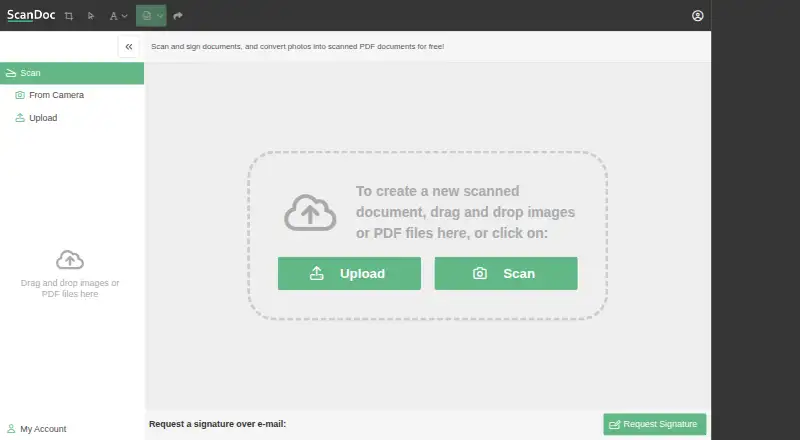
ScanDoc is a web application for turning photos of documents into image or PDF copies. Users can upload or drag in photos, or capture a document with a device camera through the browser. Brightness, document corners, page orientation, and page order can be adjusted. Multiple photos can be edited separately and rearranged. Users can add text and signatures, then download the result as an image or PDF. ScanDoc says it processes documents only in the browser and does not upload document content to a web server. It can be used in a browser on desktop computers, phones, and tablets; its desktop usage guide says a Wi-Fi connection is needed. The service describes scanning and signing as free, and its pricing information lists a free plan and a 14-day trial, though no specific plan prices are exposed in the available page text. The FAQ directs users to contact support by email. Its privacy policy says the service may collect names, usernames, email addresses, and passwords.
Who it suits
ScanDoc suits people who need to convert document photos into image or PDF files using a browser on desktop or mobile devices. It also supports adding text and signatures to the resulting documents.
What it does well
- Photos can be captured through a device camera in the browser.
- Brightness, corners, orientation, and page order are adjustable.
- Multiple photos can be edited and rearranged.
- Results can be saved as images or PDFs.
- ScanDoc says document content stays in the browser.
What to know first
- The desktop guide says Wi-Fi is needed.
- The listed trial lasts 14 days.
- The privacy policy says names, usernames, email addresses, and passwords may be collected.
Getting started
- Open ScanDoc in a web browser
- Upload or drag and drop document photos, or capture one with your device camera
- Adjust corners, brightness, and page orientation
- Edit additional photos and rearrange page order
- Add text or signatures
- Download the document as a PDF or image
Verdict
ScanDoc covers photo capture, scan adjustments, annotations, and image or PDF export in a browser. It describes the service as free and says document content is not uploaded to a web server.
Questions
Is ScanDoc free?
ScanDoc describes scanning and signing as free. Its pricing information lists a free plan and a 14-day trial.
Which devices can use ScanDoc?
It runs in a web browser on desktop computers, phones, and tablets.
Does ScanDoc upload documents?
ScanDoc says it runs only in the browser and does not upload document content to a web server.
What files can it create?
You can download finished documents as PDF files or images.
Can I process several pages?
Yes. Upload multiple photos, edit each separately, and rearrange their order before saving.
How do I contact support?
The FAQ directs users to contact support by email.
Facts from ScanDoc's own pages
- Annotations
- ScanDoc lets users add text and signatures to documents. · docs.scandoc.io, 11 Oct 2026
- Brightness correction
- The service lets users correct brightness to make scanned copies clearer. · scandoc.io, 11 Oct 2026
- Browser privacy
- ScanDoc says it runs only in the browser and does not upload content to a web server. · scandoc.io, 11 Oct 2026
- Browser processing
- ScanDoc says it runs only in the browser and does not upload document content to a web server. · scandoc.io, 11 Oct 2026
- Company location
- ScanDoc's privacy policy identifies its country of incorporation as IL. · scandoc.io, 11 Oct 2026
- Crop and adjust
- Users can adjust document corners, brightness, and page orientation. · scandoc.io, 11 Oct 2026
- Document conversion
- ScanDoc converts photos of documents into scanned copies in image or PDF format. · scandoc.io, 11 Oct 2026
- Export formats
- Users can download the resulting document as a PDF or image. · scandoc.io, 11 Oct 2026
- How to use
- Users can upload a document or capture one with a device camera through the browser. · docs.scandoc.io, 11 Oct 2026
- Internet access
- The desktop usage guide says a Wi-Fi connection is needed to use ScanDoc. · docs.scandoc.io, 11 Oct 2026
- Multiple pages
- Users can upload multiple photos, edit each separately, and rearrange them. · scandoc.io, 11 Oct 2026
- Page editing
- Users can adjust document corners, page orientation, and page order. · scandoc.io, 11 Oct 2026
- Policy date
- The privacy policy is dated February 14, 2021. · scandoc.io, 11 Oct 2026
- Pricing
- The FAQ describes ScanDoc as a free service. · scandoc.io, 11 Oct 2026
- Pricing and trial
- The pricing page says all plans include a 14-day trial and describes scanning and signing documents as free; it does not expose specific plan prices in the page text available. · scandoc.io, 11 Oct 2026
- Privacy policy
- The privacy policy says the service may collect names, usernames, email addresses, and passwords. · scandoc.io, 11 Oct 2026
- Purpose
- ScanDoc converts photos of documents into scanned image or PDF copies and can correct brightness. · scandoc.io, 11 Oct 2026
- Support
- The FAQ directs users to contact support by email. · scandoc.io, 11 Oct 2026
- Supported access
- ScanDoc is a web application usable from desktop and mobile devices. · scandoc.io, 11 Oct 2026
- Supported devices
- ScanDoc says it can be used in a web browser on desktop computers, phones, and tablets. · docs.scandoc.io, 11 Oct 2026
- Text and signatures
- Users can add text and signatures, then save the result as an image or PDF. · docs.scandoc.io, 11 Oct 2026
- Upload and scan
- Users can upload or drag and drop photos, or use the Scan control to capture a document. · scandoc.io, 11 Oct 2026
Where ScanDoc stands on Freedom251
- PDF Converter Software#24 of 47
- PDF converters#15 of 22