Freedom251 › Business Card Scanner Software
ScanBizAI
What ScanBizAI is
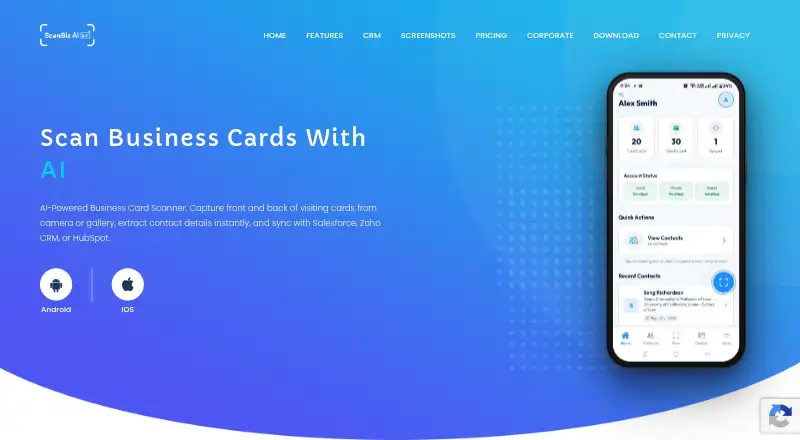
ScanBizAI scans business cards and extracts their details into structured contact profiles for CRM use. Users can photograph or upload the front and back of a card; automatic edge detection and manual adjustment are available. Its AI extracts names, titles, companies, phone numbers, emails, and addresses, and the site says each scan is automatically geotagged. Contacts can be reviewed, edited, saved, shared, and exported. Listed CRM integrations are Salesforce, Zoho CRM, and HubSpot. The service has Android and iOS apps, plus a web admin portal for corporate teams to manage users, subscriptions, billing, credit allocation, CRM integrations, permissions, and usage reports. Users can buy scan credits in-app and track usage in real time. The free Starter plan includes 10 scan credits, card capture, contact management, and basic export. Pro costs $9.99 a month and includes 100 monthly scan credits and CRM sync for one integration. Corporate pricing is custom and not listed.
Who it suits
ScanBizAI suits people who turn business cards into contacts and want to export or sync them with a listed CRM. Corporate teams may benefit from the web portal’s user, credit, billing, and permissions controls.
What it does well
- Captures both sides of a card with edge detection.
- Extracts contact details into structured profiles.
- Offers Android, iOS, and a corporate web portal.
- Starter includes 10 free scan credits.
- Corporate portal supports bulk credit allocation.
What to know first
- Starter includes only 10 scan credits.
- Pro limits CRM sync to one integration.
- Corporate pricing is custom and not listed.
Limits
Starter includes 10 scan credits and basic export. Pro costs $9.99 a month and includes 100 scan credits per month with CRM sync for one integration.
Plans
| Plan | Billed and limits | Price |
|---|---|---|
| Starter | 10 free scan credits · front and back card capture · contact management · basic export | Free |
| Pro | $9.99/ month · 100 scan credits / month · CRM sync (1 integration) · GPS location tagging · contact sharing · priority support | $9.99 a month |
| Corporate | Custom · Unlimited users · admin portal · bulk credit allocation · all CRM integrations · subscription and plan management · dedicated account manager | On request |
As scanbizai.com lists them, read 7 Oct 2026. The maker's own page has the final word.
Getting started
- Open the ScanBizAI website.
- Choose the free Starter plan or a paid plan.
- Use the Android or iOS app to capture or upload both sides of a card.
- Review and edit the extracted contact, then save, share, or export it.
- Use the web admin portal for corporate user, credit, and integration management.
Verdict
ScanBizAI combines card capture, contact management, and CRM connections across mobile apps and a corporate portal. The free plan is limited to 10 scans; Pro adds monthly credits and sync for one CRM integration.
Questions
Is ScanBizAI free?
Yes. Starter is free and includes 10 scan credits, front-and-back card capture, contact management, and basic export.
How much does Pro cost?
Pro costs $9.99 a month. It includes 100 scan credits per month and CRM sync for one integration.
Which platforms are available?
ScanBizAI lists Android and iOS apps and a web admin portal for corporate teams.
Which CRM integrations are listed?
Salesforce, Zoho CRM, and HubSpot are listed.
What does Corporate include?
The plan lists unlimited users, an admin portal, bulk credit allocation, all CRM integrations, subscription and plan management, and a dedicated account manager. Its price is custom.
How can I contact support?
The listed support email is [email protected]. Pro includes priority support.
Facts from ScanBizAI's own pages
- AI extraction
- Its AI extracts names, titles, companies, phone numbers, emails, and addresses into structured contact profiles. · scanbizai.com, 7 Oct 2026
- Availability
- The site lists Android and iOS apps and a web admin portal for corporate teams. · scanbizai.com, 7 Oct 2026
- Card capture
- Users can capture or upload front and back card images, with automatic edge detection and manual adjustment. · scanbizai.com, 7 Oct 2026
- Contact tools
- Users can review, edit, save, share, and export scanned contacts. · scanbizai.com, 7 Oct 2026
- Corporate portal
- The web admin portal supports managing users, subscriptions, billing, credit allocation, CRM integrations, permissions, and usage reports. · scanbizai.com, 7 Oct 2026
- Credit usage
- The site says users can buy scan credits in-app and track usage in real time. · scanbizai.com, 7 Oct 2026
- CRM integrations
- The listed CRM integrations are Salesforce, Zoho CRM, and HubSpot. · scanbizai.com, 7 Oct 2026
- GPS tagging
- The site says every scan is automatically geotagged. · scanbizai.com, 7 Oct 2026
- Headquarters
- Jaipur, Rajasthan, India · scanbizai.com, 28 Sept 2026
- Notable plan limit
- The Pro plan includes 100 scan credits per month and CRM sync for one integration. · scanbizai.com, 7 Oct 2026
- Purpose
- ScanBizAI scans business cards and extracts contact details for syncing with Salesforce, Zoho CRM, or HubSpot. · scanbizai.com, 7 Oct 2026
- Security
- The site says email, mobile, and wallet verification help secure accounts and describes security as enterprise-grade for corporate deployments. · scanbizai.com, 7 Oct 2026
- Support
- The Pro plan includes priority support, and the site provides [email protected] for inquiries. · scanbizai.com, 7 Oct 2026
Where ScanBizAI stands on Freedom251
- Business Card Scanner Software#13 of 24