Freedom251 › Start Menu Customization Software
SbieShell
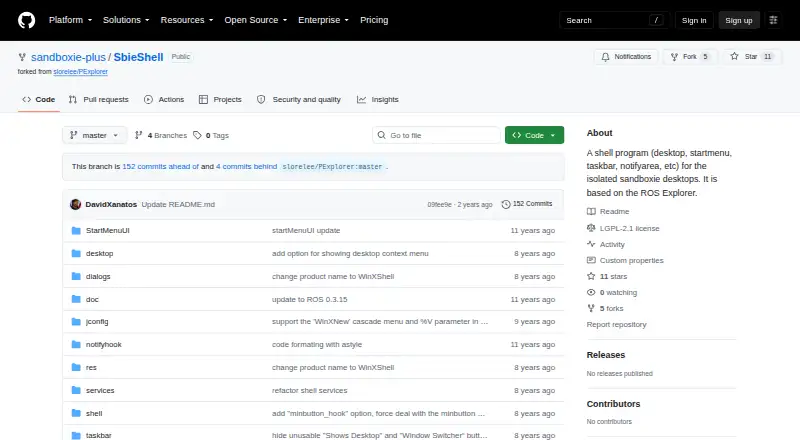
What SbieShell is
SbieShell is a Windows shell program for the isolated desktops used by Sandboxie. It covers the desktop, Start menu, taskbar, and notification area, and the project describes it as based on ROS Explorer and as the shell portion of WinXShell. The README also presents it as a freely available replacement for Windows Explorer for Windows PE.
Its listed desktop features include wallpaper support on Windows Vista and later, along with icons that can be repositioned by drag and drop. The file explorer has a Windows-style interface and automatic refresh. Users can customize third-party file explorer integration, Start menu actions, and taskbar color and height. SbieShell supports tray icons for both x86 and x64 software and lists compatibility with the third-party ClassicShell Start menu application. The project identifies its license as GNU Lesser General Public License version 2.1 (LGPL-2.1). It invites code contributions, comments, feedback, and bug reports. The repository lists no releases, and the project is available for Windows.
Who it suits
SbieShell suits Windows users who need a shell for Sandboxie’s isolated desktops or a Windows Explorer replacement for Windows PE. It may also fit users who want configurable taskbar and Start menu behavior or a shell project they can contribute to.
What it does well
- Covers the desktop, Start menu, taskbar, and notification area.
- Includes a Windows-style file explorer with automatic refresh.
- Supports drag-and-drop desktop icons and wallpaper on Windows Vista and later.
- Allows taskbar color and height customization.
- Supports tray icons for x86 and x64 software.
- Released under the GNU Lesser General Public License version 2.1.
What to know first
- Available for Windows only.
- The GitHub repository lists no releases.
Plans
| Plan | Billed and limits | Price |
|---|---|---|
| SbieShell | Freely available · Windows shell for isolated Sandboxie desktops | Free |
As github.com lists them, read 9 Oct 2026. The maker's own page has the final word.
Getting started
- Open the SbieShell GitHub repository.
- Use its Windows program for a Sandboxie isolated desktop or Windows PE environment.
- Configure the listed desktop, Start menu, taskbar, or file explorer options as needed.
- Send feedback, report bugs, or contribute code through the project.
Verdict
Choose SbieShell if you need a Windows shell for Sandboxie’s isolated desktops and want its listed desktop, taskbar, and explorer features. Its repository lists no releases, so users looking for a release-based distribution may prefer another option.
Questions
Is SbieShell free?
Yes. The project lists SbieShell at no cost.
Which platforms does it support?
SbieShell is available for Windows and lists support for x64 environments.
What license does it use?
The repository identifies the license as GNU Lesser General Public License version 2.1 (LGPL-2.1).
Does it work with ClassicShell?
The README lists support for the third-party ClassicShell Start menu application.
Who makes SbieShell?
The project is hosted by the Sandboxie-Plus GitHub organization and describes SbieShell as based on ROS Explorer and as the shell part source code of WinXShell.
Facts from SbieShell's own pages
- Architecture
- The README lists support for x64 environments and tray icons for both x86 and x64 software. · github.com, 9 Oct 2026
- Availability
- The GitHub repository lists no releases. · github.com, 9 Oct 2026
- Basis
- The project describes SbieShell as based on ROS Explorer. · github.com, 9 Oct 2026
- Contribution and feedback
- The repository welcomes code contributions, comments, feedback, and bug reports. · github.com, 9 Oct 2026
- Customization
- The README describes customization for third-party file explorers, Start menu actions, and taskbar color and height. · github.com, 9 Oct 2026
- Desktop
- The listed features include wallpaper support for Windows Vista and later and drag-and-drop desktop icons. · github.com, 9 Oct 2026
- Desktop features
- Listed features include wallpaper support for Windows Vista and later and drag-and-drop desktop icons. · github.com, 9 Oct 2026
- Explorer integration
- The listed features include binding a third-party file explorer and a Windows-style host file explorer. · github.com, 9 Oct 2026
- File explorer
- The README lists a Windows-style file explorer and automatic refresh in the file explorer among its features. · github.com, 9 Oct 2026
- License
- The repository identifies its license as GNU Lesser General Public License version 2.1 (LGPL-2.1). · github.com, 9 Oct 2026
- Origin
- The project says it is based on ROS Explorer and describes itself as the shell part source code of WinXShell. · github.com, 9 Oct 2026
- Project activity
- The maker’s GitHub organization lists SbieShell as updated on December 18, 2024. · github.com, 9 Oct 2026
- Purpose
- SbieShell is a shell program for Sandboxie’s isolated desktops, covering the desktop, Start menu, taskbar, and notification area. · github.com, 9 Oct 2026
- Refresh
- The project lists automatic refresh in its file explorer among its improved features. · github.com, 9 Oct 2026
- Start menu integration
- The repository lists support for the third-party start menu application ClassicShell. · github.com, 9 Oct 2026
- Support and contributions
- The project invites code contributions, comments, feedback, and bug reports. · github.com, 9 Oct 2026
- Taskbar
- The project lists customization options including taskbar color and height. · github.com, 9 Oct 2026
- Tray
- The repository lists tray icon support for both x86 and x64 software. · github.com, 9 Oct 2026
- Windows PE
- The README describes the freely available program as a replacement for Windows Explorer for Windows PE. · github.com, 9 Oct 2026
Where SbieShell stands on Freedom251
- Start Menu Customization Software#17 of 39