Freedom251 › Start Menu Customization Software
Start Everywhere
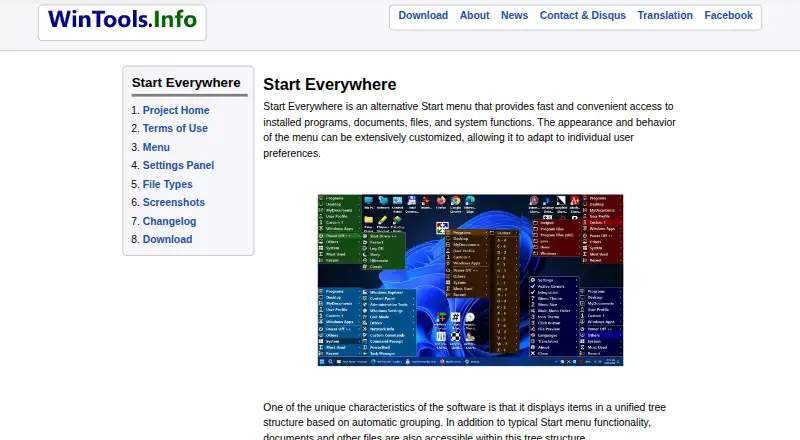
What Start Everywhere is
Start Everywhere is a free alternative Start menu for Windows that brings installed programs, documents, files, and system functions into one menu. It arranges items in a unified tree, with options to group long lists alphabetically or sort them by date. Open it from the Start button, a Click Button positioned anywhere on screen, Active Corners, or hotkeys. It can preview text and image files without opening them, and lets you adjust its appearance, colors, size, and behavior. The menu can be placed anywhere on screen, including in multi-monitor environments. The program is a single executable rather than a traditional installation, and stores settings in the user profile. The listed version is 1.5.1.50, dated 2026-04-10. The Free plan costs nothing. The site lists 64-bit support for Windows 7, 8, 10, and 11; its 32-bit beta has limited support.
Who it suits
It suits Windows users who want an alternative way to organize and open programs, documents, files, and system functions. Its customization and multiple opening methods may also suit people using more than one monitor.
What it does well
- Groups menu items in a unified tree.
- Can sort long lists alphabetically or by date.
- Previews text and image files without opening them.
- Offers multiple ways to open the menu.
- Runs as one executable without traditional installation.
What to know first
- The 32-bit version is a limited-support beta.
- Listed platform support is for Windows.
Limits
The Free plan is listed for 64-bit Windows 7, 8, 10, and 11. The 32-bit beta has limited support.
Plans
| Plan | Billed and limits | Price |
|---|---|---|
| Free | Free to use · 64-bit Windows 7/8/10/11; 32-bit beta has limited support | Free |
As wintools.info lists them, read 7 Oct 2026. The maker's own page has the final word.
Getting started
- Open the Start Everywhere website.
- Download and run its single executable file; a traditional installation is not required.
- Use the Start button, add a Click Button, set up Active Corners, or use hotkeys to open the menu.
- Customize the menu’s appearance, colors, size, and behavior as needed.
Verdict
Start Everywhere combines several ways to open a Start menu with a customizable tree for programs and files. It is free to use, with listed 64-bit support for Windows 7 through 11.
Questions
How much does Start Everywhere cost?
Its Free plan costs nothing.
Which Windows versions does it support?
The site lists 64-bit Windows 7, 8, 10, and 11 support, plus a 32-bit beta with limited support.
Does Start Everywhere require installation?
It consists of one executable file and does not require a traditional installation. Settings are stored in the user profile.
How can I open the menu?
You can open it from the Start button, a Click Button placed anywhere on screen, Active Corners, or hotkeys.
Can it preview files?
It can preview text and image files without opening them.
Who makes Start Everywhere?
It is available from the maker’s WinTools website. The maker says it develops software with visually impaired people in mind.
Facts from Start Everywhere's own pages
- Compatibility
- The site lists support for 64-bit Windows 7, 8, 10, and 11, and offers a 32-bit beta with limited support. · wintools.info, 7 Oct 2026
- Current version
- The listed version is 1.5.1.50, dated 2026-04-10. · wintools.info, 7 Oct 2026
- Customization
- Users can customize the menu’s appearance, colors, size, and behavior. · wintools.info, 7 Oct 2026
- Installation
- The program requires no traditional installation, consists of one executable file, and stores settings in the user profile. · wintools.info, 7 Oct 2026
- Intended users
- The maker says it develops software with visually impaired people in mind and identifies Start Everywhere as a start menu it uses daily. · wintools.info, 7 Oct 2026
- Multi-monitor use
- The menu can appear anywhere on screen, including in multi-monitor environments. · wintools.info, 7 Oct 2026
- Organization
- Long lists can be grouped alphabetically and sorted by date. · wintools.info, 7 Oct 2026
- Previews
- It can preview text and image files without opening them. · wintools.info, 7 Oct 2026
- Security and privacy
- The maker says software available on its site does not collect or transfer personal data and does not install viruses or spyware. · wintools.info, 7 Oct 2026
- Support
- The maker provides a Contact page with a contact form and Disqus comments. · wintools.info, 7 Oct 2026
- Unified tree
- It groups items automatically in a unified tree structure, including documents and other files. · wintools.info, 7 Oct 2026
- Ways to open
- The menu can open from the Start button, a Click Button placed anywhere on screen, Active Corners, or hotkeys. · wintools.info, 7 Oct 2026
- What it does
- Start Everywhere is an alternative Start menu for accessing installed programs, documents, files, and system functions. · wintools.info, 7 Oct 2026
Where Start Everywhere stands on Freedom251
- Start Menu Customization Software#19 of 39