Freedom251 › Screenshot Annotation Software
Savvyshot
What Savvyshot is
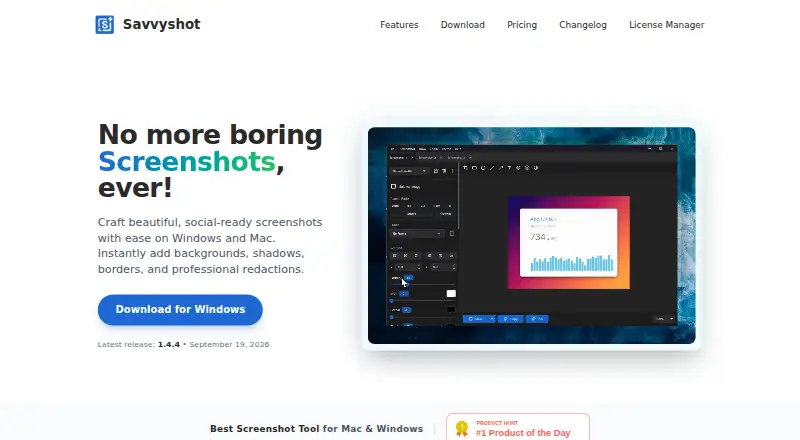
Savvyshot is a desktop screenshot editor for creating shareable images and video exports, with tools for redacting content. It runs on macOS and Windows and captures a selected region, window or entire display using a keyboard shortcut. Scroll capture joins multiple sections into one image for long pages, documents or feeds. Users can adjust padding, shadow depth, borders and aspect ratios, then choose preset backgrounds, gradients, solid colors or custom images. The app also searches Unsplash for royalty-free background images. Annotation tools include shapes, arrows, highlights, text, blur, emoji, counters and a magnifier. Image exports include PNG, JPG and WebP; video-background results can be saved as GIF or MP4. Savvyshot says processing happens offline on the device, and its privacy policy says processed images are not collected or stored and OCR text remains on-device. The free plan is free to download and use, but a license is needed to remove the watermark and unlock the full feature set, including unlimited presets and device mockups.
Who it suits
Savvyshot suits designers, developers, indie hackers and content creators who need to capture, annotate or redact screenshots on macOS or Windows. It may also suit users who want scroll capture or video exports.
What it does well
- Captures regions, windows, and entire displays.
- Scroll capture combines multiple sections into one image.
- Includes redaction and a range of annotation tools.
- Exports images as PNG, JPG, and WebP.
- Processing and OCR text stay on-device, according to the listed policies.
What to know first
- A license is required to remove the watermark.
- The full feature set requires a license.
- No team collaboration feature is listed.
- No browser extension is listed.
Limits
The Free plan can be downloaded and used, but a license is required to remove the watermark and unlock the full feature set, including unlimited presets and device mockups. Basic covers one device license and Pro covers three licenses.
Plans
| Plan | Billed and limits | Price |
|---|---|---|
| Free | Free lifetime update · Easy to use editor | Free |
| Pro | one-time · Everything in Basic · 3 licenses | $24.99, paid once |
| Basic | one-time · No watermark · Save frame profiles · Video screenshot backgrounds · 1 device license | $9.99, paid once |
As savvyshot.app lists them, read 9 Oct 2026. The maker's own page has the final word.
Getting started
- Open the Savvyshot website
- Download the desktop app for macOS or Windows
- Start with the Free plan, which is free to download and use
- Capture a region, window, or display with the keyboard shortcut
- Edit the capture with layouts, backgrounds, annotations, and redactions
- Export as PNG, JPG, WebP, GIF, or MP4
Verdict
Savvyshot provides a broad set of desktop screenshot editing and export tools, including redaction and scroll capture.
Questions
What platforms does Savvyshot support?
Savvyshot is available for macOS and Windows.
Is there a free plan?
Yes. The Free plan costs nothing and is free to download and use.
What exports are available?
Image exports are PNG, JPG, and WebP. Video-background results can be exported as GIF or MP4.
Does Savvyshot include redaction?
Yes. Redaction tools are included.
What do the paid license tiers cover?
Basic covers one device license, while Pro covers three licenses.
Facts from Savvyshot's own pages
- Annotations
- Annotation tools include shapes, lines, arrows, highlights, text, blur, emoji, counters, and a magnifier. · savvyshot.app, 9 Oct 2026
- Audience
- The site identifies designers, developers, indie hackers, and content creators as intended users. · savvyshot.app, 9 Oct 2026
- Browser extension
- No · savvyshot.app, 24 Sept 2026
- Capture
- It captures a selected region, window, or entire display using a keyboard shortcut. · savvyshot.app, 9 Oct 2026
- Export formats
- PNG, JPG, WebP; video: GIF, MP4 · savvyshot.app, 24 Sept 2026
- Exports
- Savvyshot supports WebP export and can export video-background results as GIF or MP4. · savvyshot.app, 9 Oct 2026
- Free limits
- The FAQ says a license is required to remove the watermark and unlock the full feature set, including unlimited presets and device mockups. · savvyshot.app, 9 Oct 2026
- Free plan
- Yes · savvyshot.app, 24 Sept 2026
- Layouts
- Users can adjust padding, shadow depth, borders, and aspect ratios, and choose preset backgrounds, gradients, solid colors, or custom images. · savvyshot.app, 9 Oct 2026
- License data
- The privacy policy says license activation collects device name, device ID, and platform; LemonSqueezy handles payment processing and license management. · savvyshot.app, 9 Oct 2026
- Measurement tools
- No · savvyshot.app, 24 Sept 2026
- Offline processing
- The features page says processing happens entirely offline on the machine and images are not sent to external servers. · savvyshot.app, 9 Oct 2026
- Platforms
- The download page lists Windows 10 and 11 (64-bit) and macOS 12 Monterey or later. · savvyshot.app, 9 Oct 2026
- Privacy
- The privacy policy says the app does not collect or store files or images processed with Savvyshot, and OCR-recognized text stays on-device. · savvyshot.app, 9 Oct 2026
- Purpose
- Savvyshot is a desktop screenshot editor for making polished, shareable screenshots with backgrounds, shadows, borders, and redactions. · savvyshot.app, 9 Oct 2026
- Redaction tools
- Yes · savvyshot.app, 24 Sept 2026
- Scroll capture
- Savvyshot stitches multiple scrolling sections into a single image for long pages, documents, or feeds. · savvyshot.app, 9 Oct 2026
- Support
- The site directs users with app or licensing questions to its support email. · savvyshot.app, 9 Oct 2026
- Team collaboration
- No · savvyshot.app, 24 Sept 2026
- Unsplash
- The app lets users search Unsplash for royalty-free images to use as screenshot backgrounds. · savvyshot.app, 9 Oct 2026
Where Savvyshot stands on Freedom251
- Screenshot Annotation Software#25 of 76