Freedom251 › Barcode Labeling Software

SATO Label Artist II
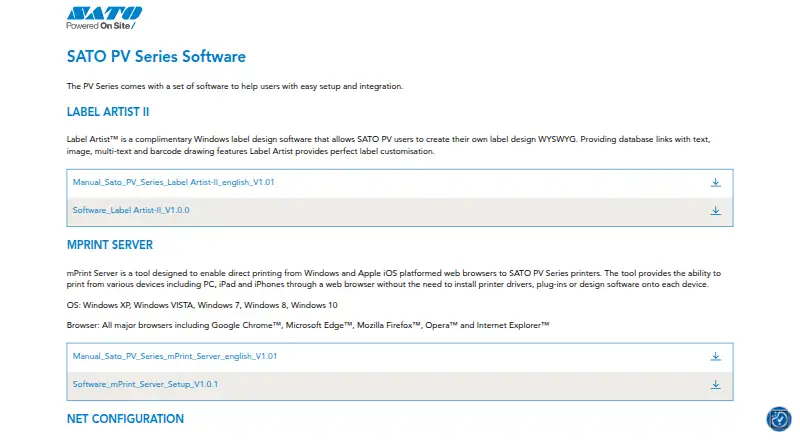
What SATO Label Artist II is
SATO Label Artist II is complimentary Windows desktop software for creating and printing labels for SATO PV users. Its WYSIWYG workspace lets users arrange text, multiline text, images, barcodes, lines, rectangles and ellipses. The manual identifies the SATO PV3 and PV4 as supported printers, and lists Windows XP through Windows 10 and specified Windows Server versions as supported environments. A printer driver must be installed to use the application.
Users can select templates and export them, set the number of copies, and print labels. For variable-data work, the manual documents connecting a database, linking fields to label content, and printing all or selected records. SATO’s PV Series software page links to the Label Artist II download and an English manual. The same software suite lists an OPOS driver for data communication with OPOS-compliant POS applications, as well as PV Series SDKs for Android, iOS, Linux, Windows CE, Windows and Xamarin for custom applications. SATO was founded in 1940 and is headquartered in Tokyo, Japan.
Who it suits
It suits SATO PV users who need Windows desktop software to design and print labels, including labels populated from database records. Users should have a printer driver installed and use a supported SATO PV3 or PV4 printer.
What it does well
- Free label design software for SATO PV users.
- WYSIWYG workspace includes text, images and barcodes.
- Supports database-linked label content and selected-row printing.
- Templates can be selected and exported.
- Copy counts can be set for printing.
What to know first
- Requires an installed printer driver.
- Designed for Windows environments.
- Supported printers identified in the manual are SATO PV3 and PV4.
Plans
| Plan | Billed and limits | Price |
|---|---|---|
| Label Artist II | Complimentary Windows label design software · for SATO PV users | Free |
As satoeurope.com lists them, read 9 Oct 2026. The maker's own page has the final word.
Getting started
- Open SATO’s PV Series software page.
- Download Label Artist II and the English manual.
- Install the printer driver required by the application.
- Use the WYSIWYG workspace to design a label or select a template.
- Connect a database and link fields if you need variable data.
- Set the copy count and print labels.
Verdict
Choose SATO Label Artist II if you use a supported SATO PV printer and need free Windows software for label design, templates and database-linked printing. Look elsewhere if you need a platform other than Windows or a printer outside the identified PV3 and PV4 models.
Questions
How much does SATO Label Artist II cost?
The listed plan is free, and the software is described as complimentary for SATO PV users.
Which printers does it support?
The manual identifies the SATO PV3 and PV4 as supported printers.
Which Windows versions are supported?
The manual lists Windows XP through Windows 10 and specified Windows Server versions.
Can it print database-linked labels?
Yes. The manual documents connecting to a database, linking fields, and printing all or selected rows.
What is required to use the application?
A printer driver must be installed.
Facts from SATO Label Artist II's own pages
- Company background
- SATO says it was founded in 1940 and began as a maker of machinery for processing bamboo, rattan, and palm. · satoeurope.com, 9 Oct 2026
- Custom development
- SATO lists PV Series SDKs for Android, iOS, Linux, Windows CE, Windows, and Xamarin to support customised applications and solutions. · satoeurope.com, 9 Oct 2026
- Database workflow
- The manual documents connecting to a database, linking database fields, and printing all or selected rows. · satoeurope.com, 9 Oct 2026
- Design objects
- The software supports text, image, multi-text, and barcode drawing features for label customisation. · satoeurope.com, 9 Oct 2026
- Download
- SATO’s PV Series software page links to a Label Artist-II software download and an English manual. · satoeurope.com, 9 Oct 2026
- Founded
- 1940 · satoeurope.com, 28 Sept 2026
- Headquarters
- Tokyo, Japan · satoeurope.com, 28 Sept 2026
- Label layout
- The manual documents text, multiline text, barcode, line, rectangle, ellipse, and picture objects. · satoeurope.com, 9 Oct 2026
- OS support
- The manual lists Windows XP through Windows 10 and specified Windows Server versions as supported environments. · satoeurope.com, 9 Oct 2026
- Printer driver requirement
- The manual states that a printer driver must be installed to use the Label Artist-II application. · satoeurope.com, 9 Oct 2026
- Printing
- The manual says users can specify the number of copies and print labels, including database-linked records. · satoeurope.com, 9 Oct 2026
- Purpose
- Label Artist™ is complimentary Windows software for SATO PV users to create label designs in WYSIWYG. · satoeurope.com, 9 Oct 2026
- Related integration tools
- SATO lists an OPOS driver for data communication with an OPOS-compliant POS application in its PV Series software suite. · satoeurope.com, 9 Oct 2026
- Supported printers
- The Label Artist-II manual lists the SATO PV3 and PV4 as supported printers. · satoeurope.com, 9 Oct 2026
- Templates
- The manual lists template selection and template export functions. · satoeurope.com, 9 Oct 2026
Where SATO Label Artist II stands on Freedom251
- Barcode Labeling Software#23 of 35