Satisfactory Mod Loader
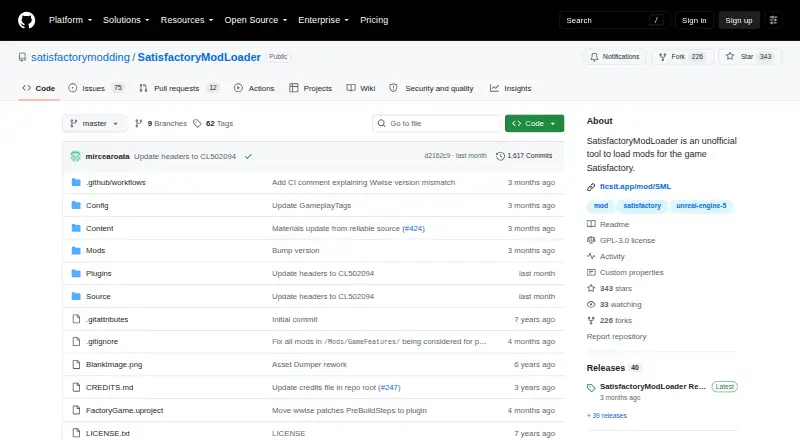
What Satisfactory Mod Loader is
Satisfactory Mod Loader (SML) is an unofficial plugin tool for loading mods in Satisfactory. It provides a framework that lets mods work with systems supplied by the game and interact with other mods. The project also includes helper features for mod developers. Mods can be written in Unreal Blueprint or C++, and community libraries support JSON files. SML is categorized as a library, so it is generally intended to provide code and assets rather than functionality on its own.
The Satisfactory Mod Manager can install SML, mods, and their dependencies, and connects to the Satisfactory Mod Repository. The project recommends using the manager to install the loader. The repository says uploaded content is checked for malware before approval for download. SML is designed with multiplayer support in mind, and its developer says it makes no connections to external networks. The project also says uninstalling the loader will not remove items or progression. Version 3.12.0 is listed as working with Stable and Experimental versions of Satisfactory. Windows client and server support are listed; Linux support is listed for servers, while Linux client support is marked N/A. The repository includes source code, an ExampleMod, editor utilities, and the Unreal project used for mod development. SML is free, has no required dependencies, and the project points users to Discord for discussion.
Who it suits
SML suits Satisfactory players who want to use mods, including in multiplayer, and mod developers working with Unreal Blueprint or C++. Developers can also use its example mod, editor utilities, and Unreal project; Linux support is listed for servers rather than clients.
What it does well
- Free to use, with no required dependencies.
- Supports Satisfactory Stable and Experimental versions.
- The Mod Manager can install mods and their dependencies.
- Designed with multiplayer support in mind.
- The developer says it makes no external network connections.
- Removing it does not cause loss of items or progression, according to the project.
What to know first
- Linux client support is marked N/A.
- As a library, it usually does not offer functionality on its own.
- Controller support is marked untested.
Plans
| Plan | Billed and limits | Price |
|---|---|---|
| Satisfactory Mod Loader | No required dependencies · Windows client and server · Linux server | Free |
As github.com lists them, read 4 Oct 2026. The maker's own page has the final word.
Getting started
- Open the Satisfactory Mod Loader project page.
- Install Satisfactory Mod Manager.
- Use the manager to install SML, mods, and their dependencies.
- Choose mods from the Satisfactory Mod Repository through the manager.
- Visit the project’s Discord for SML or Satisfactory modding discussion.
Satisfactory Mod Loader (SML) is the free plugin framework behind many Satisfactory mods, intended for players who want a managed mod setup and developers building compatible extensions. It is a strong fit for multiplayer-oriented modding and offers unusually useful development material, but it is infrastructure rather than a mod that changes the game by itself.
Overview
SML supplies the common layer that lets mods load into Satisfactory’s systems and interact with one another. That makes it valuable when several mods need shared support, while offering little reason to install it alone. The Satisfactory Mod Manager installs SML, mods, and their dependencies, then connects to the Satisfactory Mod Repository; the project specifically recommends this route instead of manual installation.
Version 3.12.0 is listed as working with both Stable and Experimental Satisfactory builds. Removing the loader is designed not to erase items or progression, which lowers the risk of trying a modded setup and returning to vanilla play. Repository uploads are tested for malware before approval, and the developer says SML makes no external network connections. Those safeguards concern the loader and repository process, not the behavior of every individual mod.
Key features
Shared loading framework
The plugin-based framework gives mods a way into game systems and a means to cooperate. Dependency handling is supported, so the manager can install required components alongside a mod instead of leaving players to assemble them manually. SML is specifically designed with multiplayer support in mind, making it a sensible foundation for co-op groups that want a consistent mod environment.
Tools for creators
Developers can write Satisfactory mods in Unreal Blueprint or C++, with community libraries also supporting JSON. The repository includes source code, an ExampleMod showing SML utilities, editor utilities, and the Unreal project used to develop mods. That material makes SML more useful as a development base than a bare runtime loader, although creators still need to understand the game’s modding technologies.
Practical boundaries
SML normally provides no standalone functionality because it is categorized as a library. Controller support is untested, so controller-focused players have no confirmed experience to rely on. Linux support is asymmetric: the latest version is listed for Linux servers, while Linux client support is marked N/A. Windows clients and servers are supported.
Pricing
| Plan | Price | Includes |
|---|---|---|
| Satisfactory Mod Loader | free | No required dependencies; Windows client and server; Linux server |
There are no paid tiers, quotas, seats, or trial terms to weigh. The free plan suits any Satisfactory player or developer whose platform matches the supported client or server options; Linux desktop players should not treat the free price as evidence of client compatibility.
Platforms
SML supports Satisfactory on Windows and Linux overall. The current release covers Windows clients and servers and Linux servers, but Linux client support is marked N/A. Controller support is untested. Installation is intended through Satisfactory Mod Manager rather than a manual release-file process.
Who it's for
Choose SML if you want a maintained base for installing Satisfactory mods, especially in multiplayer, or if you are developing mods and need shared loading behavior, dependency support, examples, and editor utilities. It is also a low-risk option for players who value being able to uninstall without losing progression. Look elsewhere if you want a loader that changes gameplay on its own, need confirmed Linux client support, or require documented controller compatibility.
Pros and cons
- Pros: Free with no required dependencies; multiplayer-minded design; manager installation handles mods and dependencies; uninstalling is not expected to remove items or progression; source, examples, editor utilities, and the Unreal development project help creators; no external network connections are made.
- Cons: SML is a library, not a standalone gameplay experience; Linux client support is marked N/A; controller support is untested; using it requires choosing and managing separate mods.
Alternatives
For a broader, free loader spanning Android, Linux, macOS, and Windows, consider MelonLoader. SMAPI is the better fit for Stardew Valley 1.6.14 or later, including Steam Deck users. Choose BepInEx when you want open-source Linux, macOS, and Windows support with manual installation and stable or bleeding-edge builds. Hollow Knight Modding API targets Hollow Knight without stated paid tiers or usage limits. ModTek is the free loader for the BattleTech PC game. MWSE offers GNU GPL free software for its supported games and welcomes contributions. xOBSE is a free downloadable GitHub release for its supported platform. Baldur's Gate 3 Script Extender is the relevant free choice for Baldur’s Gate 3, under a license whose Commons Clause restricts resale.
Browse more options in Game Mod Loaders.
Verdict
Satisfactory players who want a free, multiplayer-conscious mod foundation should choose SML and install it through Satisfactory Mod Manager. Its strongest case is dependable shared loading with developer tooling and a progression-safe uninstall path; Linux client users, controller players, and anyone seeking a self-contained gameplay mod should look elsewhere.
Verdict
Choose SML if you want a free framework for loading Satisfactory mods, with multiplayer support and developer helpers. Use the Satisfactory Mod Manager for installation. Linux players should note that client support is marked N/A, and the project describes SML as a library that usually does not provide standalone functionality.
Questions
How much does Satisfactory Mod Loader cost?
It is free. The listed plan is free.
Which platforms are supported?
Windows clients and servers are listed. Linux support is listed for servers, while Linux client support is marked N/A.
How should I install SML?
The project’s release instructions recommend installing it through Satisfactory Mod Manager rather than manually.
Does SML have required dependencies?
No required dependencies are listed.
Which game versions does it work with?
Version 3.12.0 is listed as working with both Stable and Experimental versions of Satisfactory.
What license does the project use?
The repository displays a GPL-3.0 license and says the software is provided as-is.
Facts from Satisfactory Mod Loader's own pages
- Community help
- The project links a Discord server for discussion of SML and Satisfactory modding. · github.com, 4 Oct 2026
- Controller support
- Controller support is marked untested, with no controller support information reported for the mod. · ficsit.app, 4 Oct 2026
- Dependencies
- The listing reports no required dependencies. · ficsit.app, 4 Oct 2026
- Developer helpers
- SML provides helper features to assist with mod development. · docs.ficsit.app, 4 Oct 2026
- Developer tools
- The repository includes source code, an ExampleMod with demonstrations of SML utilities, editor utilities, and the Unreal project used to develop mods. · github.com, 4 Oct 2026
- Game compatibility
- Version 3.12.0 is listed as working with both Stable and Experimental versions of Satisfactory. · ficsit.app, 4 Oct 2026
- Installation
- The project’s release instructions say to install SML through Satisfactory Mod Manager rather than manually. · github.com, 4 Oct 2026
- Latest release
- The latest listed release is version 3.12.0, dated June 6, 2026. · ficsit.app, 4 Oct 2026
- License and warranty
- The repository displays a GPL-3.0 license and says the software is provided as-is. · github.com, 4 Oct 2026
- Linux support
- The latest version is listed for Linux servers, while Linux client support is marked N/A. · ficsit.app, 4 Oct 2026
- Mod category
- The project is categorized as a library, described as a repository of assets or code that usually does not offer functionality on its own. · ficsit.app, 4 Oct 2026
- Mod development options
- Satisfactory mods can be written in Unreal Blueprint or C++, and community libraries also support JSON files. · docs.ficsit.app, 4 Oct 2026
- Mod framework
- SML provides a framework to help mods load into systems provided by the game and interact with one another. · docs.ficsit.app, 4 Oct 2026
- Mod manager integration
- The Satisfactory Mod Manager installs mods, their dependencies, and the mod loader, and connects to the Satisfactory Mod Repository. · docs.ficsit.app, 4 Oct 2026
- Multiplayer
- The listing describes SML as specifically designed with multiplayer support in mind. · ficsit.app, 4 Oct 2026
- Network activity
- The mod developer confirms that SML makes no connections to external networks. · ficsit.app, 4 Oct 2026
- Platforms
- The listing shows Windows support for both client and server, and Linux support for server only. · ficsit.app, 4 Oct 2026
- Purpose
- Satisfactory Mod Loader is an unofficial tool for loading mods in Satisfactory. · github.com, 4 Oct 2026
- Repository review
- The Satisfactory Mod Repository says uploaded content is tested for malware before approval for download. · docs.ficsit.app, 4 Oct 2026
- Security disclosure
- The mod developer confirms that SML makes no connections to external networks. · ficsit.app, 4 Oct 2026
- Support
- The project points users to its Discord server to discuss SML and Satisfactory modding. · github.com, 4 Oct 2026
- Uninstall behavior
- The project page says uninstalling this vanilla-friendly mod will not cause loss of items or progression. · ficsit.app, 4 Oct 2026
- Vanilla compatibility
- The listing says uninstalling SML will not result in losing items or progression. · ficsit.app, 4 Oct 2026
- Windows support
- The latest version is listed for both Windows clients and servers. · ficsit.app, 4 Oct 2026
Where Satisfactory Mod Loader stands on Freedom251
- Game Mod Loaders#12 of 26