BepInEx
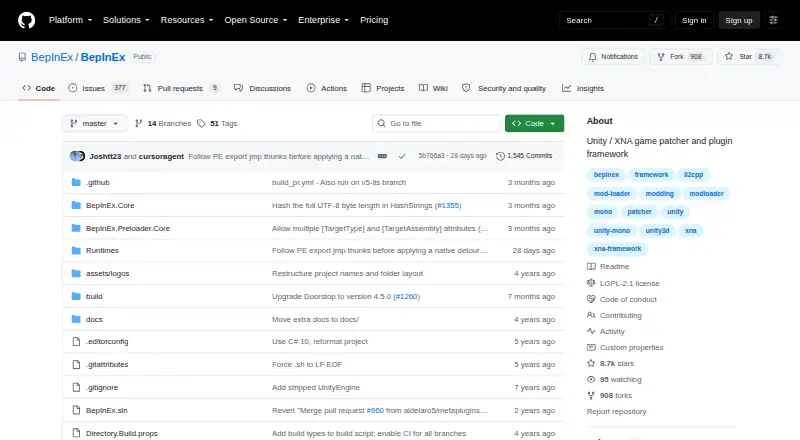
What BepInEx is
BepInEx is a free, open-source framework for installing plugins and mods in Unity Mono, Unity IL2CPP, and .NET Framework games, including XNA, FNA, and MonoGame titles. It provides configuration and logging, runtime method patching, and in-memory assembly patching. Runtime patching uses Harmony, including HarmonyX and MonoMod; in-memory patching uses Mono.Cecil with UnityDoorstop. The installation guide covers Windows, Linux, and macOS, although supported versions and architectures vary by build and game. Setup is manual: download the appropriate build and put its contents in the game's root folder. Official binaries are available as stable and bleeding edge builds; the documentation recommends stable builds in most cases and notes that bleeding edge builds tend to be buggier. Compatibility is limited: only Unity Mono has stable releases, and BepInEx 6 documentation is marked as work in progress. BepInEx 5 is in long-term support, and its plugins do not yet work with the BepInEx 6.0.0 pre-release. User and developer guides cover installation, configuration, troubleshooting, and plugin development.
Who it suits
It suits people modding supported games and developers writing plugins for them. The project provides separate user and developer guides for setup and plugin work.
What it does well
- Supports Unity and .NET Framework game types
- Includes configuration, logging, and patching tools
- Runs on Windows, Linux, and macOS
- Open source under the LGPL-2.1 license
What to know first
- Installation requires manual file placement
- Only Unity Mono has stable releases
- BepInEx 6 documentation is work in progress
- BepInEx 5 plugins do not work with the 6.0.0 pre-release
Limits
The project says only Unity Mono has stable releases, and its BepInEx 6 documentation is work in progress. BepInEx 5 is in long-term support, and BepInEx 5 plugins do not yet work with the BepInEx 6.0.0 pre-release.
Plans
| Plan | Billed and limits | Price |
|---|---|---|
| BepInEx | open source · manual installation · stable and bleeding edge builds | Free |
| BepInEx Free | Stable releases · bleeding-edge builds · Unity Mono, IL2CPP and .NET/XNA framework game targets | Free |
As github.com lists them, read 30 Sept 2026. The maker's own page has the final word.
Getting started
- Open the BepInEx project website.
- Choose the build appropriate for the game and operating system.
- Download a stable build, which the documentation recommends in most cases.
- Place the downloaded build contents in the game's root folder.
- Use the guides for configuration, troubleshooting or plugin development.
BepInEx is a free mod loader and plugin framework for Unity and .NET Framework games. It is best for players and developers whose games match its supported engines and builds. Its broad patching toolkit is useful, but manual setup and uneven release maturity make compatibility the deciding factor.
Overview
BepInEx supports Unity Mono and IL2CPP, as well as .NET Framework games built with XNA, FNA, or MonoGame. That makes it relevant across several game technologies, rather than to one named title. It serves players installing mods and developers writing plugins, with user and developer guides, troubleshooting help, and a Discord community.
Installation is manual: download the build suited to the game, then place its contents in the game’s root folder. This direct approach avoids a separate installer, but requires care when selecting a compatible build. Stable and bleeding-edge builds are available; stable builds are recommended for most cases, while bleeding-edge builds tend to be buggier.
Key features
The framework provides configuration and logging alongside plugin loading, giving developers shared tools instead of requiring each plugin to supply those basics. Runtime method patching is powered by Harmony integrations, including HarmonyX and MonoMod. For in-memory assembly patching, BepInEx uses Mono.Cecil with UnityDoorstop. These capabilities make it a flexible foundation for plugins that need to alter game behavior, though the specific game and framework version still determine whether it is a practical choice.
Mod loading uses injection, and the framework supports plugins, load-order control, and dependency handling. Those capabilities help organize a mod setup and its relationships, but do not remove the need to confirm compatibility with the target game.
Pricing
BepInEx is open-source software under the LGPL-2.1 license. Its BepInEx plan costs nothing and includes manual installation plus stable and bleeding-edge builds. There is no paid tier or trial to weigh against the free option; the meaningful trade-off is the time required to install it and select a suitable build.
Platforms
BepInEx supports Windows, macOS, and Linux. Supported operating-system versions and architectures vary by build and game, so platform availability alone does not guarantee a compatible setup. Check the game’s requirements and choose its matching build before installing.
Who it's for
BepInEx fits players looking to load mods in supported Unity or .NET Framework games, and developers building plugins for those games. Its configuration, logging, and patching tools are especially relevant to plugin authors. It is less suitable for anyone who needs a consistently stable release across all supported frameworks: stable releases are limited to Unity Mono, and BepInEx 6 documentation remains a work in progress.
Pros and cons
- Pros: Support for Unity Mono and IL2CPP as well as several .NET Framework game technologies gives modders and plugin authors a wider range of potential targets.
- Pros: Built-in configuration, logging, patching, load-order control, and dependency handling provide practical foundations for mod setups and plugin development.
- Pros: Free, open-source distribution avoids a purchase cost, while user and developer guides cover installation, troubleshooting, and plugin development.
- Cons: Manual placement in the game folder makes build selection and compatibility checks the user’s responsibility.
- Cons: Stable releases are limited to Unity Mono, and BepInEx 6 is still a work in progress; BepInEx 5 plugins do not yet work with the 6.0.0 pre-release.
- Cons: Bleeding-edge builds tend to be buggier, so they are a less dependable choice when stability matters.
Alternatives
Game Mod Loaders is the broader category to browse when you want to compare mod-loading options.
MelonLoader is another free option for Linux, macOS, Windows, and Android. SMAPI is free and is the relevant choice when modding Stardew Valley 1.6.14 or later on Linux, macOS, Windows, or Steam Deck.
ModTek is a free loader for BattleTech PC. MWSE is a free, GPL-licensed option for Linux and Windows that welcomes contributions such as bug fixes and documentation.
Satisfactory Mod Loader is free, has no required dependencies, and supports Windows clients and servers plus Linux servers. Cyber Engine Tweaks is a free, MIT-licensed framework for Linux and Windows.
Fallout 4 Script Extender (F4SE) is a free Windows option supporting Fallout 4 versions available on Steam and GOG. Hell2Modding is another free option for macOS and Windows.
Verdict
Choose BepInEx if you want a free, open-source loader and plugin toolkit for a compatible Unity or .NET Framework game, particularly if you value its patching and development facilities. Look elsewhere if your game lacks a suitable build or if you need stable support beyond Unity Mono; compatibility and release maturity are the limits that matter most.
Verdict
BepInEx provides mod loading and plugin development tools for several game frameworks. Check the game's compatibility and choose a build carefully, especially where stable support matters.
Questions
Does BepInEx cost anything?
No. The BepInEx plan is free.
Which games does it support?
Its purpose includes games built with Unity Mono, Unity IL2CPP and .NET Framework technologies such as XNA, FNA and MonoGame. The documentation lists Unity 3 or newer and .NET Framework games among supported engines.
Which operating systems are listed?
The installation guide lists Windows, Linux and macOS. Supported versions and architectures vary by build and game.
How is BepInEx installed?
Download the correct build and place its contents in the game's root folder.
Is BepInEx open source?
Yes. The project is open source under the LGPL-2.1 license.
Are BepInEx 5 plugins compatible with BepInEx 6?
They do not yet work with the BepInEx 6.0.0 pre-release.
Facts from BepInEx's own pages
- Antivirus complaint
- A 2021 GitHub issue reports Norton deleting BepInEx.Preloader.dll as a threat, which the reporter associated with the loader's injection behavior. · github.com, 15 Oct 2026
- Antivirus false positive
- A GitHub discussion records Gridinsoft flagging winhttp.dll and .doorstop_version in the 5.4.23.2 archive, with the reporter concluding it appeared benign after checking a related issue. · github.com, 15 Oct 2026
- API documentation
- The API reference documents namespaces for core plugin classes, configuration, paths, bootstrap access and logging. · docs.bepinex.dev, 15 Oct 2026
- Assembly patching
- Mono.Cecil and UnityDoorstop enable in-memory patching of game assemblies. · docs.bepinex.dev, 15 Oct 2026
- Audience
- The docs provide instructions for installing BepInEx and writing plugins, indicating it is intended for people modding games and developing game plugins. · docs.bepinex.dev, 30 Sept 2026
- BepInEx 6 limitation
- The BepInEx 6.0.0-pre.2 release warns that BepInEx 5 plugins do not yet work with it and that the prerelease has many issues. · github.com, 15 Oct 2026
- Bleeding-edge builds
- The builds site publishes platform-specific archives for Windows, Linux and macOS Unity Mono and IL2CPP, plus .NET Framework and CoreCLR targets. · builds.bepinex.dev, 15 Oct 2026
- Build channels
- Official binaries are available as stable builds and bleeding edge builds; the docs say stable builds are recommended in most cases and bleeding edge builds tend to be buggier. · docs.bepinex.dev, 30 Sept 2026
- Compatibility limit
- The repository says only Unity Mono has stable releases, and BepInEx 6 documentation is marked as work in progress. · github.com, 30 Sept 2026
- Compatibility matrix
- The repository marks Unity Mono for Windows, macOS and Linux; Unity IL2CPP for Windows and Linux but not macOS; and .NET/XNA with Mono on macOS and Linux. · github.com, 15 Oct 2026
- Configuration
- BepInEx includes a built-in configuration system for the framework and plugins. · docs.bepinex.dev, 15 Oct 2026
- Developer tooling
- The developer guide covers C# project setup, starter templates, logging, configuration files, preloader patchers and runtime method patching. · docs.bepinex.dev, 15 Oct 2026
- Drop-in installation
- The documentation lists drop-in installation as a core capability. · docs.bepinex.dev, 15 Oct 2026
- Ecosystem dependence
- PC Gamer says most Valheim mods require BepInEx and recommends installing its BepInExPack before additional mods. · pcgamer.com, 15 Oct 2026
- Engine requirements
- Supported engines include Unity 3 or newer plus XNA, FNA, MonoGame and other .NET Framework engines. · docs.bepinex.dev, 15 Oct 2026
- Features
- It provides drop-in installation, built-in configuration and logging, runtime method patching, and in-memory assembly patching. · docs.bepinex.dev, 30 Sept 2026
- Game support
- The documentation lists Unity 3 or newer and .NET Framework games such as XNA, FNA, and MonoGame as supported game engines. · docs.bepinex.dev, 30 Sept 2026
- Independent listing status
- SourceForge hosts an exact mirror, states it is not affiliated with BepInEx, and shows 430 downloads in the reported week. · sourceforge.net, 15 Oct 2026
- Installation
- BepInEx is installed manually by downloading the correct build and placing its contents in the game's root folder. · docs.bepinex.dev, 30 Sept 2026
- Installation method
- The official guide says installation is currently manual and requires choosing binaries for the game's runtime. · docs.bepinex.dev, 15 Oct 2026
- Latest stable release
- GitHub lists BepInEx 5.4.23.5 as the latest stable release and records fixes for Unity 2022.3.62f3, Doorstop 4.5.0 and Unity 6 logging. · github.com, 15 Oct 2026
- Licence
- The GitHub repository identifies the BepInEx project licence as LGPL-2.1. · github.com, 15 Oct 2026
- License
- The project is open source under the LGPL-2.1 license. · github.com, 30 Sept 2026
- Limit: compatibility dependence
- Hysen Labs notes that plugin failures can follow game updates, runtime changes or obfuscation when targeted methods no longer exist. · hysenlabs.com, 15 Oct 2026
Where BepInEx stands on Freedom251
- Game Mod Loaders#1 of 26