Freedom251 › Salon Inventory Management Software

SALON STOCK
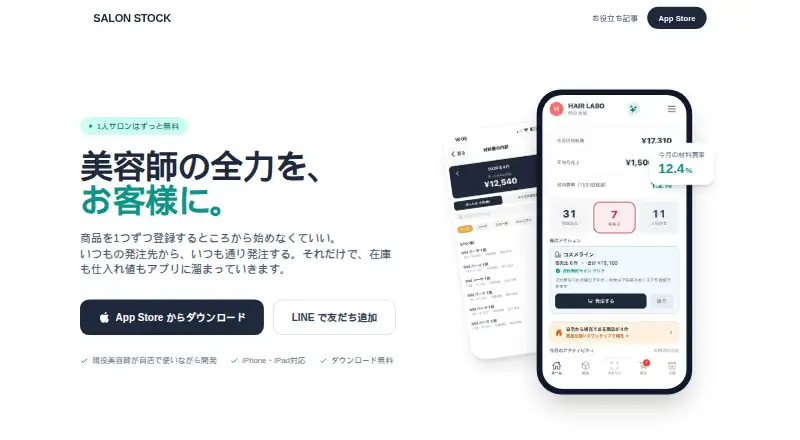
What SALON STOCK is
SALON STOCK is an iOS app for salon operators managing inventory, purchasing, receiving, and material costs. Users can open supplier sites inside the app, record orders, and add products, quantities, and purchase prices to inventory and cost records. Automatic cart loading is listed for D Online (DD-STORE/Daria), Lyrae Cosmetic, and SHAKA, but not Mikoru. Inventory tools include barcode scanning, reorder alerts, stocktaking, delivery-note OCR, and LINE notifications. The free plan covers one-person salons and includes unlimited inventory, ordering and receiving, stocktaking, barcode scanning, LINE notifications, and current-month material cost. Individual Pro costs ¥1,280 a month and adds material-cost analysis, usage and waste tracking, supplier analysis, Square sales integration, CSV export, and AI queries. Team costs ¥2,980 a month per store and adds staff accounts, role management, shared order notes, and multiple locations. The app says it does not store supplier login credentials; users confirm and pay for orders on supplier sites. Data is backed up to the cloud and can be restored by logging in on a replacement phone. Android is in preparation; the app currently supports iPhone and iPad only.
Who it suits
SALON STOCK suits independent salon operators, freelance stylists, and salons managing consumable supplies. The Team plan may suit businesses that need staff roles, shared order notes, or inventory across two locations.
What it does well
- Tracks inventory, orders, receiving, and material costs.
- Includes barcode scanning and reorder alerts.
- Free plan has unlimited inventory.
- Cloud backup can be restored on a replacement phone.
- Team supports multiple locations.
What to know first
- Currently supports iPhone and iPad only.
- Mikoru does not support automatic cart loading.
- AI open-ended questions require Pro.
- Team costs ¥2,980 a month per store.
Limits
The Free plan is for one-person salons and includes current-month material cost; material-cost analysis, usage and waste tracking, supplier analysis, Square sales integration, CSV export, and AI queries are included with Individual Pro. Open-ended AI questions require Pro, and Team features include staff from the second user and multiple locations.
Plans
| Plan | Billed and limits | Price |
|---|---|---|
| Free | ¥0/月 · 1-person salons · unlimited inventory · barcode scanning · ordering and receiving · stocktaking · LINE notifications · current-month material cost | Free |
| 個人 Pro | ¥1,280/月 · Free features · material-cost analysis · usage and waste tracking · supplier analysis · Square sales integration · CSV export · AI queries | ¥1,280 a month |
| チーム | ¥2,980/月・店舗 · Individual Pro features · staff from second user · role management · shared order notes · multiple locations | ¥2,980 a month |
As salon-stock.com lists them, read 30 Sept 2026. The maker's own page has the final word.
Getting started
- Open the SALON STOCK website.
- Install the app on an iPhone or iPad.
- Choose the Free, 個人 Pro, or チーム plan.
- Open a supplier site in the app, record an order, and add its products, quantities, and purchase prices to your records.
- Use the usage guide or contact support through the app's LINE account.
Overview
SALON STOCK combines salon supply ordering with inventory and material-cost records. It is most compelling for independent stylists and small salons that buy from supported suppliers; its iPhone-and-iPad limit rules it out for teams that need Android access.
Users can open supplier sites in the app and record orders so products, quantities, and purchase prices feed into inventory and cost records. Automatic cart loading works with D Online (DD-STORE/Daria), Lyrae Cosmetic, and SHAKA, but not Mikoru. That supplier coverage can reduce duplicate stock entry, though it is not a universal ordering shortcut. Users still confirm and pay on supplier sites themselves; SALON STOCK says it does not store supplier login credentials.
Key features
Stock and replenishment
Barcode scanning, stocktaking, reorder alerts, delivery-note OCR, and LINE notifications cover the recurring work of counting and replenishing salon consumables. The free plan includes the core tools, making them accessible to a solo operator, while unlimited inventory avoids a product-count ceiling. The app is aimed at supplies rather than a broad retail operation, so salons choosing software primarily for other business workflows may need a different fit.
Costs and team workflows
Free tracks current-month material costs. Individual Pro adds material-cost analysis, usage and waste tracking, supplier analysis, CSV export, and Square sales integration, giving a solo salon more context for reviewing consumption and costs. Its LINE AI assistant answers common questions for free, while open-ended queries require Pro. Pro also supports stock at two locations, such as a salon and home, with staged replenishment from the secondary location.
Team adds staff from the second user, role management, shared order notes, and multiple locations. Those tools make the higher tier relevant when purchasing and stock handling are shared; a one-person salon has little reason to pay for team controls.
Pricing
SALON STOCK is freemium, with a free plan and monthly paid plans. The published prices are ¥0/月 for Free, ¥1,280/月 for 個人 Pro, and ¥2,980/月・店舗 for チーム.
- Free — free: For one-person salons, with unlimited inventory, barcode scanning, ordering and receiving, stocktaking, LINE notifications, and current-month material cost. It covers day-to-day stock control but leaves cost analysis and the listed advanced cost tools to Pro.
- 個人 Pro — ¥1,280 a month: Keeps Free features and adds material-cost analysis, usage and waste tracking, supplier analysis, Square sales integration, CSV export, and AI queries. It suits a solo operator who wants to examine costs rather than just track current-month totals.
- チーム — ¥2,980 a month per store: Includes Individual Pro features, staff from the second user, role management, shared order notes, and multiple locations. It is the practical choice when stock and orders are handled by a team; the per-store billing matters for salons operating more than one location.
Platforms
The app supports iPhone and iPad on iOS. Android is in preparation, so salons whose staff need Android access should not rely on it as their shared stock system. Data is saved automatically to the cloud and can be restored by signing in to the same account on a replacement phone. Support is available through the maker's LINE account, alongside a usage guide.
Who it's for
Independent salons and freelance stylists who manage consumables, especially those ordering from D Online, Lyrae Cosmetic, or SHAKA, get the clearest fit: core stock tools cost nothing, and paid plans add cost visibility or team coordination as needed. It is less suitable for Android-dependent workplaces, or salons whose main suppliers do not fit the supported cart workflow.
Pros and cons
- Pro: Core inventory has no product cap on Free. A one-person salon can scan barcodes, stocktake, record orders, and get LINE notifications without a monthly fee.
- Pro: Orders connect to stock and costs. Recording quantities and purchase prices alongside orders can cut separate recordkeeping for supported supplier workflows.
- Pro: Paid plans scale by need. A solo user can add cost analysis and Square integration, while a team can add shared notes, roles, and locations.
- Con: iOS only. Android users cannot use the app today, which is a substantial constraint for mixed-device teams.
- Con: Automatic cart loading is supplier-specific. Mikoru is not supported, and all purchases still need user confirmation and payment on supplier sites.
Alternatives
For more options, browse Salon Inventory Management Software.
- Pronto is a better fit for operators who want broad platform support, including web, Windows, macOS, Linux, and self-hosting, plus a free tier with one staff member, 100 clients, 50 bookings a month, and 100 products.
- Salonist suits readers seeking Android, iOS, and web access with a free marketplace-listing plan covering 50 appointments a month, online booking, scheduling, and staff shifts.
- Feelaxo is oriented toward web-based customer communication and marketing, with a free tier for live chat, email marketing, forms, and traffic analytics.
- EasyGrox may suit a salon that wants a free hosted booking website and shareable booking URL rather than SALON STOCK's inventory-centered workflow.
- GuestVision is another salon software option.
- SalonNow is another salon software option.
- SpaSoft is another salon software option.
- Fresha may be preferable for teams seeking web, iOS, and Android availability, with separate Independent and Team plans.
Verdict
Choose SALON STOCK if you run a solo salon or small team on iOS and want purchasing records to feed directly into stock and material-cost tracking. The free tier is a strong starting point for core inventory, while Pro and Team make clear upgrades for cost analysis and shared workflows. Look elsewhere if Android access or automatic cart loading for Mikoru is essential.
Verdict
SALON STOCK brings salon purchasing and stock tracking together, with a free plan for one-person salons and paid tiers for cost analysis or team workflows. Check the iOS-only availability and supplier-specific cart limits before choosing it.
Questions
How much does SALON STOCK cost?
The Free plan costs nothing. 個人 Pro costs 1,280 JPY per month, and チーム costs 2,980 JPY per month per store.
What does the Free plan include?
It covers one-person salons and includes unlimited inventory, barcode scanning, ordering and receiving, stocktaking, LINE notifications, and current-month material cost.
Which devices does it support?
SALON STOCK currently supports iPhone and iPad on iOS.
What does Individual Pro add?
It adds material-cost analysis, usage and waste tracking, supplier analysis, Square sales integration, CSV export, and AI queries.
Who makes SALON STOCK?
The maker is Syn Stack, Inc. (株式会社Syn Stack). Its site identifies the developer as a working hairdresser with 19 years of experience.
Can inventory data be restored on a replacement phone?
Data is saved automatically to the cloud. It can be restored by logging into the same account on a replacement phone.
Facts from SALON STOCK's own pages
- AI assistant
- The site says users can ask the AI assistant about store inventory, orders, and material costs through LINE; common questions are free and open-ended questions require Pro. · salon-stock.com, 30 Sept 2026
- Cloud backup
- The FAQ says data is saved automatically to the cloud and can be restored by logging into the same account on a replacement phone. · salon-stock.com, 30 Sept 2026
- Cost analysis
- The app calculates material costs and can show material-cost trends and breakdowns on Pro plans. · salon-stock.com, 30 Sept 2026
- Developer
- The site identifies the maker as Syn Stack, Inc. (株式会社Syn Stack), and says its developer is a working hairdresser with 19 years of experience. · salon-stock.com, 30 Sept 2026
- Headquarters
- Tokyo, Japan · salon-stock.com, 23 Sept 2026
- Intended users
- The app is aimed at salon operators, including independent salons, freelance stylists, and salons managing consumable supplies. · apps.apple.com, 30 Sept 2026
- Inventory features
- Inventory tools include barcode scanning, reorder alerts, stocktaking, delivery-note OCR, and LINE notifications. · salon-stock.com, 30 Sept 2026
- Ordering workflow
- Users can open supplier sites inside the app, record orders, and have products, quantities, and purchase prices added to inventory and cost records. · salon-stock.com, 30 Sept 2026
- Platform availability
- The FAQ says the app currently supports iOS on iPhone and iPad only, with Android in preparation. · salon-stock.com, 30 Sept 2026
- Purpose
- SALON STOCK manages salon inventory, purchasing, receiving, and material costs. · salon-stock.com, 30 Sept 2026
- Security
- The app says it does not store supplier login credentials, and users confirm and pay for orders themselves on supplier sites. · salon-stock.com, 30 Sept 2026
- Square integration
- The Individual Pro plan lists Square sales integration. · salon-stock.com, 30 Sept 2026
- Support
- The site links to a usage guide and offers support inquiries through its LINE account. · salon-stock.com, 30 Sept 2026
- Supported auto-cart suppliers
- Automatic cart loading is listed for D Online (DD-STORE/Daria), Lyrae Cosmetic, and SHAKA; Mikoru does not yet support automatic cart loading. · salon-stock.com, 30 Sept 2026
- Two stock locations
- Pro supports inventory at two locations, such as a salon and home, with staged replenishment from the secondary location. · salon-stock.com, 30 Sept 2026