Freedom251 › Terminal Emulators
Sakura
What Sakura is
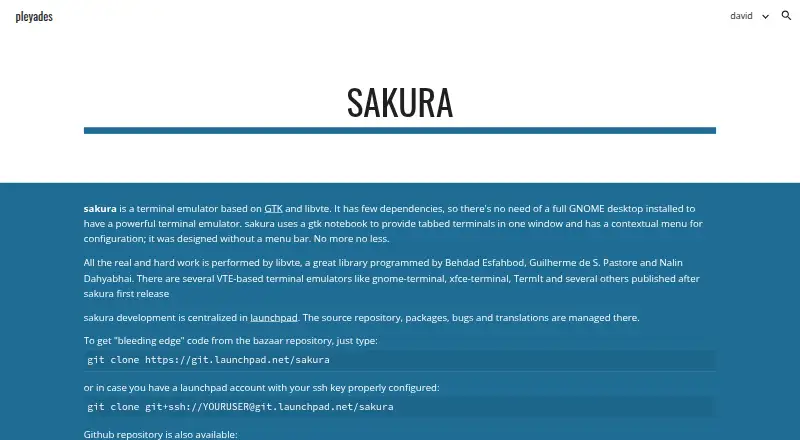
Sakura is a free Linux terminal emulator built with GTK and libvte. Its tabbed window holds several terminals, while a contextual menu provides configuration options. The maker describes it as having few dependencies and not requiring a full GNOME desktop. Shortcuts support creating, closing, naming, and switching tabs, copying and pasting, and toggling the scrollbar; Ctrl+Shift+left-click opens links. Documentation covers fullscreen mode, scrollback navigation, tab-specific color sets, and GTK font-size controls. Middle-click pastes by default, and right-click opens the contextual menu, with both behaviors configurable. Keyboard bindings are stored in ~/.config/sakura/sakura.conf, but there is no graphical editor. The project is GNU GPL v2, with source repositories on Bazaar and GitHub. Launchpad manages source, packages, bugs, translations, questions, and answers.
Who it suits
Sakura suits Linux users wanting a tabbed terminal without a full GNOME desktop. It also fits users comfortable editing configuration files and compiling from source.
What it does well
- Free under GNU GPL v2
- Several terminals in one tabbed window
- Few dependencies
- Configurable mouse behavior
- Fullscreen and scrollback controls
What to know first
- Linux only
- Keyboard bindings have no GUI editor
- OSC 7 needs shell setup in some cases
Verdict
Sakura provides a focused, low-dependency terminal with tabs and configurable controls. Its Linux-only scope and file-based keyboard configuration are important considerations.
Facts from Sakura's own pages
- Build
- The GitHub README gives CMake and make commands for compiling and installing Sakura. · github.com, 11 Oct 2026
- Configuration
- Configuration options are available through a contextual menu. · pleyades.net, 11 Oct 2026
- Configuration limit
- Keyboard bindings are configured in ~/.config/sakura/sakura.conf, and the README says there is no GUI for editing them. · github.com, 11 Oct 2026
- Dependencies
- The maker says Sakura has few dependencies and does not require a full GNOME desktop. · pleyades.net, 11 Oct 2026
- Development
- The maker says Sakura development is centralized on Launchpad, where its source repository, packages, bugs, and translations are managed. · pleyades.net, 11 Oct 2026
- Downloads
- Launchpad lists source archives for Sakura 3.8.9, released on 2025-04-04. · launchpad.net, 11 Oct 2026
- Free plan
- Yes · pleyades.net, 20 Sept 2026
- Keyboard bindings
- Keyboard bindings can be set in a configuration file, which the README says has no GUI editor. · github.com, 11 Oct 2026
- Keyboard shortcuts
- Default shortcuts include creating and closing tabs, copying and pasting text, naming tabs, moving between tabs, and toggling the scrollbar. · github.com, 11 Oct 2026
- License
- Launchpad lists the project license as GNU GPL v2. · launchpad.net, 11 Oct 2026
- Link handling
- Ctrl+Shift+left-click opens a link. · github.com, 11 Oct 2026
- Maker
- The maker's homepage identifies David Gómez as its owner and says he works as a translator rather than a programmer these days. · pleyades.net, 11 Oct 2026
- Mouse behavior
- By default, the middle mouse button pastes and the right mouse button opens the contextual menu; these buttons can be changed in configuration. · github.com, 11 Oct 2026
- OSC 7 setup
- For OSC 7 support in non-login shells, the README says the distribution must source the VTE script or the user can add it to .bashrc. · github.com, 11 Oct 2026
- Product
- Sakura is a GTK and libvte based terminal emulator. · pleyades.net, 11 Oct 2026
- Purpose
- Sakura is a GTK and libvte terminal emulator with few dependencies, designed to provide a terminal without requiring a full GNOME desktop. · pleyades.net, 11 Oct 2026
- Source and issue tracking
- The maker's project page says source, packages, bugs, and translations are managed on Launchpad, and also links a GitHub repository. · pleyades.net, 11 Oct 2026
- Source code
- The maker's page provides Git clone commands for the Bazaar repository and a GitHub repository. · pleyades.net, 11 Oct 2026
- Support
- Launchpad provides bug reporting and a question-and-answer section for the project. · launchpad.net, 11 Oct 2026
- Support and contributions
- The README welcomes pull requests and asks contributors to file a Launchpad bug report before major changes. · github.com, 11 Oct 2026
- Supported platforms
- Linux · pleyades.net, 20 Sept 2026
- Tabs
- It uses tabs to provide several terminals in one window. · pleyades.net, 11 Oct 2026
- Terminal controls
- Documented shortcuts include opening and closing tabs, copying and pasting text, switching tabs, and toggling the scrollbar. · github.com, 11 Oct 2026
- Terminal display
- The README documents fullscreen mode, scrollback navigation, tab-specific color sets, and GTK-standard font-size controls. · github.com, 11 Oct 2026
Where Sakura stands on Freedom251
- Terminal Emulators#35 of 40
- Terminal apps#39 of 41