Freedom251 › Font Design Software

Runebender
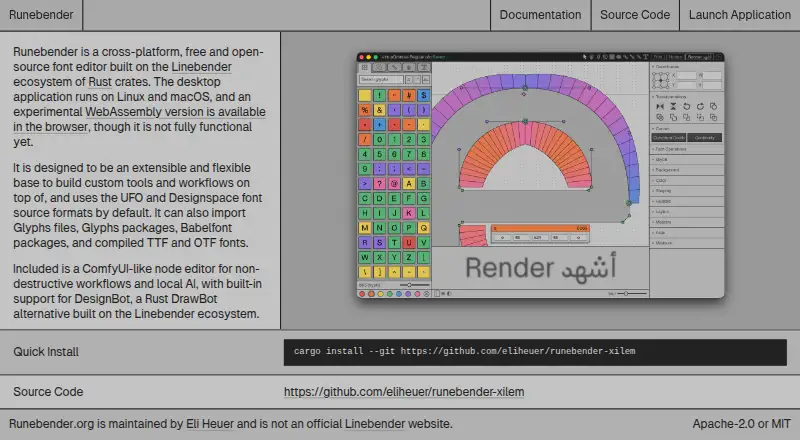
What Runebender is
Runebender is a free font editor for UFO and Designspace font sources. Its tools cover glyphs, paths and filters, components, anchors, masters and interpolation, spacing and kerning, feature code, color fonts, text shaping, font information, and font checking. It opens UFO and Designspace files, Glyphs files and packages, and compiled TTF or OTF fonts; Glyphs files are converted to UFO, while compiled fonts open as UFOs in memory. It can also import Babelfont packages. Experimental local models can suggest a heavier glyph master from a lighter one, and local chat is available through font-ml. The browser editor runs locally without uploading files, but has documented interaction gaps and is not recommended for real work. Runebender is alpha software and has no packaged native release; the native application is installed from source with Cargo. It writes UFO and Designspace files in place, so its documentation advises using copies and version control. The project is licensed Apache-2.0 or MIT and is maintained independently, not as an official Linebender project.
Who it suits
Runebender may suit font creators working with UFO or Designspace sources who are comfortable with alpha software. Its native editor requires installation from source, while the browser version is not recommended for real work.
What it does well
- Covers glyphs, spacing, kerning, and feature code.
- Opens several source and compiled font formats.
- Experimental local models can suggest heavier glyph masters.
- Browser editor does not upload files.
What to know first
- Alpha software with no packaged native release.
- Native installation is from source with Cargo.
- Browser build is not recommended for real work.
- Writes source files in place.
Limits
The free plan costs nothing, but Runebender is alpha software. There is no packaged native release; the browser build has interaction gaps and is not recommended for real work.
Plans
| Plan | Billed and limits | Price |
|---|---|---|
| Free and open source | No cost · Alpha software · Native editor and experimental browser build | Free |
As runebender.org lists them, read 3 Oct 2026. The maker's own page has the final word.
Getting started
- Open the browser build on the Runebender website, or prepare to install the native application from source with Cargo.
- Choose the font source you want to work with: UFO, Designspace, Glyphs, a Glyphs package, a Babelfont package, TTF, or OTF.
- For a local model workflow, provide the required model files; Runebender does not download them.
- Work on a copy of your UFO or Designspace source and keep it under version control.
Runebender is a free font editor for UFO and Designspace sources, aimed at font designers who want editing tools across a broad production workflow. Its range is promising, but alpha maturity and source-based desktop installation make it a cautious choice.
Overview
Runebender works directly with UFO and Designspace sources and can also import Glyphs files and packages, Babelfont packages, and compiled TTF or OTF fonts. Glyphs files become UFOs, while compiled fonts open as UFOs in memory; choose it when source-oriented editing fits your workflow, not when preserving an imported file's original editing format is essential.
The native editor has no packaged release and must be installed from source with Cargo. It writes UFO and Designspace files in place, so the project's advice to work on copies and keep source files under version control is important. The software is alpha, which makes it better suited to careful development than a workflow that depends on a stable production tool.
Key features
Runebender covers glyph editing, paths and filters, components and anchors, masters and interpolation, spacing and kerning, feature code, font information, and font checking. Text shaping, variable-font support, OpenType layout tools, and color-font tools extend its reach beyond drawing individual glyphs. That breadth makes it worth considering for designers who want source editing and production-oriented capabilities in one editor, though alpha status tempers its suitability for critical work.
Experimental local models can propose a heavier glyph master from a lighter one. The model workflow runs on the user's machine, and drawings are not sent elsewhere; users must provide the model files because the editor does not download them. Local chat is available through font-ml. An experimental MCP interface can connect an agent to the open native editor and its unsaved font. The client controls model authentication and provider selection, but a hosted model may receive font data returned to the client, so this integration is not equivalent to keeping all font data local.
The experimental WebAssembly editor runs in a browser without uploading files. Documented interaction gaps and the recommendation against real work make it useful only for limited exploration, not as a substitute for the native editor.
Pricing
Runebender is free and open source: the Free and open source plan costs nothing. It includes the native editor and experimental browser build, with no paid tier or free trial. Its Apache-2.0 or MIT licensing and zero cost suit designers willing to accept alpha software and handle installation themselves.
Platforms
Runebender supports Linux, macOS, and Windows through the native application, which is installed from source with Cargo; a browser build can be opened on the site. Although the browser editor avoids file uploads, its interaction gaps and unsuitability for real work limit its practical role. The FAQ directs users seeking support to open an issue in the project repository. Runebender is independently maintained and is not an official Linebender project.
Who it's for
Runebender best fits font designers comfortable with UFO and Designspace sources, version control, and alpha software. Its broad editing coverage and import options are attractive for experimentation and cautious source work. Those who need a packaged desktop install, a mature production workflow, or a browser editor for substantial work should look elsewhere.
Pros and cons
- Pro: A wide range of glyph, spacing, interpolation, layout, shaping, and color-font tools supports more than basic outline drawing.
- Pro: It can import source files, packages, and compiled fonts, giving designers multiple ways to bring work into a source-based workflow.
- Pro: The local model workflow keeps drawings on the user's machine, provided users supply their own model files.
- Con: Alpha status and in-place writes make copies and version control essential safeguards.
- Con: Native installation requires building from source with Cargo rather than installing a packaged release.
- Con: The browser build is experimental and not recommended for real work; the MCP integration may send font data to a hosted model.
Alternatives
For a wider comparison, browse Font Design Software.
- FontBob is a better fit for readers who want a freemium tool with drawing, spacing, preview, and OTF export in its free plan; FontBob Pro is $7 a month.
- Fontra is another free, open-source, browser-based, cross-platform option for readers who prioritize a browser workflow.
- Birdfont suits readers seeking an open-source alternative with TTF and monochrome SVG fonts, kerning, ligature substitutions, alternates, and SVG import.
- FontForge is a free and open-source alternative for readers who value source-code access and redistribution.
- FontStruct is a free online font-building option, funded by advertising and sponsors.
- Glyphr Studio is a free, open-source, self-hosted or web alternative with no sign-up.
- Bitmap Font Editor is another free option for Linux, macOS, and Windows.
- Bezy is another free option for Linux, macOS, and web.
Verdict
Choose Runebender if you want broad, free source-based font editing and are prepared to work cautiously with alpha software. Its strongest case is the breadth of its editing tools alongside local-first model experimentation. Look elsewhere if you need a packaged native installer, a more mature production tool, or a browser editor suited to real work.
Verdict
Runebender offers broad font-source editing tools, but its alpha status and source-based native installation matter for adopting it. Work on copies and keep source files under version control, as the project documentation advises.
Questions
How much does Runebender cost?
Runebender is free and costs nothing plan.
Which platforms does it support?
The listed platforms are Linux, macOS, web, and Windows.
What font formats can it open or import?
It opens UFO, Designspace, Glyphs files and packages, and compiled TTF or OTF fonts. It can also import Babelfont packages; Glyphs files are converted to UFO, and compiled fonts are opened as UFOs in memory.
Is Runebender open source?
Yes. The FAQ says it is licensed under Apache-2.0 or MIT.
Does it include AI features?
Experimental local models can suggest a heavier glyph master from a lighter one, and local chat is available through font-ml. Users supply the model files.
How do I get help?
The FAQ directs users to open an issue in the project repository.
Facts from Runebender's own pages
- Agent integration
- An experimental MCP interface can connect an agent to the open native editor and its unsaved font; the client controls model authentication and provider selection, and a hosted model may receive font data returned to the client. · runebender.org, 3 Oct 2026
- AI features
- Experimental local models can propose a heavier glyph master from a lighter one, while local chat is available through font-ml. · runebender.org, 3 Oct 2026
- AI privacy
- The local model workflow runs on the user's machine and the documentation says drawings are not sent anywhere; it requires users to provide model files, which the editor does not download. · runebender.org, 3 Oct 2026
- Browser privacy and limits
- The experimental WebAssembly browser editor runs locally without uploading files, but has documented interaction gaps and is not recommended for real work. · runebender.org, 3 Oct 2026
- Editing features
- The documentation covers glyph editing, paths and filters, components and anchors, masters and interpolation, spacing and kerning, feature code, color fonts, text shaping, font info, and font checking. · runebender.org, 3 Oct 2026
- File support
- It opens UFO, Designspace, Glyphs files and packages, and compiled TTF or OTF fonts; Glyphs files are converted to UFO, and compiled fonts are opened as UFOs in memory. · runebender.org, 3 Oct 2026
- Installation
- The project has no packaged release yet; the native application is installed from source with Cargo, and the browser build can be opened on the site. · runebender.org, 3 Oct 2026
- License and project status
- The FAQ says Runebender costs nothing and is licensed Apache-2.0 or MIT; it is maintained independently and is not an official Linebender project. · runebender.org, 3 Oct 2026
- Platforms
- The FAQ says the code builds on Windows and Linux, while macOS is where it is used daily; the install guide describes the browser build as experimental. · runebender.org, 3 Oct 2026
- Stability and source safety
- Runebender is alpha software and writes UFO and Designspace files in place, so its documentation advises keeping sources under version control and working on copies. · runebender.org, 3 Oct 2026
- Support
- The FAQ directs users to open an issue in the project repository for help. · runebender.org, 3 Oct 2026
- What it does
- Runebender is a font editor for UFO and Designspace font sources. · runebender.org, 3 Oct 2026
- Workflow formats
- Runebender uses UFO and Designspace font source formats by default and can import Glyphs files, Glyphs packages, Babelfont packages, and compiled TTF and OTF fonts. · runebender.org, 3 Oct 2026
Where Runebender stands on Freedom251
- Font Design Software#13 of 33