Freedom251 › Wedding Website Builders
RSVP Hub
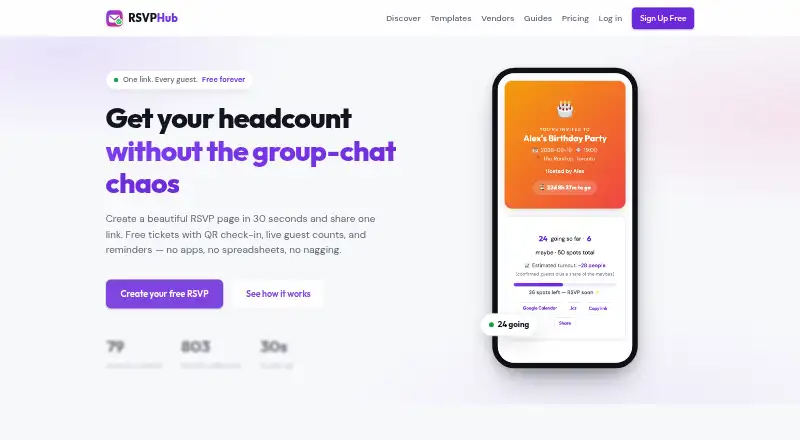
What RSVP Hub is
RSVP Hub lets hosts create online event invitations, share them by link, and track responses in a dashboard. Guests can answer Yes, No, or Maybe, include plus-ones, and message the host without an account. Hosts can set a guest cap, display the number of remaining spots, and have an event marked full when the cap is reached. Guests who say they are going receive a digital ticket with a unique code and QR code, which the host can scan or enter from a phone at the door. The dashboard updates response, plus-one, and check-in counts in real time and includes page-view and view-to-RSVP analytics. Hosts can ask custom questions, export guest details and answers to CSV, post event updates, and email every guest. Invitations and tickets include Google Calendar and Apple/Outlook calendar buttons. The free plan includes unlimited events and RSVPs, QR tickets and check-in, custom questions, guest updates, and CSV export. Host Pro costs C$5 a month; Pro event costs C$9, paid once.
Who it suits
It suits hosts organizing events such as weddings, birthdays, fundraisers, or corporate gatherings who want link-based invitations and response tracking. The free plan includes tools for guest questions, updates, check-in, and exports.
What it does well
- Guests can respond without an account
- Tracks RSVP and check-in counts in real time
- QR tickets support door check-in
- Free plan includes unlimited events and RSVPs
- Exports guest information and answers to CSV
What to know first
- Free trial is not available
- Host Pro costs C$5 a month
- Pro event costs C$9, paid once
Plans
| Plan | Billed and limits | Price |
|---|---|---|
| Free | Free forever · Unlimited events · up to 25 guests per event · QR tickets and check-in · custom questions · guest updates · calendar links · CSV export · 92 templates · 50 games | Free |
| Guest pack 250 | One payment per event · Up to 250 guests · custom link · accent colour · no RSVP Hub branding | C$19, paid once |
| Guest pack 500 | One payment per event · Up to 500 guests · custom link · accent colour · no RSVP Hub branding | C$29, paid once |
| Guest pack 50 | One payment per event · Up to 50 guests · custom link · accent colour · no RSVP Hub branding | C$5, paid once |
| Host Pro | Monthly; cancel any time · Pro features on every event · custom links and colours · no RSVP Hub branding · priority support | C$5 a month |
| Guest pack 100 | One payment per event · Up to 100 guests · custom link · accent colour · no RSVP Hub branding | C$9, paid once |
| Pro event | One payment; no renewal · Custom link · accent colour · no RSVP Hub branding · priority support | C$9, paid once |
As rsvphub.ca lists them, read 21 Oct 2026. The maker's own page has the final word.
Getting started
- Open rsvphub.ca or use the Android or iOS app.
- Create an event invitation and share its link with guests.
- Set an optional guest cap and add custom questions if needed.
- Review responses and check-in counts in the dashboard.
- Use QR tickets or ticket codes to check guests in at the door.
- Choose Host Pro or Pro event for custom links and colours, no branding, and priority support.
RSVP Hub is an event invitation and guest-response service for hosts who want to manage attendance through a shared event page. It suits gatherings that need RSVP tracking and door check-in without charging per guest or ticket; its paid plans focus on customizing the event’s appearance and link.
Overview
Hosts can create an invitation page for birthdays, weddings, showers, BBQs, game nights, corporate events, fundraisers, meetups, or festivals, then share its link. Guests can reply Yes, No, or Maybe, add plus-ones, and message the host without registering for an account. That makes the invitation straightforward to use while keeping responses together in a host dashboard.
The dashboard updates RSVP, plus-one, and check-in counts in real time. Page-view and view-to-RSVP analytics add a useful measure of how many people who open the event page go on to respond. Events are visible to people with the shared link, and RSVP Hub says guest lists remain private.
Key features
An optional guest cap can display how many places remain and mark an event full when the limit is reached. This gives hosts a simple way to communicate capacity, though it is not a replacement for a more extensive ticketing operation.
Each guest who accepts receives a digital ticket with a unique code and QR. At the door, the host can scan the code or enter it from a phone, connecting check-in with the guest counts. Hosts can also collect custom answers, such as meal choices, and export names, responses, plus-ones, messages, and check-in status to CSV. That combination is useful for practical event coordination, particularly when a host needs to work with guest details outside the event page.
Invitations and tickets include one-tap options to add an event to Google Calendar or to Apple and Outlook calendars through .ics. Hosts can post page updates and email all guests at once, which keeps changes and reminders in one channel rather than requiring individual messages.
RSVP Hub says it stores data securely and does not sell it. Pro payments go through Stripe checkout, and the service says it does not see card numbers. Pro hosts also receive priority support, with their questions moved to the front of the inbox.
Pricing
The free plan costs nothing, billed Free forever. It includes unlimited events and RSVPs, QR tickets and check-in, custom questions, guest updates, and CSV export, with no credit card, per-guest fees, or per-ticket fees. For a host organizing events without a need for bespoke styling, this covers the core workflow without a usage cap.
Host Pro costs C$5 a month, billed Monthly, and can be cancelled any time. It adds Pro features on every event, custom links and colours, removal of RSVP Hub branding, and priority support. This is the better fit for hosts running multiple events who want a consistent, branded presentation. The one-time Pro event plan costs C$9, paid once, billed One-time payment per event, and provides a custom link, accent colour, no RSVP Hub branding, and priority support. It suits a single occasion where those presentation options matter but a monthly commitment does not. Both paid plans give up the free plan’s no-cost advantage in exchange for customization and support; the stated Pro event inclusions are narrower than Host Pro’s per-event Pro features.
RSVP Hub has no free trial. Its unlimited-event and RSVP allowance is a notable advantage for recurring hosts, while the paid choice is chiefly about how the invitation looks and how guests reach it.
Platforms
RSVP Hub is available on Android, iOS, and the web. Hosts can use a phone for door check-in, while guests can reach invitations through a shared link.
Who it's for
RSVP Hub is a strong choice for individuals, community organizers, and event hosts who need guest responses, custom questions, updates, and QR check-in in one place. Its free plan is particularly suitable for events with many invitees or for hosts managing several gatherings, since it has unlimited events and RSVPs and no per-guest or per-ticket fees.
It is less suited to someone whose main priority is a wedding-planning suite or a highly customized event experience. The paid plans add link and colour choices and remove branding, but the described offering centers on invitations and guest management.
Pros and cons
- Pros: The free plan includes unlimited events and RSVPs, QR tickets, check-in, custom questions, updates, and CSV export, with no per-guest or per-ticket charges.
- Pros: Guests can reply and add plus-ones without an account, reducing the steps between receiving an invitation and responding.
- Pros: Real-time counts, capacity indicators, calendar buttons, and bulk guest updates support the whole RSVP-to-event-day process.
- Cons: Hosts who want a custom link, colour options, and no RSVP Hub branding must pay, even though the core RSVP and check-in features are free.
- Cons: The service is centered on invitation and guest administration; readers looking for a broader wedding-planning toolkit may prefer a dedicated planner.
Alternatives
For a wedding-focused tool, compare Wedence, whose free plan includes an animated invitation and wedding website, two designs, an unlimited guest list, per-event RSVPs, a guestbook, and a planning checklist. Joy (WithJoy) is another wedding-oriented option; its free plan includes unlimited guests, a planning dashboard, wedding website, registry, mobile app, online RSVP, and digital invitations.
Planning.Wedding is a better match for couples who want wedding logistics beyond invitations: its free Basic plan includes a guest list, RSVPs, website, checklist, budget, itinerary, vendors and venues, notes, and files. Say Yes is another wedding-planning alternative; its Free plan costs nothing and has a 50-guest limit.
Choose The Knot Wedding Websites if a wedding website is the priority: its free plan includes customizable templates, RSVP collection, registry links, and guest messaging. Vowesta is a free alternative for wedding planning, while Zola Wedding Planner offers free wedding-planning tools for personal, non-commercial use with a registered account.
Aisle may suit users who want to build and preview a wedding website before setting it up; its free setup also includes adding guests, organizing groups, and a planning checklist. For a wider set of wedding website options, see Wedding Website Builders.
Verdict
RSVP Hub is a sound choice for hosts who want an uncomplicated route from invitation to RSVP tracking and QR check-in, especially when unlimited events and responses matter more than custom presentation. Choose it for the free core tools and no per-guest or per-ticket fees; look elsewhere if the central need is a fuller wedding-planning suite or if its paid styling options do not meet your requirements.
Verdict
RSVP Hub combines invitations, guest tracking, tickets, and check-in, with a free plan for unlimited events and RSVPs. Hosts who want custom links, colours, and no RSVP Hub branding can choose a paid option.
Questions
Is there a free plan?
Yes. Free costs nothing, billed Free forever, with unlimited events and RSVPs and no credit card, per-guest fees, or per-ticket fees.
What do the paid plans cost?
Host Pro is C$5 a month. Pro event is C$9, paid once, as a one-time payment per event.
Which platforms are available?
RSVP Hub is available on Android, iOS, and the web.
Do guests need an account to respond?
No. Guests can reply Yes, No, or Maybe, include plus-ones, and send messages without an account.
Can hosts check guests in and export responses?
Yes. Attending guests receive digital tickets with a unique code and QR code for door check-in. Hosts can export guest names, answers, plus-ones, messages, and check-in status to CSV.
What do the Pro plans add?
Host Pro includes Pro features on every event, custom links and colours, no RSVP Hub branding, and priority support. Pro event includes a custom link, accent colour, no branding, and priority support.
Facts from RSVP Hub's own pages
- Brand customization
- Paid guest packs provide a custom event link, one accent colour and removal of RSVP Hub branding. · rsvphub.ca, 21 Oct 2026
- Business templates
- Business templates cover restaurants, real-estate open houses, fitness studios, workshops, shops, nonprofits, schools and community groups. · rsvphub.ca, 21 Oct 2026
- Calendar integration
- Invitations and tickets offer one-tap Google Calendar and Apple/Outlook .ics calendar actions. · rsvphub.ca, 21 Oct 2026
- Calendar integrations
- Invitations and tickets include one-tap Google Calendar and Apple/Outlook (.ics) add-to-calendar buttons. · rsvphub.ca, 11 Oct 2026
- CSV export
- Organizers can download names, emails, answers and attendance status as a CSV file. · rsvphub.ca, 21 Oct 2026
- Custom questions
- Events support up to ten organizer-defined questions, including required multiple-choice or free-text fields. · rsvphub.ca, 21 Oct 2026
- Custom questions and export
- Hosts can collect custom answers such as meal choices and export guest names, answers, plus-ones, messages, and check-in status to CSV. · rsvphub.ca, 11 Oct 2026
- Data and payment security
- The site says data is stored securely and never sold; Pro payments use Stripe checkout, and RSVP Hub says it never sees card numbers. · rsvphub.ca, 11 Oct 2026
- Documentation
- The official site provides event-planning guides, including a detailed guide for collecting dietary restrictions with custom questions and CSV export. · rsvphub.ca, 21 Oct 2026
- Event duplication
- Hosts can duplicate an event and retain its questions, cap and cover photo while changing the date. · rsvphub.ca, 21 Oct 2026
- Event types
- The site lists birthdays, weddings, showers, BBQs, game nights, corporate events, fundraisers, meetups, and festivals among its use cases. · rsvphub.ca, 11 Oct 2026
- Games and scoreboards
- The service includes 50 browser party games and live scoreboards for activities such as trivia and tournaments. · rsvphub.ca, 21 Oct 2026
- Guest caps
- Hosts can set a capacity, display remaining spots and block new Yes responses after the limit is reached. · rsvphub.ca, 21 Oct 2026
- Guest limits
- Hosts can set an optional guest cap, show a live spots-left count, and have the event marked full when the cap is reached. · rsvphub.ca, 11 Oct 2026
- Guest responses
- Guests can answer Yes, No or Maybe, add plus-ones and leave messages without creating accounts. · rsvphub.ca, 21 Oct 2026
- Guest updates
- Hosts can post updates on the event page and email every guest at once. · rsvphub.ca, 11 Oct 2026
- Independent description: SignupKit
- SignupKit’s independent RSVP Hub page describes the topic as forms, definitions and event RSVPs. · signupkit.co, 21 Oct 2026
- Independent listing date
- SignupKit marks the RSVP Hub page as last updated July 26, 2026. · signupkit.co, 21 Oct 2026
- Independent listing: free plan
- SignupKit’s page states that a free plan is available. · signupkit.co, 21 Oct 2026
- Independent listing: mobile use
- SignupKit characterizes the signups as mobile-friendly. · signupkit.co, 21 Oct 2026
- Independent listing: participant access
- SignupKit says participants do not need to log in. · signupkit.co, 21 Oct 2026
- Independent resource coverage
- SignupKit links RSVP-related guides for weddings, birthdays, baby showers, reunions, graduations and corporate events. · signupkit.co, 21 Oct 2026
- Independent signup controls
- SignupKit says organizers can create signup slots, set quantities and add optional deadlines. · signupkit.co, 21 Oct 2026
- Independent workflow
- SignupKit’s described RSVP workflow starts by entering an event name, date, location and description. · signupkit.co, 21 Oct 2026
Where RSVP Hub stands on Freedom251
- Wedding Website Builders#17 of 62