Freedom251 › Game Wiki Software
RPG Story Toolkit
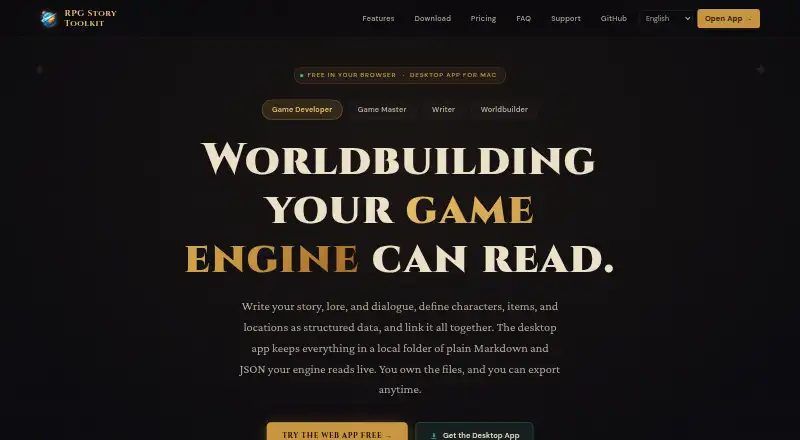
What RPG Story Toolkit is
RPG Story Toolkit is a workspace for building stories and organizing the world information behind a game or other fictional setting. Its rich-text editor can link text to database records, and linked mentions update when a record is renamed. Users can define tables and fields for characters, items, locations, calendars, and other records, then organize events in ordered or Gantt-style timelines. Maps support uploaded images, pins, and drawn regions.
The web app can publish documents and database records as a browsable wiki at its own address; changes to the project are republished. Documents, tables, and conditions can be exported as JSON, CSV, TSV, Markdown, plain text, DOCX, or a ZIP bundle. The site also demonstrates workflows for Godot, Unity, Unreal, and GameMaker that use JSON written into a project.
RPG Story Toolkit is available in a browser and as a Mac desktop app. The desktop app stores projects as local Markdown, JSON, and asset files, works fully offline, and keeps project files on the user's computer. Automatic desktop-to-web sync requires Pro. The site links to the app's code on GitHub and says users can inspect and modify it. Web Free costs nothing with one project, up to three documents and image uploads, public wiki publishing, and export. The desktop app is free; Pro costs $5 a month. A Windows desktop app is marked as coming soon.
Who it suits
The toolkit suits game developers, game masters, writers, and worldbuilders who want writing, structured setting data, timelines, and maps together. It also fits users who want to publish a project wiki, export content, or keep project files locally in the Mac desktop app.
What it does well
- Links in writing update when database records are renamed.
- Custom tables can organize characters, items, places, and calendars.
- Timelines support ordered and Gantt-style views.
- Maps support uploads, pins, and drawn regions.
- Exports include common text, data, document, and bundle formats.
- The Mac desktop app works offline and stores local files.
What to know first
- Web Free is limited to one project and three documents.
- Web Free allows up to three image uploads.
- Desktop-to-web sync requires the Pro plan.
- The Windows desktop app is coming soon.
Limits
Web Free includes one project, up to three documents, and up to three image uploads. Automatic desktop-to-web sync requires Pro, which costs $5 a month. The free desktop app has unlimited documents and projects and works offline.
Plans
| Plan | Billed and limits | Price |
|---|---|---|
| Web Free | $0 · Up to 3 documents · Up to 3 image uploads · 1 project · Public wiki publishing · Data export | Free |
| Desktop | Free · Unlimited documents & projects · Works fully offline · Files stay on your machine · Optional cloud sync requires Pro | Free |
| Pro | $5/ month · Unlimited documents · Unlimited image uploads · Multiple projects · Desktop ↔ web sync | $5 a month |
As rpgstorytoolkit.com lists them, read 7 Oct 2026. The maker's own page has the final word.
Getting started
- Open the browser app or download the Mac desktop app from the website.
- Create a project in the web app or desktop app.
- Add documents and define tables and fields for world records.
- Build timelines and upload maps to add pins or draw regions.
- Publish a project wiki or export documents, tables, and conditions.
- Choose Pro if you need automatic desktop-to-web project sync.
RPG Story Toolkit brings writing, linked world records, timelines, maps, and wiki publishing into a workspace for game developers, game masters, writers, and worldbuilders. It is most compelling for Mac users who want local, offline project files alongside game-ready exports. Its split between a generous desktop app and a tightly capped web free plan makes the right choice depend on where you want to work and publish.
Overview
The toolkit connects prose to structured worldbuilding: text can link to records for characters, places, items, and other data, and those mentions follow a record when it is renamed. Timelines, maps, and wiki publishing extend that shared project beyond notes. This is a practical fit for sprawling settings where story documents and reference material need to stay connected.
Its strongest distinction is the Mac desktop app, which keeps projects in Markdown, JSON, and asset files on the user's computer and works offline. The browser app adds public wiki publishing, while automatic desktop-to-web sync requires Pro. That makes the toolkit less suitable for someone who expects a seamless free workflow across desktop and web.
Key features
Writing and world records
The rich-text editor links mentions to database records, so a renamed character or location does not leave outdated references in documents. Users can define tables and fields for characters, items, locations, calendars, and other record types. This structure can keep a setting consistent, though it asks users to maintain both narrative documents and organized data.
Timelines, maps, and exports
Ordered and Gantt-style timelines support both straightforward chronology and schedules with overlapping events. Uploaded maps can carry pins and drawn regions, giving worldbuilders a way to connect places to visual references. Documents, tables, and conditions export to JSON, CSV, TSV, Markdown, plain text, DOCX, or a ZIP bundle; the range suits both portable archives and structured data workflows.
Game workflows and wiki publishing
The site demonstrates JSON-based project workflows for Godot, Unity, Unreal, and GameMaker. These integrations give developers a route to use toolkit data in a project, but they are described as workflows that write JSON rather than dedicated engine plugins. The web app can publish documents and records as a browsable wiki at its own address, with project updates republished. Public wiki publishing is available on Web Free, but that plan's one-project and three-document caps limit its usefulness for a substantial setting.
Pricing
Web Free costs nothing, billed $0. It includes one project, up to 3 documents, up to 3 image uploads, public wiki publishing, and data export. It is a low-commitment way to publish a small project, but the document and upload caps are restrictive for ongoing worldbuilding.
Desktop costs nothing, billed Free. The Mac app allows unlimited documents and projects, works fully offline, and keeps files on the user's machine. Optional cloud sync requires Pro, so this is best for people comfortable keeping their work local rather than moving it automatically to the web.
Pro costs $5 a month, billed $5/ month. It adds unlimited image uploads, multiple projects, and desktop-to-web sync, alongside unlimited documents. It is the relevant upgrade for users who want their Mac projects and web workspace connected; the free desktop tier remains more capable for offline work alone.
Platforms
RPG Story Toolkit offers a browser app and a Mac desktop download. Windows desktop is coming soon. The desktop app works offline, and the web app provides public wiki publishing. Automatic desktop-to-web sync is a Pro feature; the site says sync sends only changed data.
Who it's for
Mac-based writers and worldbuilders who want offline access, local project files, and room for unlimited projects get the clearest fit. Game developers may value the JSON exports and demonstrated workflows for four engines. Game masters and setting creators who want a browsable public reference can use the web app, provided the Web Free caps are enough or Pro fits their budget.
It is a weaker choice for Windows users seeking a desktop app today, or for anyone who needs desktop-to-web sync without a subscription. The linked-record system and user-defined tables are most useful when a project benefits from organized data; a writer seeking only a simple drafting tool may not need that structure.
Pros and cons
Pros
- Unlimited documents and projects in the free Mac app, with offline use and files stored locally.
- Linked record mentions update when records are renamed, helping keep a large setting's prose consistent.
- Broad exports, including DOCX, Markdown, structured formats, and ZIP, make project data portable.
- Public wiki publishing and map, timeline, and database tools bring several worldbuilding needs into one project.
Cons
- Web Free is limited to one project, three documents, and three image uploads, which can constrain a growing setting.
- Desktop-to-web sync requires Pro at $5 a month.
- The desktop download is for Mac; Windows desktop is still coming soon.
- Engine workflows use JSON written into a project, which is less direct than a dedicated integration would be.
Alternatives
Game Wiki Software is a broader category to explore if you want to compare wiki-focused tools.
- Campfire is worth considering if you need apps across Android, iOS, Mac, web, and Windows, or want to try its limited writing and worldbuilding modules free without a credit card.
- AnvilWiki suits readers looking for a free, open-source MIT template with Cloudflare Pages free unlimited bandwidth.
- Wikily is an option if free wiki creation and reading are the priority, with iOS, web, and Windows platforms.
- Huijiwiki offers free web wiki hosting, with site applications subject to approval.
- Kanka is an alternative with a free Kobold plan that includes unlimited entries and campaigns.
- LegendKeeper may fit readers who want a web-based option with a free Basic plan for viewing and exporting projects and collaborating with project owners.
- Miraheze is a free wiki-hosting alternative with 300+ extensions and skins.
- Nectory is worth a look if you need a free public wiki with team access, full-text search, and a draft-and-publish workflow.
Verdict
Choose RPG Story Toolkit if you are a Mac-based writer, game master, developer, or worldbuilder who wants linked prose and world data, offline local files, and flexible exports in one workspace. The free desktop app is its strongest reason to choose it; the main reason to look elsewhere is the gap between that offline experience and web use, where project limits apply and sync costs $5 a month.
Verdict
Choose RPG Story Toolkit if you want writing, world records, timelines, maps, and wiki publishing in one workspace. Its free Mac desktop app supports unlimited documents and projects offline, while Web Free is limited to one project; Pro is needed for desktop-to-web sync and costs $5 a month.
Questions
Is RPG Story Toolkit free?
Yes. Web Free costs nothing and includes one project, up to three documents and image uploads, public wiki publishing, and data export. The Mac desktop app is also free and allows unlimited documents and projects.
How much is Pro?
Pro costs $5 a month. It includes unlimited documents and image uploads, multiple projects, and desktop-to-web sync.
Which platforms are available?
RPG Story Toolkit offers a browser app and a Mac desktop download. Its Windows desktop app is marked as coming soon.
Does the desktop app work offline?
The Mac desktop app works fully offline and stores projects as local Markdown, JSON, and asset files on the user's computer.
Can I publish a wiki or export my work?
The web app can publish documents and database records as a browsable wiki at its own address. Documents, tables, and conditions can be exported to JSON, CSV, TSV, Markdown, plain text, DOCX, or a ZIP bundle.
Is RPG Story Toolkit open source?
The site links to the app's code on GitHub and says users can inspect and modify it.
Facts from RPG Story Toolkit's own pages
- Audience
- The toolkit is presented for game developers, game masters, writers, and worldbuilders. · rpgstorytoolkit.com, 7 Oct 2026
- Desktop storage
- The Mac desktop app stores projects as local Markdown, JSON, and asset files and works fully offline. · rpgstorytoolkit.com, 7 Oct 2026
- Exports
- Documents, tables, and conditions can be exported to JSON, CSV, TSV, Markdown, plain text, DOCX, or a ZIP bundle. · rpgstorytoolkit.com, 7 Oct 2026
- Game engine integrations
- The site demonstrates workflows for Godot, Unity, Unreal, and GameMaker using JSON written into a project. · rpgstorytoolkit.com, 7 Oct 2026
- Open source
- The site links to the app's code on GitHub and says users can inspect and modify it. · rpgstorytoolkit.com, 7 Oct 2026
- Platform availability
- The site offers a browser app and a Mac desktop download, and labels the Windows desktop app as coming soon. · rpgstorytoolkit.com, 7 Oct 2026
- Privacy and data control
- The site says desktop project files remain on the user's computer and projects can be exported at any time. · rpgstorytoolkit.com, 7 Oct 2026
- Purpose
- RPG Story Toolkit combines story writing, structured world data, timelines, maps, wiki publishing, and game-ready exports in one workspace. · rpgstorytoolkit.com, 7 Oct 2026
- Support
- The site provides a Google Forms support link. · rpgstorytoolkit.com, 7 Oct 2026
- Sync limit
- Automatic desktop-to-web project sync is available with Pro; the site says it sends only changed data. · rpgstorytoolkit.com, 7 Oct 2026
- Timeline and maps
- The toolkit provides ordered or Gantt-style timelines and lets users upload maps, add pins, and draw regions. · rpgstorytoolkit.com, 7 Oct 2026
- Wiki publishing
- The web app can publish documents and database records as a browsable wiki at its own address, with updates republished from the project. · rpgstorytoolkit.com, 7 Oct 2026
- World database
- Users can define tables and fields for characters, items, locations, calendars, and other records. · rpgstorytoolkit.com, 7 Oct 2026
- Writing and linking
- Its rich-text editor lets users link text to database records, and linked mentions update when a record is renamed. · rpgstorytoolkit.com, 7 Oct 2026
Where RPG Story Toolkit stands on Freedom251
- Game Wiki Software#12 of 19