Freedom251 › Route Optimization Software

Rouptimize
What Rouptimize is
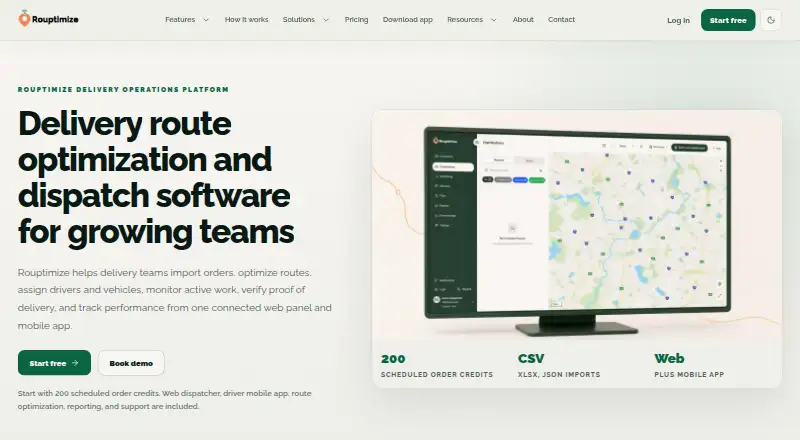
Rouptimize is route planning and dispatch software for coordinating deliveries and field work, from order import through reporting. Dispatchers can plan routes around missions, vehicles, depots, working windows, capacity, skills, and priorities, then make adjustments after route generation. Mission data can be imported from CSV, Excel XLSX, or JSON, with validation before final import. The driver app presents assigned routes and mission details, supports navigation and status updates, and retains delivery history. Proof of delivery uses a customer 5-digit code; the system records attempts, expiry, and verification time. Dispatchers can monitor selected drivers and vehicles, including live locations when mobile location streaming is enabled. Reports cover delivery activity, active routes, driver performance, mission history, distance, duration, success rate, and fleet utilization. It runs on Android, iOS, and web. The free Starter plan includes 200 scheduled order credits during the first month. Paid self-serve costs A$100 a month for 1,000 scheduled orders; higher volumes use stepped marginal pricing, and 50,001+ monthly orders require a custom plan. A two-week free trial is also offered.
Who it suits
Rouptimize suits last-mile, courier, e-commerce, grocery, and food delivery teams, as well as multi-branch operations and field service routing teams. It may fit dispatchers who need route adjustments, driver monitoring, and delivery reporting.
What it does well
- Plans around vehicles, depots, windows, capacity, skills, and priorities.
- Imports CSV, Excel XLSX, and JSON mission data.
- Driver app supports navigation and status updates.
- Proof of delivery uses customer 5-digit code confirmation.
- Free Starter plan includes 200 first-month scheduled order credits.
What to know first
- Paid self-serve starts at A$100 a month.
- Credits are consumed when missions are newly scheduled onto routes.
- More than 50,000 monthly orders requires a custom plan.
Limits
The free Starter plan includes 200 scheduled order credits during the first month. Paid self-serve includes 1,000 scheduled orders per month at A$100 a month; pricing above 1,000 is stepped, and 50,001 or more requires a custom plan.
Plans
| Plan | Billed and limits | Price |
|---|---|---|
| Starter | 200 scheduled order credits during the first month · 200 scheduled order credits · Web dispatcher, route optimization, mission import, driver mobile app, live monitoring, reports and support | Free |
| Paid self-serve | Monthly; paid checkout starts at A$100 for 1,000 scheduled orders · 1,000 scheduled orders/month · Stepped marginal pricing above 1,000 · 50,001+ requires a custom plan | A$100 a month |
| Custom plan | Contact sales · For more than 50,000 scheduled orders/month | On request |
As rouptimize.com lists them, read 10 Oct 2026. The maker's own page has the final word.
Getting started
- Visit the Rouptimize website.
- Start with the free Starter plan or use the advertised two-week free trial.
- Import missions from CSV, Excel XLSX, or JSON and complete validation.
- Generate routes using your mission and vehicle constraints.
- Assign routes to drivers through the driver app and monitor progress.
Rouptimize is delivery route optimization and dispatch software for teams coordinating drivers, technicians, and vehicles across multiple jobs. It is best suited to last-mile, courier, grocery, food, e-commerce, multi-branch, and field-service operations with a dispatcher; occasional solo drivers may find its scheduled-order model excessive. Its combination of constrained planning, driver execution, live oversight, proof of delivery, and reporting is compelling, provided your monthly order volume fits the credit pricing.
Overview
Rouptimize connects order intake, route generation, driver assignment, monitoring, delivery evidence, and operational reports in one workflow. Planning can account for missions, vehicles, depots, working windows, capacity, skills, and priorities. Dispatchers can then adjust generated routes, which matters when staffing changes, customer commitments, or depot realities make the mathematically optimal route impractical.
Missions arrive through CSV, Excel XLSX, or JSON, with validation before import is finalized. Credits are consumed when missions are newly scheduled onto routes. Importing missions and reordering stops already on a route do not, by themselves, consume another credit, so refining an existing schedule is less costly than repeatedly creating new scheduled work.
Key features
Planning and dispatch
The constraint set is broad enough for mixed fleets and service territories: time windows, vehicle capacity, depots, skills, priorities, and mission requirements can all influence routing. The web dispatcher handles route optimization and assignment, while post-generation editing preserves human control instead of forcing teams to accept every automated result.
Driver execution and proof
The mobile driver app displays assigned routes and mission details, supports navigation and status updates, and keeps delivery history. Proof of delivery uses a customer five-digit code; Rouptimize records attempts, expiry, and verification time. That creates a specific verification trail for disputed deliveries rather than relying only on a driver’s completion status. A technician mobile app is also provided, making the workflow relevant beyond parcel delivery.
Monitoring and reporting
Dispatchers can monitor selected drivers and vehicles, including live locations when mobile location streaming is enabled. Reports cover delivery activity, active routes, driver performance, mission history, distance, duration, success rate, and fleet utilization. These measures support operational review and capacity decisions, although the value of live tracking depends on drivers enabling location streaming.
Administration and support
Company, user, role, permission, branch, and depot controls support multi-site organizations and delegated access. Support is handled through tickets with messages and attachments. Stripe checkout is used for purchasing scheduled-order credits and viewing purchase history.
Pricing
Starter
Starter is free and provides 200 scheduled order credits during the first month. It includes the web dispatcher, route optimization, mission import, driver mobile app, live monitoring, reports, and support. This is a useful short-volume entry point, but the first-month 200-credit allowance is a hard ceiling for a busy operation and does not represent an ongoing high-volume free tier.
Paid self-serve
The paid self-serve plan costs A$100 a month, billed monthly, with checkout starting at A$100 for 1,000 scheduled orders. It adds stepped marginal pricing above 1,000 scheduled orders per month. Teams should forecast newly scheduled missions rather than every imported or reordered stop, since that is what consumes credits. Operations above 50,000 scheduled orders per month need a custom plan.
Custom plan and trial
The custom plan has contact-sales pricing for more than 50,000 scheduled orders per month. A two-week free trial provides all features without payment, giving larger teams time to model routing volume and dispatch fit before committing.
Platforms
Rouptimize runs on web, Android, and iOS. Dispatchers get the web workspace, while drivers and technicians use mobile apps for routes, navigation, status updates, and location streaming.
Who it's for
Choose Rouptimize for dispatcher-led last-mile, courier, grocery, food-delivery, e-commerce, field-service, or multi-branch teams that need time-window planning, live technician tracking, delivery verification, and fleet reporting together. It is less suitable for very small workloads that rarely create new routes or for users seeking a permanently generous free allowance.
Pros and cons
- Pros: Planning covers vehicles, depots, capacity, windows, skills, and priorities.
- Pros: Dispatchers can edit generated routes, while drivers receive mobile navigation and status workflows.
- Pros: Five-digit proof codes and recorded verification times provide concrete delivery evidence.
- Pros: Monitoring and reports span drivers, vehicles, performance, utilization, distance, and success rates.
- Cons: The free Starter allowance is limited to 200 scheduled order credits during its first month.
- Cons: Monthly cost rises through stepped pricing above 1,000 scheduled orders, and higher volumes require a custom plan.
- Cons: Live location monitoring requires mobile location streaming to be enabled.
Alternatives
For a broader directory of routing tools, see the Route Optimization Software list.
Drivant is the better fit when you want a free-forever desktop-oriented plan with one project, three routes, 100 stops, one driver, and CSV or DVNT export.
Choose Otiggo when a low-cost freemium service with a one-route-per-day free allowance and small stop limits is sufficient.
Routific suits teams seeking a free tier for up to 100 orders a month or a separate paid offering, with Android, iOS, web, and API access.
Pick Geo2 for a one-user free plan capped at 15 orders per route and 10 AI requests per day.
GraphHopper is an alternative built around commercial APIs and an open-source routing engine, with cloud, mobile, and self-hosted options.
OptiMap is preferable for simple stop optimization, offering a free five-stop route and a premium unlimited-stop tier.
Route4Me fits users wanting a small free mobile plan or unlimited stops on a monthly subscription.
Routella is an alternative freemium choice for small teams centered on driver, order, round, and store-integration limits.
Verdict
Rouptimize is a strong choice for delivery and field-service operations that need constrained route planning, dispatcher control, mobile execution, live oversight, proof codes, and reporting in one system. Its main reason to look elsewhere is the scheduled-order credit model: small or highly variable users may prefer a simpler free allowance, while very high-volume fleets should request custom pricing before adopting it.
Verdict
Rouptimize combines route planning, dispatch, proof of delivery, monitoring, and reporting for delivery and field routing teams. Check the scheduled-order credit limits and paid pricing tiers against the volume you need to route.
Questions
How much does Rouptimize cost?
The Starter plan is free and includes 200 scheduled order credits during the first month. Paid self-serve costs A$100 a month for 1,000 scheduled orders; higher volumes use stepped marginal pricing, and 50,001 or more requires a custom plan.
Does Rouptimize have a free trial?
Yes. The About page advertises a two-week free trial and says users can experience all features without payment.
Which platforms does Rouptimize support?
Rouptimize is available on Android, iOS, and web.
How are scheduled order credits used?
Credits are consumed when missions are newly scheduled onto routes. Importing missions and reordering stops already on a route do not use a new credit by themselves.
What integrations are identified?
The pricing page identifies Stripe checkout for purchasing scheduled order credits and viewing purchase history.
Does Rouptimize include support?
Yes. The product includes support tickets with messages and attachments.
Facts from Rouptimize's own pages
- Audience
- Rouptimize presents itself for last-mile, courier, e-commerce, grocery and food delivery, multi-branch operations and field service routing teams. · rouptimize.com, 10 Oct 2026
- Credit limits
- Credits are consumed when missions are newly scheduled onto routes; importing missions and reordering stops already on a route do not use a new credit by themselves. · rouptimize.com, 10 Oct 2026
- Driver app
- The driver mobile app shows assigned routes and mission details, supports navigation and status updates, and provides delivery history and proof code verification. · rouptimize.com, 10 Oct 2026
- Imports
- Missions can be imported from CSV, Excel XLSX or JSON, with validation before final import. · rouptimize.com, 10 Oct 2026
- Integrations
- The pricing page identifies Stripe checkout for purchasing scheduled order credits and viewing purchase history. · rouptimize.com, 10 Oct 2026
- Monitoring
- Dispatchers can monitor selected drivers and vehicles, including live locations when mobile location streaming is enabled. · rouptimize.com, 10 Oct 2026
- Product
- Rouptimize is delivery route optimization and dispatch software connecting order import, route planning, driver assignment, monitoring, proof of delivery and reporting. · rouptimize.com, 10 Oct 2026
- Proof of delivery
- Proof of delivery uses customer 5-digit code confirmation and records attempts, expiry and verification time. · rouptimize.com, 10 Oct 2026
- Reports
- Reports cover delivery activity, active routes, driver performance, mission history, distance, duration, success rate and fleet utilization. · rouptimize.com, 10 Oct 2026
- Routing
- Route optimization accounts for missions, vehicles, depots, working windows, capacity, skills and priorities, and dispatchers can adjust routes after generation. · rouptimize.com, 10 Oct 2026
- Security and roles
- The product describes company, user, role, permission, branch and depot controls; the opened pages made no specific security certification claim. · rouptimize.com, 10 Oct 2026
- Support
- The product includes support tickets with messages and attachments. · rouptimize.com, 10 Oct 2026
- Trial
- The About page advertises a 2 Weeks Free Trial and says users can experience all features without payment. · rouptimize.com, 10 Oct 2026
Where Rouptimize stands on Freedom251
- Route Optimization Software#14 of 30