Freedom251 › Bid Management Software
RFP Software
What RFP Software is
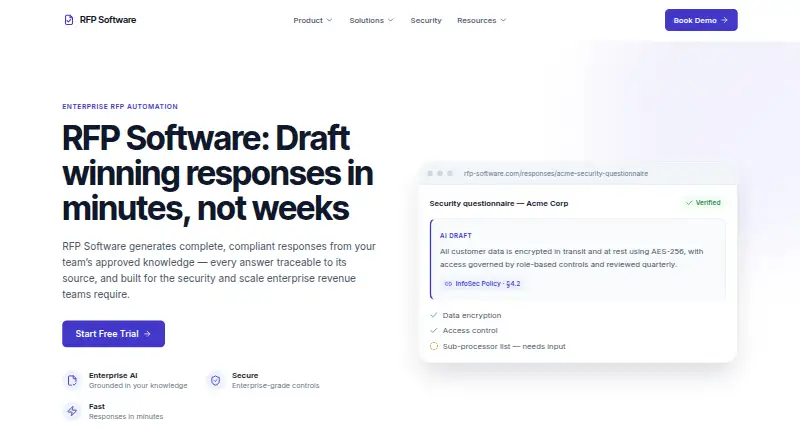
RFP Software helps teams draft, answer, review, and validate responses to RFPs, RFIs, and security questionnaires using approved team knowledge. It creates first drafts in a team’s voice and links answers to source documents. Its workflow runs from uploading an RFP and parsing requirements through knowledge-base search, drafting, review, and export. Teams can assign sections, edit answers in context, and approve responses in the workspace. Requirement tracking flags gaps before submission; proposal tools also include approval workflows, analytics, version history, and rollback. Uploads can include Word, Excel, PDF, and portal exports, while finished responses can be exported to the buyer’s required format. Integrations include Salesforce, HubSpot, Microsoft Dynamics, Slack, Microsoft Teams, Google Drive, SharePoint, and identity providers, with REST API and webhook workflows also available. Security features include encryption in transit and at rest, role-based permissions, SSO and SAML 2.0, SCIM provisioning, multi-factor authentication, and exportable audit logs. Customer content is not used to train shared or third-party models. Pricing is on request; a free trial is offered without requiring a credit card, with no duration stated.
Who it suits
It suits proposal, bid, sales, and security teams handling questionnaire or proposal responses. The stated audiences span technology, financial services, healthcare, manufacturing, and the public sector.
What it does well
- Drafts responses from approved team knowledge.
- Flags unanswered requirements before submission.
- Supports review, assignment, and approval in one workspace.
- Exports to the buyer’s required format.
- Free trial starts without a credit card.
What to know first
- Pricing is available on request.
- No trial duration is stated.
- Support typically replies within one business day.
Limits
No lower-plan quotas or feature limits are given in these facts.
Getting started
- Visit https://www.rfp-software.com/.
- Start the free trial; no credit card is required.
- Upload an RFP or questionnaire in Word, Excel, PDF, or portal-export format.
- Parse requirements and search the team knowledge base.
- Draft responses, assign sections, and review them in the workspace.
- Approve and export the finished response in the buyer’s required format.
Verdict
RFP Software brings drafting, compliance checks, collaboration, and export into a proposal workflow. Teams considering it should request pricing and confirm whether its integrations and approval process fit their needs.
Questions
How much does RFP Software cost?
It is a paid product with pricing on request.
Is there a free trial?
Yes. The homepage says no credit card is required to start the trial.
What platforms does it support?
The listed platforms are web and API.
Which integrations are listed?
They include Salesforce, HubSpot, Microsoft Dynamics, Slack, Microsoft Teams, Google Drive, SharePoint, and identity providers. REST API and webhook workflows are also described.
What file types can teams upload?
Uploads can include Word, Excel, PDF, and portal exports. Finished responses can be exported in the buyer’s required format.
How does the company use customer content?
The company says customer content is used only to generate responses for that customer’s workspace, not to train shared or third-party models.
Facts from RFP Software's own pages
- Access and audit
- The security page describes role-based permissions, SSO and SAML 2.0, SCIM provisioning, multi-factor authentication, and exportable audit logs. · rfp-software.com, 9 Oct 2026
- AI data use
- The company says customer content is not used to train shared or third-party models and is used only to generate responses for that customer’s workspace. · rfp-software.com, 9 Oct 2026
- AI drafting
- The platform creates first-draft responses in the team’s voice and traces answers to their source documents. · rfp-software.com, 9 Oct 2026
- Analytics and reporting
- Yes · rfp-software.com, 20 Sept 2026
- API
- The integrations page says teams can build workflows using a REST API and webhooks. · rfp-software.com, 9 Oct 2026
- Collaboration
- Teams can assign sections, review and edit answers in context, and approve responses within the workspace. · rfp-software.com, 9 Oct 2026
- Compliance
- The security page lists SOC 2 Type II, GDPR, ISO 27001 alignment, and CCPA support. · rfp-software.com, 9 Oct 2026
- Compliance checks
- It tracks questionnaire requirements to completion and flags gaps before submission. · rfp-software.com, 9 Oct 2026
- Compliance tracking
- The platform tracks questionnaire requirements to completion and flags gaps before submission. · rfp-software.com, 9 Oct 2026
- CRM integrations
- Yes · rfp-software.com, 20 Sept 2026
- Encryption
- The security page states that data is encrypted in transit using TLS 1.2 or higher and at rest using AES-256. · rfp-software.com, 9 Oct 2026
- File formats
- The Help Center says uploads can include Word, Excel, PDF, and portal exports, and finished responses export to the buyer’s required format. · rfp-software.com, 9 Oct 2026
- Integrations
- Listed integrations include Salesforce, HubSpot, Microsoft Dynamics, Slack, Microsoft Teams, Google Drive, SharePoint, and identity providers; the site also describes REST API and webhook workflows. · rfp-software.com, 9 Oct 2026
- Intended users
- The company says proposal, bid, sales, and security teams across technology, financial services, healthcare, manufacturing, and the public sector use the product. · rfp-software.com, 9 Oct 2026
- Privacy
- The security page says customer content is not used to train shared or third-party models and lists regional data residency options. · rfp-software.com, 9 Oct 2026
- Proposal workflow
- The platform supports proposal management, approval workflows, analytics, and version history with rollback. · rfp-software.com, 9 Oct 2026
- Purpose
- RFP Software drafts, answers, and validates responses to RFPs, RFIs, and security questionnaires using a team’s approved knowledge. · rfp-software.com, 9 Oct 2026
- Security
- The security page specifies TLS 1.2 or higher in transit, AES-256 at rest, SSO/SAML 2.0, SCIM provisioning, role-based access, and exportable audit logs. · rfp-software.com, 9 Oct 2026
- Support
- The Help Center says users can contact support through the Contact page and typically receive a reply within one business day. · rfp-software.com, 9 Oct 2026
- Support and onboarding
- The homepage says every plan includes guided onboarding, while the Help Center says the team typically responds to support inquiries within one business day. · rfp-software.com, 9 Oct 2026
- Supported files
- The Help Center says uploads include Word, Excel, PDF, and portal exports, and finished responses can be exported in the buyer’s required format. · rfp-software.com, 9 Oct 2026
- Target users
- The About page says proposal, bid, sales, and security teams across technology, financial services, healthcare, manufacturing, and the public sector use the product. · rfp-software.com, 9 Oct 2026
- Trial
- The homepage offers a free trial and says no credit card is required to start it; it does not state a trial duration. · rfp-software.com, 9 Oct 2026
- Workflow
- The workflow covers uploading an RFP, parsing requirements, searching the knowledge base, drafting, team review, and proposal export. · rfp-software.com, 9 Oct 2026
Where RFP Software stands on Freedom251
- Bid Management Software#31 of 94
- AI RFP Response Software#21 of 33
- RFP Software#18 of 24
- Proposal Software#104 of 134