Freedom251 › Retrospective Software
RetroStack
What RetroStack is
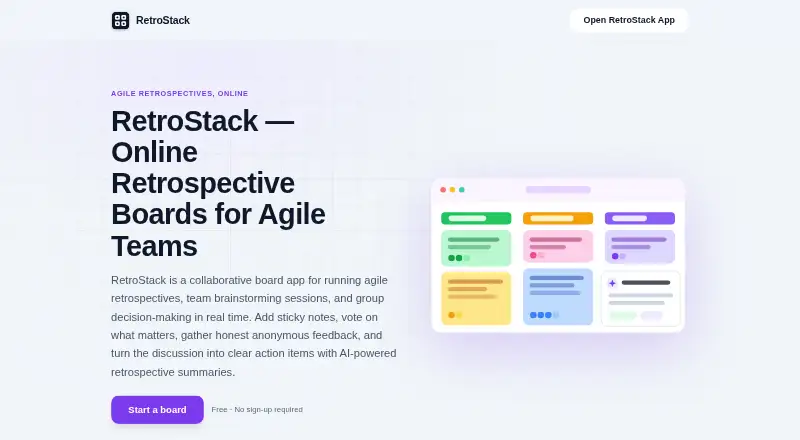
RetroStack is a collaborative board app for retrospectives, brainstorming, planning, and group decisions. Participants edit the same board live across phones, tablets, laptops, and desktops. It includes six ready-made board formats and supports fully custom boards. Teams can set each section's voting limit to 1, 2, 3, 5, or 10 votes, or leave voting unlimited.
People can join anonymously with the full feature set, and starting a board does not require an account. AI analysis can provide sentiment insights and key themes, and generate action items and meeting recaps. Boards can be exported to PDF or JSON and shared through private links. Registration options include email and password, Google Sign-In, and Apple Sign-In, alongside anonymous use. RetroStack says data is encrypted in transit and at rest, and that user content is not used to train AI models; content is processed through OpenAI for requested analysis. The service may limit board creation, notes per section, votes per session, and daily AI requests. Its free plan requires no sign-up.
Who it suits
RetroStack suits agile, distributed, and remote teams running retrospectives, planning, brainstorming, or decision-making meetings. Anonymous participation may also suit groups that want to start without account creation.
What it does well
- Live shared boards work across phones, tablets, laptops, and desktops.
- Six templates plus custom boards.
- Anonymous participants get the full feature set.
- AI can produce action items and meeting recaps.
- Boards export to PDF or JSON.
What to know first
- Usage limits may apply to boards, notes, votes, and AI requests.
- Requested AI analysis content is processed through OpenAI.
- Support is by email, with a stated response time within 24 hours.
Limits
The service may limit board creation, notes per section, votes per session, and AI analysis requests per day.
Plans
| Plan | Billed and limits | Price |
|---|---|---|
| Free | Free · No sign-up required · Web, iOS, Android & Mac | Free |
As retrostack.app lists them, read 15 Oct 2026. The maker's own page has the final word.
Getting started
- Open https://retrostack.app/.
- Start a board without signing up, or register with email and password, Google, or Apple.
- Choose one of the six ready-made formats or create a custom board.
- Invite participants to join anonymously or through a private link.
- Set voting limits for each section if needed.
- Use AI analysis for themes, sentiment, action items, or a recap; export the board as PDF or JSON.
RetroStack is a live collaborative board for retrospectives, brainstorming, and group decisions. It is best suited to agile and distributed teams that want guests to contribute without creating accounts. Its broad device support and flexible participation make it a practical meeting tool, though possible usage caps matter for teams that rely on it frequently.
Overview
RetroStack brings participants into one shared board, whether they join from a phone, tablet, laptop, or desktop. Anonymous access with the same feature set as registered users lowers the barrier for guests and can suit feedback sessions where people prefer not to identify themselves. The trade-off is that the service may limit board creation, notes, votes, and daily AI requests, so teams with intensive usage should weigh that uncertainty before making it a regular fixture.
Key features
Six ready-made board formats offer a starting structure, while custom boards let facilitators tailor a session to their team's process. Live editing keeps contributions together as a discussion unfolds. Section-level voting can be set to 1, 2, 3, 5, or 10 votes, or left unlimited, giving facilitators a useful range for prioritization; potential per-session vote limits may constrain repeated or large-group exercises.
AI analysis can surface sentiment and themes, generate action items, and produce meeting recaps. That may help teams turn discussion into follow-up, but it involves sending content through OpenAI for the requested analysis. RetroStack says it does not use user content to train AI models. Boards can be shared by private link or exported to PDF or JSON, and action tracking supports follow-through after a session.
Users can register with email and password, Google, or Apple, or participate anonymously. RetroStack says data is encrypted in transit and at rest, with access controls, authentication requirements, and security-incident monitoring. Email technical support has a stated response time within 24 hours.
Pricing
The Free plan costs nothing and requires no sign-up. It includes web, iOS, Android, and Mac access, as well as retro templates, anonymous feedback, live delivery, and action tracking. That makes it a low-commitment choice for teams trying the format or running occasional sessions. There is no paid tier described here to compare, and possible caps on boards, notes, votes, and daily AI requests may limit sustained or high-volume use.
Platforms
RetroStack supports web, iOS, Android, and macOS, with shared live boards spanning phones, tablets, laptops, and desktops. It suits teams whose participants use a mix of devices; Windows and Linux support are not among its listed platforms.
Who it's for
Agile, remote, and distributed teams running retrospectives, planning, brainstorming, or group decision-making are the clearest fit. Account-free anonymous participation is especially useful when inviting occasional contributors or gathering candid input. Teams that need predictable high-volume quotas, or do not want meeting content processed by OpenAI for AI analysis, should look elsewhere or avoid those AI requests.
Pros and cons
- Pros: Anonymous use with full features and no account needed to start a board makes guest participation straightforward.
- Pros: Live editing across mobile and desktop devices keeps distributed participants on one board.
- Pros: Configurable voting, custom boards, exports, and action tracking support both prioritization and follow-up.
- Cons: Possible caps on boards, notes, votes, and daily AI requests make frequent use harder to plan.
- Cons: AI analysis processes content through OpenAI, which may not suit teams with stricter preferences about meeting data.
Alternatives
Retrospective Software is a broader category to explore when you want to compare more tools. Choose Echometer if its free Starter plan's one team, 25 workspace members, unlimited retro guests, and one retro per month after the trial period better match your needs. FocusRetro is worth considering for web-only use if three personal boards per month, core templates, voting, reactions, phase timers, and action items suit your routine. Pick FreeRetrospectives if its currently 100% free web plan—with rooms, live chat, templates, action tracking, exports, AI recaps, health checks, and bridge workflows—fits better. Neatro may suit a web team of up to 10 members looking for unlimited retrospectives and radars, more than 70 templates, and basic facilitation tools on its free plan. Consider Reetro if its free plan's three teams, nine members per team, 10 active boards, and one monthly health check fit; that plan has no AI features. ScatterSpoke is an option for API or web access with one free seat, unlimited static surveys and responses, and limited one-time Agent Survey and Ask credits. Team O'clock may be a better fit if you want its Growth plan's retrospective activities, activity history, and team metrics, at $3 a month per active member, starting at 10 monthly active members. EasyRetro is another web-based freemium alternative.
Verdict
Choose RetroStack if your agile or distributed team wants a free, device-flexible board with anonymous guest participation, configurable voting, and useful meeting outputs. Its strongest reason to choose it is the combination of low-friction live collaboration and post-session action support. Look elsewhere if you need predictable usage allowances or prefer not to route content through OpenAI for AI analysis.
Verdict
RetroStack combines live boards, voting, anonymous participation, and AI-generated meeting outputs. Keep its possible usage limits and AI-processing arrangement in mind when choosing it for team sessions.
Questions
How much does RetroStack cost?
The Free plan costs nothing.
Do participants need accounts?
No. A board can be started without an account, and participants can join anonymously with the same full feature set.
Which platforms are supported?
RetroStack is available on Android, iOS, macOS, and the web.
What can teams export?
Boards can be exported as PDF or JSON and shared through private links.
Does RetroStack use board content to train AI models?
RetroStack says it does not use user content to train AI models. It processes content through OpenAI to provide requested analysis.
How can users sign in?
The service supports email and password registration, Google Sign-In, Apple Sign-In, and anonymous usage.
Facts from RetroStack's own pages
- AI features
- AI analysis provides team sentiment insights, key themes, automatically generated action items, and meeting recaps. · retrostack.app, 1 Oct 2026
- AI limitation
- The terms warn that AI results can contain errors and that AI features may be unavailable or rate-limited. · retrostack.app, 15 Oct 2026
- AI privacy
- RetroStack says it does not use user content to train AI models and processes content through OpenAI to provide requested analysis. · retrostack.app, 1 Oct 2026
- AI processing
- Requested AI analysis may send board content to OpenAI, and RetroStack says that content is not used to train AI models. · retrostack.app, 15 Oct 2026
- AI summaries
- AI analysis produces sentiment insights, key themes, action items and meeting recaps. · retrostack.app, 15 Oct 2026
- Anonymous participation
- People can join anonymously and receive the same feature set as signed-in users. · retrostack.app, 15 Oct 2026
- Anonymous use
- Users can join anonymously with the same full feature set, and no account is required to start a board. · retrostack.app, 1 Oct 2026
- API and SDK
- The maker pages reviewed do not publish a public API, SDK or developer documentation. · retrostack.app, 15 Oct 2026
- Apple system requirements
- The App Store listing requires iOS 15.6 or later, iPadOS 15.6 or later, and macOS 12.5 or later on an Apple M1-or-newer Mac. · apps.apple.com, 15 Oct 2026
- App size
- Apple lists the app at 58 MB. · apps.apple.com, 15 Oct 2026
- App Store accessibility
- Apple states that the developer has not indicated which accessibility features the app supports. · apps.apple.com, 15 Oct 2026
- App Store privacy disclosure
- Apple's listing says the developer may link contact information, user content, identifiers and usage data to users, while diagnostics may be collected without linkage. · apps.apple.com, 15 Oct 2026
- Audience
- RetroStack is designed for agile, distributed, and remote teams running retrospectives, planning, brainstorming, and decision-making meetings. · retrostack.app, 1 Oct 2026
- Authentication
- Sign-in options include email and password, Google and Apple, while anonymous use is supported with limited account requirements. · retrostack.app, 15 Oct 2026
- Browser support
- Support documentation lists Chrome, Safari, Firefox and Edge, recommending current versions. · retrostack.app, 15 Oct 2026
- Collaboration
- Everyone edits the same board live across phones, tablets, laptops, and desktops. · retrostack.app, 1 Oct 2026
- Custom boards
- Users can create boards with their own sections. · retrostack.app, 15 Oct 2026
- Data retention
- Deleted boards and account data are stated to be permanently removed within 30 days, while security logs are retained for 90 days. · retrostack.app, 15 Oct 2026
- Decision boards
- The product supports ideation workshops, planning and Pros and Cons decision boards. · retrostack.app, 15 Oct 2026
- Exports
- Boards can be exported as PDF or JSON files. · retrostack.app, 15 Oct 2026
- Independent review coverage
- The Apple listings provide no user-review overview because the app has not accumulated enough ratings or reviews. · apps.apple.com, 15 Oct 2026
- Integrations
- The documented external services are Google and Apple authentication, Firebase/Google Cloud infrastructure and OpenAI analysis. · retrostack.app, 15 Oct 2026
- Licence
- The terms state that RetroStack owns its original service content, features and functionality, indicating proprietary software rather than open-source licensing. · retrostack.app, 15 Oct 2026
- Maker location
- The maker's LinkedIn profile places Clifton Hatfield in the Nashville metropolitan area. · linkedin.com, 15 Oct 2026
Where RetroStack stands on Freedom251
- Retrospective Software#5 of 31