Freedom251 › Pixel Art Software
RetroSprite
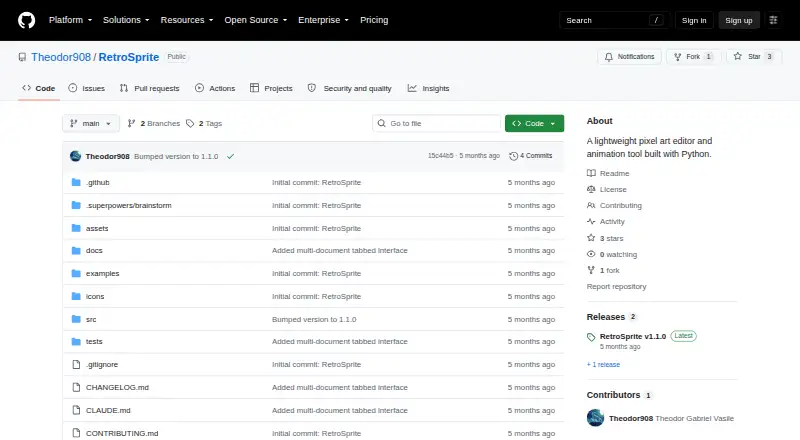
What RetroSprite is
RetroSprite is a free Windows pixel-art editor and animation tool built with Python. It is intended for pixel art, sprite sheets, tilemaps, and frame-by-frame animation. Fourteen drawing tools include symmetry modes, pixel-perfect lines, dithering, and tiled drawing. Text supports bitmap fonts, custom TTF or OTF fonts, adjustable letter spacing, and multiline layouts. Rectangle, magic-wand, lasso, and polygon selections can be rotated, scaled, or skewed. Animation work includes unlimited layers, blend modes, layer groups, non-destructive effects, onion skinning, frame tags, and forward, reverse, or ping-pong playback. Tilemap features provide reusable palettes, pixel and tile editing, canvas sampling, and tile thumbnails with flip controls. Projects use the .retro format; exports include PNG, GIF, WebP, APNG, sprite sheets, and frame sequences. Imports include Aseprite and Photoshop PSD files. Plugins, a scripting API, and command-line mode support custom tools, effects, batch operations, and headless export. Source installation requires Python 3.10 or newer plus Pillow, NumPy, imageio, and Tkinter. The project is licensed under GPLv3 or later.
Who it suits
It suits Windows artists and developers creating pixel graphics, tilemaps, sprites, and frame animations who can install a Python-based project or executable build.
What it does well
- Includes 14 drawing tools
- Supports unlimited layers and onion skinning
- Provides tilemap editing features
- Exports many image and animation formats
- Offers plugins, scripting, and CLI export
What to know first
- Windows only
- Source setup requires several Python dependencies
- Repository has no published releases
- No security policy or published advisories
Verdict
RetroSprite offers a broad pixel-art and animation toolkit with tilemaps, scripting, and multiple export formats. Users should account for its Windows focus and source-installation requirements.
Facts from RetroSprite's own pages
- Download/build
- The README documents installing from source and building a Windows executable with PyInstaller; the repository page shows no published releases. · github.com, 7 Oct 2026
- Drawing
- It includes 14 drawing tools, symmetry modes, pixel-perfect lines, dithering, and tiled drawing mode. · github.com, 7 Oct 2026
- Extensibility
- It has a plugin system for custom tools, filters, effects, and menu items, plus a scripting API for batch operations and CLI mode for headless export. · github.com, 7 Oct 2026
- File formats
- The native project format is `.retro`; the app exports PNG, GIF, WebP, APNG, sprite sheets, and frame sequences, and imports Aseprite, Photoshop PSD, and other listed image formats. · github.com, 7 Oct 2026
- Installation
- The README documents installation from source using Python 3.10 or later and lists Pillow, NumPy, imageio, and Tkinter requirements. · github.com, 7 Oct 2026
- Installation requirements
- Source installation requires Python 3.10 or newer, Pillow, NumPy, imageio, and Tkinter; `psd-tools` is optional for Photoshop import support. · github.com, 7 Oct 2026
- Integrations
- The README lists Aseprite and Photoshop PSD import and palette import/export in GPL, PAL, HEX, and ASE formats. · github.com, 7 Oct 2026
- Layers and animation
- It supports unlimited layers with blend modes, layer groups, non-destructive effects, onion skinning, frame tags, and forward, reverse, and ping-pong playback. · github.com, 7 Oct 2026
- License
- RetroSprite is licensed under the GNU General Public License v3.0 or later. · github.com, 7 Oct 2026
- Maker
- The repository is owned by Theodor908, whose GitHub profile identifies him as Theodor Gabriel Vasile and lists Romania. · github.com, 7 Oct 2026
- Palettes
- Built-in palettes include Pico-8, DB16, DB32, Commodore 64, and NES, and palettes can be imported or exported in GPL, PAL, HEX, and ASE formats. · github.com, 7 Oct 2026
- Platform
- The README shows a Windows executable build output at `dist/RetroSprite/RetroSprite.exe`. · github.com, 7 Oct 2026
- Product
- RetroSprite is a lightweight pixel art editor and animation tool built with Python. · github.com, 7 Oct 2026
- Purpose
- RetroSprite is a lightweight pixel art editor and animation tool built with Python for creating pixel art, sprite sheets, tilemaps, and frame-by-frame animations. · github.com, 7 Oct 2026
- Security
- GitHub reports that the repository has no security policy file and no published security advisories. · github.com, 7 Oct 2026
- Selection
- Selection tools include rectangle, magic wand, lasso, and polygon modes, plus transforms that rotate, scale, and skew selections. · github.com, 7 Oct 2026
- Support and community
- The repository page lists zero open issues and invites contributors to follow its CONTRIBUTING.md guidelines. · github.com, 7 Oct 2026
- Text
- The text tool supports built-in bitmap fonts, custom TTF/OTF fonts, adjustable letter spacing, and multiline text. · github.com, 7 Oct 2026
- Tilemaps
- Tilemap features include reusable tile palettes, pixel and tile editing modes, canvas tile sampling, and tile thumbnails with flip controls. · github.com, 7 Oct 2026
- Use
- It provides tools to create pixel art, sprite sheets, tilemaps, and frame-by-frame animations. · github.com, 7 Oct 2026
Where RetroSprite stands on Freedom251
- Pixel Art Software#56 of 69