Freedom251 › AI Resume Builders

Resume.com
by Resume.com
What Resume.com is
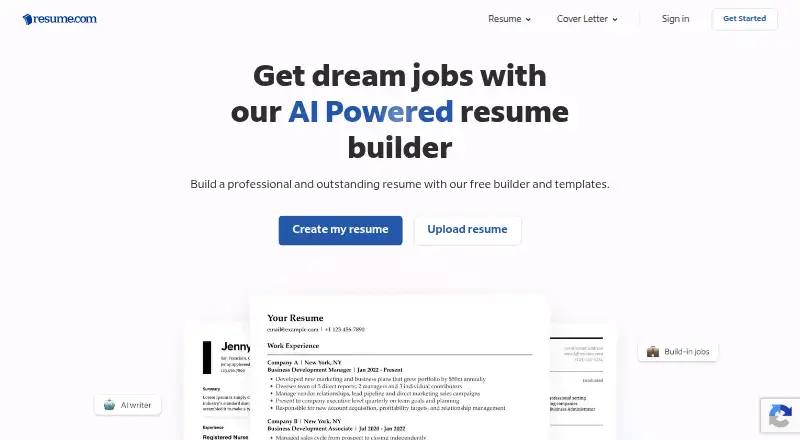
Resume.com is a free resume and cover-letter builder available on the web, Android, and iOS. Its rich-text editor lets users arrange and customize resume sections with drag-and-drop controls, or upload an existing resume to enhance it. An AI writer can generate work experience descriptions and AI-powered cover letters. The site offers employer-informed templates and more than 100 job-tailored examples. Users can create multiple resumes and cover letters, then download them as PDF or plain text or print them at no cost. Resume.com also says users can share resumes with employers on Indeed and sign in to their account with an Indeed account. The Free plan costs nothing and includes multiple resumes and cover letters, professional templates, and PDF and plain-text downloads, with no premium membership. For product questions, users can submit a request through the Help Center. Resume.com says user information is secure and will not be sold. The maker was founded in 2014 and is headquartered in Vancouver, Canada.
Who it suits
Resume.com suits people who want to create or revise resumes and cover letters on the web or a mobile app. Its templates, examples, and AI writing tools may help users assembling job applications.
What it does well
- Free plan includes multiple resumes and cover letters.
- Downloads as PDF or plain text at no cost.
- AI writer generates experience descriptions and cover letters.
- Offers more than 100 job-tailored examples.
What to know first
- No free trial is offered.
- Product questions are directed through the Help Center request process.
Limits
The free plan costs nothing and includes multiple resumes and cover letters, professional templates, and PDF and plain-text downloads. It has no premium membership.
Plans
| Plan | Billed and limits | Price |
|---|---|---|
| Free | Multiple resumes and cover letters · professional templates · PDF and plain-text downloads · no premium membership | Free |
As resume.com lists them, read 10 Oct 2026. The maker's own page has the final word.
Getting started
- Visit the Resume.com website or use its Android or iOS app.
- Sign in with an Indeed account to access a Resume.com account.
- Start a resume or cover letter, or upload an existing resume to enhance it.
- Use the free plan to create documents and download them as PDF or plain text, or print them.
Resume.com is a resume and cover-letter builder for people who want to create or refresh application documents without paying for downloads. It suits job seekers who value a free, straightforward set of editing and writing tools over a paid membership with more defined limits or features.
Its strongest case is the combination of AI writing, templates, multiple documents, and free PDF or plain-text exports. The trade-off is that the published offer centers on document creation rather than a broader job-search toolkit.
Overview
Resume.com combines resume and cover-letter editing in a rich-text editor. Users can arrange and customize resume sections with drag-and-drop controls, or upload an existing resume to enhance it. This gives both first-time writers and people revising an older document a way to start, though the available features are focused on the documents themselves.
An AI writer generates work-experience descriptions and AI-powered cover letters. These can help users get past a blank page, while the editor’s customization tools leave room to shape the result. Resume.com also offers employer-informed templates and more than 100 job-tailored examples, a useful source of structure when adapting an application to a particular role.
Key features
- Resume editing: Drag-and-drop section organization and customization make it possible to rearrange a resume rather than work from a fixed layout. Uploading an existing resume supports revisions as well as new drafts.
- AI writing: Generated work-experience descriptions and cover letters provide a starting point for application copy. The service does not replace the need to tailor and review that writing for each role.
- Templates and examples: Professional templates and more than 100 job-tailored examples give users options for presenting experience and approaching different applications.
- Downloads and sharing: Resumes can be downloaded as PDFs or plain text and printed at no cost. Resume.com also says users can share resumes with employers on Indeed.
Resume.com says user information is secure and will not be sold. Product questions go through its Help Center, where users can submit a request.
Pricing
| Plan | Price | What it includes |
|---|---|---|
| Free | free | Multiple resumes and cover letters, professional templates, PDF and plain-text downloads, and no premium membership. |
The free plan is the full stated membership option, not a trial: Resume.com has no free trial and no premium membership in this offer. It fits job seekers who want to make multiple documents and export or print them without a subscription. No resume or cover-letter quota is stated for the plan, so there is no published cap to weigh against those uses.
Platforms
Resume.com is available on the web, Android, and iOS. Users can sign in with an Indeed account to access their Resume.com account, and the service says resumes can be shared with employers on Indeed.
Who it's for
Choose Resume.com if you need to build or revise application documents, want AI assistance with first drafts, and consider free downloads essential. Its multiple-resume and cover-letter allowance also suits someone preparing applications for several roles. Look elsewhere if your priority is a service whose published offer is centered on more specialized job-application workflows rather than resume and cover-letter creation.
Pros and cons
Pros
- No-cost exports: PDF and plain-text downloads, plus printing, are included at no cost, so finished documents do not require a paid upgrade.
- Room for multiple applications: The free plan includes multiple resumes and cover letters, which is useful when tailoring documents to different roles.
- Several ways to get started: Users can upload a resume, use drag-and-drop editing, draw on templates and examples, or ask the AI writer for draft copy.
- Indeed connection: Indeed account sign-in and resume sharing may be convenient for people who already use Indeed.
Cons
- Focused scope: The stated tools center on writing, editing, and sharing resumes and cover letters; readers seeking a wider job-search workflow should compare alternatives.
- AI drafts still need judgment: Generated descriptions and letters are starting points, not a substitute for checking that each application reflects the candidate and role.
Alternatives
Kickresume is another free-plan option for users who want a set of basic resume and matching cover-letter templates, plus a basic website template and pre-written phrases.
Rezi may suit users who want its stated resume-focused AI interview feature alongside resume building; its free plan allows one resume and three PDF downloads.
AI Job Agent is worth considering for users prioritizing automated applications, autofills, cover letters, and ATS refinements in its Pro plans.
ApplyMate Cover Letter Generator fits someone who wants one complete cover letter at no cost without a password, card, or subscription, or prefers to buy credits for additional letters.
Cover Letter Tailor may be a better fit for users who want a stated daily free allowance of two letters and multiple tone options, with an unlimited monthly plan as an upgrade.
CoverAI is an option for users who want daily cover-letter and resume PDF allowances without signing up, or prefer its stated INR-priced Pro plan.
CoverDoc.ai suits users interested in job guides paired with cover letters and originality scores, with a free starter allowance and a pay-as-you-go option.
Cvali Cover Letter Generator may suit users who want a cover-letter tool that also states a scan allowance, AI rewrites, templates, exports, a tracker, and a Chrome extension.
For broader category browsing, see AI Cover Letter Generators, Resume Design Software, Cover Letter Software, and AI Resume Builders.
Verdict
Resume.com is a sensible choice for job seekers who want AI-assisted resume and cover-letter creation, multiple documents, and downloadable files without paying. Its clearest advantage is that useful editing and export tools sit together in a free plan; choose another service if your main need is a more specialized job-application workflow.
Verdict
Resume.com brings resume editing, cover-letter writing, templates, and downloads together at no cost. Its Indeed sharing and sign-in options may suit users who also use Indeed.
Questions
How much does Resume.com cost?
Its Free plan costs nothing.
Is there a free trial?
No. Resume.com lists no free trial.
Which platforms can I use?
Resume.com is available on the web, Android, and iOS.
Can I download or print my resume for free?
Yes. Users can download resumes as PDF or plain text and print them at no cost.
Who makes Resume.com?
The maker is Resume.com, founded in 2014 and headquartered in Vancouver, Canada.
Facts from Resume.com's own pages
- Account access
- Resume.com says users can sign in with an Indeed account to access their Resume.com account. · resume.com, 10 Oct 2026
- AI writing
- The site offers an AI writer that generates work experience descriptions and AI-powered cover letters. · resume.com, 10 Oct 2026
- Data statement
- The site says user information is secure and will not be sold. · resume.com, 10 Oct 2026
- Downloads
- Users can download resumes as PDF or plain text and print them at no cost. · resume.com, 10 Oct 2026
- Founded
- 2014 · resume.com, 28 Sept 2026
- Free plan
- Yes · resume.com, 20 Sept 2026
- Headquarters
- Vancouver, Canada · resume.com, 28 Sept 2026
- Indeed sharing
- The site says users can share resumes with employers on Indeed. · resume.com, 10 Oct 2026
- Mobile app
- Resume.com has an Android app listed on Google Play and an iOS app listed on the App Store. · play.google.com, 10 Oct 2026
- Product
- Resume.com is a resume and cover-letter building tool. · resume.com, 10 Oct 2026
- Resume tools
- Users can organize and customize resume sections with drag-and-drop controls and upload an existing resume to enhance it. · resume.com, 10 Oct 2026
- Support
- Resume.com directs users to its Help Center for product questions, where they can submit a request. · resume.com, 10 Oct 2026
- Templates and examples
- The site offers employer-informed resume templates and more than 100 job-tailored examples. · resume.com, 10 Oct 2026
Where Resume.com stands on Freedom251
- AI Resume Builders#27 of 80
- AI Cover Letter Generators#15 of 41
- Cover Letter Software#26 of 62
- Resume Design Software#13 of 26