Freedom251 › AI Cover Letter Generators

Cvali Cover Letter Generator
What Cvali Cover Letter Generator is
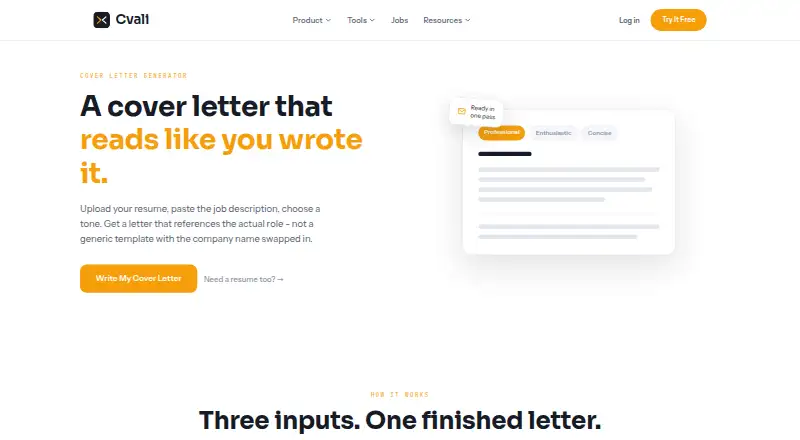
Cvali Cover Letter Generator creates a cover letter from an uploaded resume and a pasted job description. It accepts PDF and DOCX resumes and offers professional, enthusiastic, and concise tone choices. Cvali says the generated letter draws on the supplied materials to emphasize relevant experience and job requirements rather than inventing details. Users can review, edit, copy, and regenerate a letter for each application. The free plan includes three AI cover letters per month, with the allowance resetting on the first, and the cover-letter page says no account or credit card is needed to begin. The web generator is accompanied by a Chrome extension that can score a job listing and fill an application form, but does not submit it. Cvali says uploaded files and results are stored on Supabase for logged-in accounts, and submitted content is not used to train a model. A 90-day Pro Access option costs 18.00 USD once; the listed 30-day and lifetime options have no price shown.
Who it suits
The generator suits job seekers who want to tailor a letter to a specific role using their resume and the job description. Its tone choices and ability to edit or regenerate letters may help people applying to multiple jobs.
What it does well
- Accepts resumes in PDF or DOCX.
- Offers three tone choices.
- Free plan includes three letters monthly.
- No account or card needed to start.
- Chrome extension fills forms without submitting.
What to know first
- Free plan is limited to three letters monthly.
- Chrome extension stops before application submission.
- 30-day and lifetime option prices are not shown.
Limits
The free plan provides three AI cover letters per month, and the allowance resets on the first. The Chrome extension fills the application form but stops before submission.
Plans
| Plan | Billed and limits | Price |
|---|---|---|
| Free | 1 scan per account · 3 AI rewrites/month · 3 AI cover letters/month · builder, 10 templates, PDF/DOCX export, tracker, and Chrome extension included | Free |
| Pro Access — 90 Days | $0.20/day · billed once · Unlimited scans and rewrites · AI resume builder and cover letters · job board and tracker · Chrome extension | $18, paid once |
| Pro Access — 30 Days | One-time payment; no subscription or auto-renewal. The pricing page lists a 30-day option but does not show its price in the opened page. · Unlimited scans and rewrites · AI resume builder and cover letters · job board and tracker · Chrome extension | On request |
| Pro Access — Lifetime | One-time payment; the pricing page does not show a price for this option in the opened page. · Unlimited scans and rewrites · AI resume builder and cover letters · job board and tracker · Chrome extension | On request |
As cvali.com lists them, read 2 Oct 2026. The maker's own page has the final word.
Getting started
- Visit https://cvali.com/cover-letter.
- Upload a resume in PDF or DOCX format.
- Paste the job description.
- Choose a professional, enthusiastic, or concise tone.
- Generate the letter, then read, edit, and copy it.
- Use the Chrome extension to score a job listing or fill its application form.
Verdict
Cvali combines resume-based letter generation with tone selection and editing, and its free plan supports three letters each month. Applicants should note that the extension does not submit applications and that prices are not shown for two Pro Access options.
Questions
Is Cvali Cover Letter Generator free?
Yes. The Free plan costs nothing and includes three AI cover letters each month.
How much does Pro Access cost?
Pro Access — 90 Days costs 18.00 USD once. The 30-day and lifetime options are listed without prices.
What resume formats can I upload?
The generator accepts resumes in PDF or DOCX format.
Which platforms are available?
Cvali lists web and extension platforms. Its extension is for Chrome.
Do I need an account to start?
No account or credit card is needed to get started on the cover-letter page.
Does Cvali name integrations?
Cvali describes a Chrome extension that scores job listings and fills application forms, stopping before submission. No other specific integrations are named in these facts.
Facts from Cvali Cover Letter Generator's own pages
- Company background
- Cvali calls itself early and still small; the opened About page does not state a founder, headquarters, or founding date. · cvali.com, 2 Oct 2026
- Data handling
- Cvali says uploaded files and results are stored on Supabase for logged-in accounts, and submitted content is not used to train a model. · cvali.com, 2 Oct 2026
- Editing and reuse
- Users can read, tweak, and copy the generated letter, and the page says they can regenerate for each application. · cvali.com, 2 Oct 2026
- Free allowance
- The free plan includes three AI cover letters a month, and monthly allowances reset on the first. · cvali.com, 2 Oct 2026
- Grounded content
- Cvali says it draws from the uploaded resume and job description and reframes or prioritizes experience rather than inventing it. · cvali.com, 2 Oct 2026
- Integrations
- Cvali describes a Chrome extension that scores a job listing and fills the application form, but stops before submitting it. · cvali.com, 2 Oct 2026
- Intended users
- Cvali describes itself as an independent job-search toolkit made for job seekers. · cvali.com, 2 Oct 2026
- No account to start
- The cover-letter page says no account or credit card is needed to get started. · cvali.com, 2 Oct 2026
- Privacy claims
- Cvali says it has no advertising trackers and does not sell resumes or share them with recruiters. · cvali.com, 2 Oct 2026
- Purpose
- Cvali generates a cover letter from an uploaded resume and pasted job description. · cvali.com, 2 Oct 2026
- Resume input
- The generator accepts a resume in PDF or DOCX format. · cvali.com, 2 Oct 2026
- Role matching
- Cvali says the letter picks up language, priorities, and requirements from the pasted job description. · cvali.com, 2 Oct 2026
- Support
- Cvali lists [email protected] as its contact for bugs, billing, data requests, partnerships, and press, with replies expected within a couple of business days. · cvali.com, 2 Oct 2026
- Tone choices
- Users can choose professional, enthusiastic, or concise tone before generating a letter. · cvali.com, 2 Oct 2026
Where Cvali Cover Letter Generator stands on Freedom251
- AI Cover Letter Generators#7 of 41