Freedom251 › Video Editing Software
Renderforest Video Editor
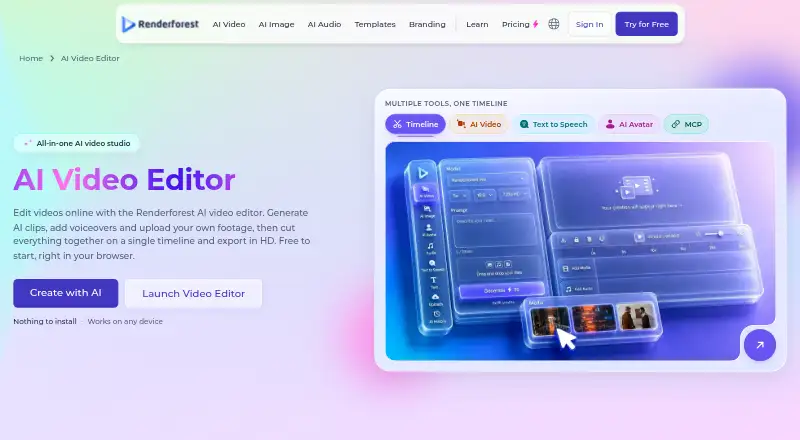
What Renderforest Video Editor is
Renderforest Video Editor is a browser-based tool for making videos with uploaded footage, timeline editing, and AI generation. You can trim, split, merge, crop, change speed, add transitions, place text and captions, choose aspect ratios, adjust clip volume, and add audio tracks. Video generation lists Renderforest’s model, Kling 3.0 Omni, Seedance 2.5, Veo 3.1, and MiniMax H3. Image generation uses Nano Banana, Seedream, GPT, and Flux 2 Pro, with up to 10 reference photos. The editor can create lip-synced avatar clips and text-to-speech narration in more than 50 languages. A music library and personal audio uploads are included. Generated clips retain prompts, model settings, and version history for revisions. Projects are saved in the cloud and accessible through browsers across devices. Android and iOS apps are available, but there is no desktop app. The free plan supports editing and generation with Renderforest’s model; paid plans add watermark-free HD exports, credits, and commercial licensing.
Who it suits
It suits marketing professionals, educators, trainers, small business owners, and content creators who want browser-based video creation with AI tools. Teams may also use its collaboration and cloud access features.
What it does well
- Free plan supports editing and generation
- Timeline includes trimming, captions, and transitions
- Generates video with several listed AI models
- Text-to-speech supports 50+ languages
- Projects retain prompts and version history
What to know first
- Free HD exports include a watermark
- No desktop application
- Free editor uses Renderforest’s model
- Cloud storage starts at 10 GB on Lite
Plans
| Plan | Billed and limits | Price |
|---|---|---|
| Lite | $8 month (monthly) · $12 month (yearly selection) · 400 AI credits/month · 5 HD720 template exports · premium AI models · 10 GB cloud storage | $8 a month |
| Pro | $19 month (monthly) · $39 month (yearly selection) · 1,600 AI credits/month · unlimited HD720 AI video creations with Renderforest Fast · unlimited Full HD1080 template exports · 50 GB cloud storage | $19 a month |
| Business | $39 month (monthly) · $59 month (yearly selection) · 3,000 AI credits/month · unlimited HD1080 AI video creations with Renderforest Fast · UHD 4K template exports · reseller license · team management · 100 GB cloud storage | $39 a month |
| Free | HD video with watermark · basic features · free AI video editor | Free |
As renderforest.com lists them, read 11 Oct 2026. The maker's own page has the final word.
Verdict
Renderforest combines conventional timeline editing with video, image, avatar, and narration generation in a browser. Its free tier is limited by watermarks and model access, while paid plans expand exports, credits, storage, and licensing.
Facts from Renderforest Video Editor's own pages
- AI images
- The editor offers image generation with Nano Banana, Seedream, GPT, and Flux 2 Pro and accepts up to 10 reference photos. · renderforest.com, 11 Oct 2026
- AI video models
- The editor page lists Renderforest’s model, Kling 3.0 Omni, Seedance 2.5, Veo 3.1, and MiniMax H3 for video generation. · renderforest.com, 11 Oct 2026
- Avatars and speech
- Users can create lip-synced avatar clips and generate text-to-speech narration in 50+ languages. · renderforest.com, 11 Oct 2026
- Cloud and browser access
- Renderforest says the editor works in a browser across operating systems and devices, with projects saved to the cloud as users work. · renderforest.com, 11 Oct 2026
- Included cloud storage
- 10 · renderforest.com, 21 Sept 2026
- Company
- Renderforest says it was founded in 2013 and is headquartered in Jrvezh, Armenia. · renderforest.com, 11 Oct 2026
- Desktop app
- No · renderforest.com, 21 Sept 2026
- 4K export
- Yes · renderforest.com, 21 Sept 2026
- Free plan
- Yes · renderforest.com, 21 Sept 2026
- Free tier limits
- The free editor permits editing and generation with the Renderforest model; paid plans add watermark-free HD exports, more generation credits, and commercial licensing. · renderforest.com, 11 Oct 2026
- Intended users
- The maker identifies marketing professionals, educators and trainers, small business owners, and content creators as audiences for the editor. · renderforest.com, 11 Oct 2026
- Mobile app
- Yes · renderforest.com, 21 Sept 2026
- Mobile apps
- Renderforest’s pricing page says subscriptions provide access to its mobile app, and its company history mentions both iOS and Android apps. · renderforest.com, 11 Oct 2026
- Music
- The editor includes a music library and lets users upload their own audio tracks. · renderforest.com, 11 Oct 2026
- Privacy and GDPR
- Renderforest’s privacy policy says it processes personal data in accordance with GDPR and UK GDPR for users in the EEA, Switzerland, or UK. · renderforest.com, 11 Oct 2026
- Product
- Renderforest describes its AI Video Editor as a browser-based editor for uploading footage, generating AI clips, adding voiceovers, editing on a timeline, and exporting in HD. · renderforest.com, 11 Oct 2026
- Prompt history
- Generated clips retain their prompts, model settings, and version history so users can revise prompts, regenerate takes, and return to earlier versions. · renderforest.com, 11 Oct 2026
- Support
- The pricing page directs users with questions to Renderforest’s support team. · renderforest.com, 11 Oct 2026
- Team collaboration
- Yes · renderforest.com, 21 Sept 2026
- Timeline editing
- The timeline supports trimming, splitting, merging, cropping, speed controls, transitions, text overlays, captions, aspect ratios, per-clip volume, and audio tracks. · renderforest.com, 11 Oct 2026
- Web app
- Yes · renderforest.com, 21 Sept 2026
Where Renderforest Video Editor stands on Freedom251
- Video Editing Software#33 of 155