Freedom251 › Video Editing Software
Reframe
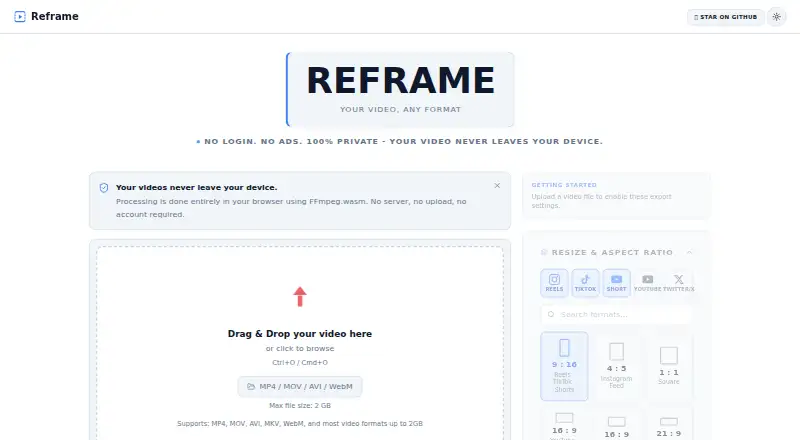
What Reframe is
Reframe is a free browser-based video editor for resizing, trimming, and converting videos without installing software. It offers 11 preset formats and custom dimensions, with letterboxing to fit or cropping to fill an aspect ratio. Editing controls include precise trimming, rotation at 0°, 90°, 180°, or 270°, independent audio muting, playback speeds from 0.25x to 4x, and a CRF quality setting. Export shows live progress and provides an instant download. The site accepts MP4, MOV, AVI, MKV, WebM, and most video formats up to 2 GB. Processing runs locally in the browser with FFmpeg.wasm, and the maker says media is not sent to external servers. Reframe collects no analytics, telemetry, crash reports, or usage tracking. It is open source under the MIT License and can work offline after first load.
Who it suits
Reframe suits creators resizing social videos and anyone trimming or converting clips without installing an application. It requires a browser with WebAssembly support.
What it does well
- Free plan has no fees
- Eleven presets plus custom dimensions
- Local browser processing
- Supports files up to 2 GB
- Works offline after first load
What to know first
- Browser WebAssembly support is required
- Maximum stated file size is 2 GB
- No desktop or mobile app
- No included cloud storage
Plans
| Plan | Billed and limits | Price |
|---|---|---|
| Free | No fees · videos up to 2 GB | Free |
As reframe-lilac.vercel.app lists them, read 12 Oct 2026. The maker's own page has the final word.
Verdict
Reframe is a focused browser editor with local processing and common format support. Its free, open-source setup is suited to straightforward video adjustments when WebAssembly is available.
Facts from Reframe's own pages
- Aspect ratios
- It offers preset aspect ratios for social video formats and a custom dimensions option. · github.com, 12 Oct 2026
- Audience
- The project describes itself as suitable for social media creators and people who want to trim or convert videos without installing bulky software. · github.com, 12 Oct 2026
- Browser requirement
- The repository says Reframe requires WebAssembly support to process videos in the browser. · github.com, 12 Oct 2026
- Included cloud storage
- 0 · github.com, 22 Sept 2026
- Contact
- The maker's site provides a contact form with name and email fields. · reframe-lilac.vercel.app, 12 Oct 2026
- Desktop app
- No · github.com, 22 Sept 2026
- Editing
- Features include precise trimming, rotation, audio control, playback speed control, and quality settings. · github.com, 12 Oct 2026
- Editing controls
- Features include trimming, 0°/90°/180°/270° rotation, independent audio mute, and playback speed from 0.25x to 4x. · github.com, 11 Oct 2026
- Export
- The repository describes live export progress and instant downloads, and lists Ctrl+Enter or Cmd+Enter as the export shortcut. · github.com, 12 Oct 2026
- File size and formats
- The site accepts common video formats including MP4, MOV, AVI, MKV, and WebM, with a stated maximum file size of 2 GB. · reframe-lilac.vercel.app, 11 Oct 2026
- Formats
- The site says it supports MP4, MOV, AVI, MKV, WebM, and most video formats up to 2 GB. · reframe-lilac.vercel.app, 12 Oct 2026
- Framing
- Users can fit a video within a frame with letterboxing or fill a frame by cropping. · reframe-lilac.vercel.app, 12 Oct 2026
- Free plan
- Yes · github.com, 22 Sept 2026
- License
- The project is open source under the MIT License. · github.com, 12 Oct 2026
- Limits
- The project documentation says browser video processing requires WebAssembly support. · github.com, 11 Oct 2026
- Local processing
- Video processing runs in the browser using FFmpeg.wasm, and the maker says media is not sent to external servers. · reframe-lilac.vercel.app, 11 Oct 2026
- Mobile app
- No · github.com, 22 Sept 2026
- Offline use
- The repository says Reframe can be used offline after its first load. · github.com, 12 Oct 2026
- Open source
- The maker describes Reframe as open source and identifies its license as MIT. · reframe-lilac.vercel.app, 11 Oct 2026
- Privacy
- Video processing happens on the user's device, and video files are not uploaded to a server. · reframe-lilac.vercel.app, 12 Oct 2026
- Privacy details
- The privacy policy says Reframe does not collect analytics, telemetry, crash reports, or usage tracking. · reframe-lilac.vercel.app, 12 Oct 2026
- Purpose
- Reframe is a browser-based video editor for resizing, trimming, and converting videos. · github.com, 12 Oct 2026
- Resizing
- It offers 11 preset formats and custom dimensions. · github.com, 11 Oct 2026
- Storage
- The policy says Reframe does not use localStorage or IndexedDB to store user media; files remain in browser runtime memory or local processing context. · reframe-lilac.vercel.app, 11 Oct 2026
Where Reframe stands on Freedom251
- Video Editing Software#111 of 153