Freedom251 › Speed Reading Apps
Reading Trainer
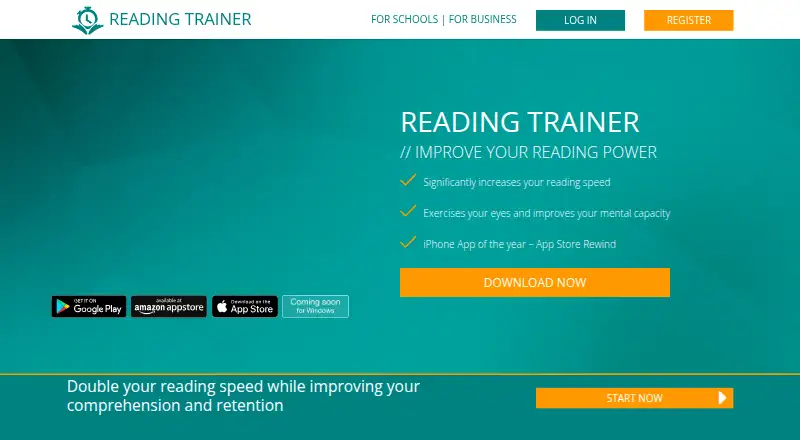
What Reading Trainer is
Reading Trainer is a reading practice service aimed at improving speed, comprehension and retention through exercises and a curriculum that adapts to a user’s progress and results. Its library includes 20 exercises, 15 of which can also be practiced individually outside the training plan. PowerReader lets users practice with their own content, while statistics on the app and website show exercise results, reading power, strengths and weaknesses. The service supports 10 training languages, adjustable exercise font size and offline use for up to two weeks; progress cannot synchronize while offline. Free access includes the first curriculum unit and a couple of exercises. Premium membership adds the full personalized curriculum, unlimited units, interactive exercises and cloud synchronization. Reading Trainer is available on Android, iOS, web and Windows. Businesses and schools can request a demo; the business offering describes customized curricula and exercises, progress monitoring and integration with existing HR ecosystems. The service is intended for consumers aged 16 or older, with an exception for minors aged 14 or older who have written consent from legal representatives.
Who it suits
Reading Trainer may suit frequent readers, students and professionals who want structured reading practice and progress statistics. Businesses and schools can request a demo for customized curricula, exercises and progress monitoring.
What it does well
- Curriculum adapts to progress and results.
- PowerReader supports practice with users’ own content.
- Supports 10 training languages.
- Statistics cover reading power, strengths and weaknesses.
- Offline use is available for up to two weeks.
What to know first
- Free access covers only the first unit and a couple of exercises.
- Progress cannot sync while offline.
- Consumers generally must be at least 16.
Limits
The Free plan includes the first curriculum unit and a couple of exercises. Premium membership includes unlimited units, the full personalized adaptive curriculum, interactive exercises, and cloud synchronization; progress cannot sync while using the app offline.
Plans
| Plan | Billed and limits | Price |
|---|---|---|
| Free | First curriculum unit and a couple of exercises | Free |
As readingtrainer.com lists them, read 4 Oct 2026. The maker's own page has the final word.
Getting started
- Open https://readingtrainer.com/ or install the app on Android or iOS.
- Register on the website or in the app.
- Start with the first curriculum unit and the free exercises.
- Choose a training language and adjust exercise font size as needed.
- Use PowerReader to practice with your own content.
- Request a demo for business or education use.
Overview
Reading Trainer is a structured reading-practice app for people who want to work on speed, comprehension and retention through guided training. It suits frequent readers, students and professionals who value an adaptive plan; its narrow free allowance makes Premium the practical option for anyone intending to keep training.
The combination of a changing curriculum, individual drills and progress statistics gives practice more direction than a speed-only tool. Choose it for that broader training approach, not if your main need is simply to display your own text for faster reading.
Key features
The curriculum adjusts to progress and results, so the sequence responds to how a user is doing. There are 20 exercises, 15 of which can be practiced outside the plan. That balance allows targeted sessions without abandoning guided training, although five exercises remain tied to the curriculum.
Statistics cover exercises, reading power, strengths and weaknesses, and are available on the app and website. They give users a way to monitor performance over time. PowerReader supports practice with personal content, while adjustable font size accommodates different reading preferences. Ten training languages and comprehension exercises make the offering broader than speed drills alone.
Offline use is possible for up to two weeks, but progress will not sync while offline. That is useful during temporary disconnection, but less suitable for people who need current progress across devices while away from a connection.
Pricing
Reading Trainer is freemium, with a free plan at no cost. It includes the first curriculum unit and a couple of exercises, enough to try the approach but too limited for a sustained course of practice.
Premium provides full access to the personalized adaptive curriculum, unlimited units, interactive exercises and cloud synchronization. The free plan gives up the broader curriculum and full exercise access, so readers committed to regular training will need Premium.
Businesses and schools can request a demo for customized curricula, exercises and progress monitoring. Business use can integrate with an existing HR ecosystem and monitor employee progress, making it a better fit for organized training than individual practice alone.
Platforms
Reading Trainer supports web, Android, iOS and Windows. The FAQ describes switching training language in the app, with 10 languages supported. Offline app use lasts up to two weeks, with synchronization paused until reconnection.
Who it's for
The product names frequent readers, executives, personal assistants, high school and college students, and purchasing and sales professionals as potential users. Its adaptive curriculum and statistics are most useful to people who want recurring practice and a way to follow their strengths and weak spots. The service is intended for consumers aged 16 or older; minors aged at least 14 may use it with written consent from legal representatives.
Teams and schools may find the demo-led offering more appropriate, particularly where customized training and employee or student progress monitoring matter. Readers seeking an occasional speed-reading aid without a curriculum may find the training structure excessive.
Pros and cons
- Pros: Adaptive training adjusts to progress, and 15 exercises can be used independently for focused practice.
- Pros: Statistics span reading power, exercises, strengths and weaknesses, while PowerReader supports practice with personal material.
- Pros: Ten training languages, comprehension exercises and four platforms support a range of learners and routines.
- Cons: Free access stops after the first unit and a couple of exercises, limiting long-term use without Premium.
- Cons: Offline access is capped at two weeks and progress does not sync during that period.
Alternatives
Speed Reading Apps is a useful place to compare options across the category. Choose Ledor if a free plan with all features, no ads and no account is the priority; it supports Android, iOS, Linux and web. Superead is another freemium option on Android, iOS and web, with limited free features and a Premium monthly plan.
LightSpeedRead suits readers who want a free website reader, speed test, calculator and guides, or a Chrome extension that reads up to 600 wpm; Pro costs $2.99 a month. Outread offers basic free features and an Outread+ Monthly plan at $4.99 a month for all features, for its extension, iOS and macOS platforms.
Dogear is a free iOS and macOS alternative with no ads, subscription or account. Flash-Read is web-only, with three free stories for guests and a Starter plan at $4.49 a month for unlimited stories and .txt uploads. LumaRead is another web option: its free plan allows 1,500 words per day, one library book and WPM up to 600, while Monthly costs $3.99 a month and includes unlimited reading and 10 books.
Spreeder is also worth considering as an alternative.
Verdict
Reading Trainer is a good fit for learners who want an adaptive routine, comprehension practice and progress tracking rather than speed drills alone. Its strongest reason to choose is the mix of guided and standalone exercises across multiple languages. The main reason to look elsewhere is the small free allowance: sustained access requires Premium, and offline sessions cannot sync progress until reconnecting.
Verdict
Reading Trainer combines adaptive practice, individual exercises and progress statistics, with limited free access and additional features in Premium. Offline use lasts up to two weeks, but progress will not sync during that time.
Questions
Is Reading Trainer free?
Yes. The Free plan costs nothing and includes the first curriculum unit and a couple of exercises.
What does Premium include?
Premium provides the full personalized adaptive curriculum, unlimited units, interactive exercises, and cloud synchronization of progress.
Which platforms are listed?
Reading Trainer is listed for Android, iOS, web, and Windows. Its stated supported platforms are web and Android.
How many exercises and languages does it support?
The FAQ says it has 20 exercises, 15 of which can be practiced individually outside the training plan. Users can switch among 10 training languages.
Can I use it offline?
The app can be used offline for up to two weeks, but progress cannot sync while offline.
Who provides Reading Trainer?
The imprint names HeKu IT GmbH – IT Solutions & Services as the provider and lists its address in Garching, Germany.
Facts from Reading Trainer's own pages
- Adaptive curriculum
- The curriculum adapts to a user's progress and results. · readingtrainer.com, 4 Oct 2026
- Audience
- The product page names frequent readers, executives, personal assistants, high school and college students, and purchasing and sales professionals as potential users. · readingtrainer.com, 4 Oct 2026
- Business and education
- The business page describes the product for teams and students and offers demo requests for business and education use. · readingtrainer.com, 3 Oct 2026
- Business and schools
- The business page offers schools and businesses a demo and describes customized curricula, exercises, and progress monitoring. · readingtrainer.com, 4 Oct 2026
- Eligibility
- The terms say the service is intended for consumers aged 16 or older, with a stated exception for some minors aged 14 or older who have written consent from legal representatives. · readingtrainer.com, 4 Oct 2026
- Exercise library
- The FAQ says the product has 20 different exercises, 15 of which can also be used individually outside the training plan. · readingtrainer.com, 3 Oct 2026
- Exercises
- The FAQ says the product has 20 different exercises, 15 of which can also be practiced individually outside the training plan. · readingtrainer.com, 4 Oct 2026
- Free access
- The first curriculum unit and a couple of exercises are free; registration is available on the website or in the app. · readingtrainer.com, 3 Oct 2026
- Headquarters
- Garching, Germany · readingtrainer.com, 28 Sept 2026
- Integrations
- The website and app support registration or login using email, Facebook, Amazon, and Google. · readingtrainer.com, 4 Oct 2026
- Languages
- The FAQ says users can switch training language in the app and that Reading Trainer supports 10 languages. · readingtrainer.com, 4 Oct 2026
- Offline use
- The app can be used offline for up to two weeks, but progress cannot sync while offline. · readingtrainer.com, 4 Oct 2026
- PowerReader
- The PowerReader lets users practice with their own content. · readingtrainer.com, 4 Oct 2026
- Premium
- Premium membership includes full access to a personalized adaptive curriculum, unlimited units, interactive exercises, and cloud synchronization of progress. · readingtrainer.com, 3 Oct 2026
- Privacy
- The maker says it does not sell personal data. · readingtrainer.com, 4 Oct 2026
- Progress tracking
- Users can view statistics about exercises, reading power, strengths, and weaknesses on the app and website. · readingtrainer.com, 4 Oct 2026
- Provider
- The imprint names HeKu IT GmbH – IT Solutions & Services as the provider and lists its address in Garching, Germany. · readingtrainer.com, 3 Oct 2026
- Purpose
- Reading Trainer is designed to improve reading speed, comprehension, and retention through an adaptive curriculum and exercises. · readingtrainer.com, 4 Oct 2026
- Reading tools
- Features listed include individual statistics, PowerReader for users’ own content, adjustable exercise font size, multiple training languages, and offline mode. · readingtrainer.com, 3 Oct 2026
- Security and hosting
- The privacy policy says the site uses SSL/TLS encryption and hosts service content with Amazon Web Services. · readingtrainer.com, 4 Oct 2026
- Security limitation
- The privacy policy says internet data transmission can have security vulnerabilities and complete protection from third-party access is not possible. · readingtrainer.com, 3 Oct 2026
- Service terms
- The terms describe Reading Trainer as a software-as-a-service offering with free limited functionality and paid Premium services. · readingtrainer.com, 3 Oct 2026
- Support
- Users can contact the support team by email or submit a request through the support page. · readingtrainer.com, 4 Oct 2026
Where Reading Trainer stands on Freedom251
- Speed Reading Apps#8 of 27