Freedom251 › Speed Reading Apps
Doova Speed Reading Trainer
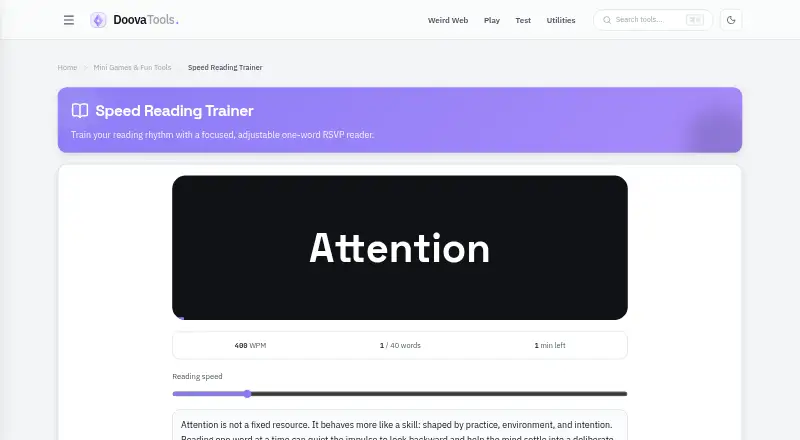
What Doova Speed Reading Trainer is
Doova Speed Reading Trainer is a free web tool for practicing reading rhythm with text displayed one word at a time. It uses RSVP, a method that keeps words in one place as they appear, intended to reduce eye movement and support pacing practice. You can paste in your own text or use the passage included with the trainer, then select a speed from 250 to 1,200 words per minute. Playback can be paused or reset at any point in a session.
Doova advises beginning at roughly 250–350 words per minute and raising the pace only while you can still explain what you have read. Its guidance emphasizes comprehension over raw speed. The trainer is available free, with no signup required for Doova Tools. Doova says browser-native tools run in the browser and their inputs are not sent to remote servers. Its privacy policy also says it uses Google AdSense and that advertising vendors may use cookies for personalized ads. The trainer is framed for reading rhythm and pacing practice; Doova describes its broader tools as serving creators, developers, and everyday users.
Who it suits
It suits readers who want to practice pacing with their own text or the included passage, and who want adjustable one-word-at-a-time playback. It can also suit creators, developers, and everyday users looking for a free browser-based practice tool.
What it does well
- Free to use with no signup required.
- Choose a speed from 250 to 1,200 words per minute.
- Paste your own text or use the included passage.
- Pause or reset a session at any moment.
- Browser-native inputs are not sent to remote servers, Doova says.
What to know first
- Available on the web only.
- Advertising vendors may use cookies for personalized ads.
Plans
| Plan | Billed and limits | Price |
|---|---|---|
| Free | Free to use; no subscription · Adjustable 250–1,200 WPM · paste text or use included passage | Free |
As doovatools.com lists them, read 9 Oct 2026. The maker's own page has the final word.
Getting started
- Open the Doova Speed Reading Trainer website.
- Paste text or choose the included passage.
- Set a reading speed between 250 and 1,200 words per minute.
- Start the session, pausing or resetting as needed.
- Begin around 250–350 WPM and increase only while you can explain what you read.
Verdict
Choose Doova Speed Reading Trainer if you want a free web tool for practicing reading rhythm with adjustable RSVP playback and your own text. Look elsewhere if you need a platform beyond the web or prefer not to use a service whose advertising vendors may use cookies for personalized ads.
Questions
How much does Doova Speed Reading Trainer cost?
It is free to use, with no subscription.
Do I need to sign up?
No. Doova Tools says its tools require no signup.
Which platforms does it support?
The trainer is available on the web.
Can I use my own reading material?
Yes. You can paste your own text or use the included passage.
What speeds can I choose?
The selectable range is 250 to 1,200 words per minute.
Is my text sent to Doova's servers?
Doova's privacy policy says browser-native tools run in the browser and their inputs are not sent to remote servers. It also says advertising vendors may use cookies for personalized ads.
Facts from Doova Speed Reading Trainer's own pages
- Advertising
- Doova's privacy policy says it uses Google AdSense and that advertising vendors may use cookies for personalized ads. · doovatools.com, 9 Oct 2026
- Comprehension guidance
- The page advises starting around 250–350 WPM and increasing only while the reader can explain what they read. · doovatools.com, 9 Oct 2026
- Comprehension limit
- The trainer page cautions that comprehension matters more than raw speed. · doovatools.com, 9 Oct 2026
- Playback controls
- Users can pause or reset the reading session at any moment. · doovatools.com, 9 Oct 2026
- Price and access
- The tool page describes the trainer as free and says Doova Tools tools require no signup. · doovatools.com, 9 Oct 2026
- Privacy
- Doova's privacy policy says text and other browser-native tools run in the browser and their inputs are not sent to remote servers. · doovatools.com, 9 Oct 2026
- Purpose
- The trainer presents text one word at a time to help users practice reading rhythm. · doovatools.com, 9 Oct 2026
- Reading method
- The page says RSVP presents words in one place to reduce eye movement and support pacing practice. · doovatools.com, 9 Oct 2026
- Speed range
- Users can choose a reading speed from 250 to 1,200 words per minute. · doovatools.com, 9 Oct 2026
- Support
- Doova lists [email protected] for general support and separate email addresses for feature requests and bug reports. · doovatools.com, 9 Oct 2026
- Text input
- Users can paste their own text or use the included passage. · doovatools.com, 9 Oct 2026
- Who it is for
- Doova describes its broader tools as serving creators, developers, and everyday users; the trainer page frames this tool for reading rhythm and pacing practice. · doovatools.com, 9 Oct 2026
Where Doova Speed Reading Trainer stands on Freedom251
- Speed Reading Apps#6 of 27