Freedom251 › Text-to-speech tools
ReadAnyText
What ReadAnyText is
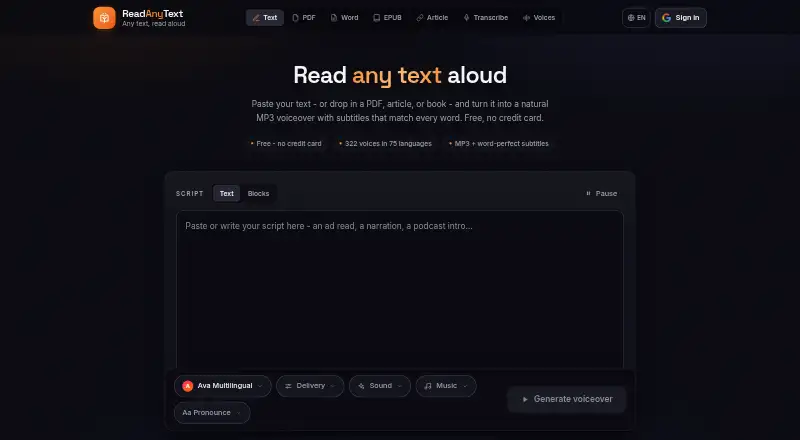
ReadAnyText turns text into downloadable MP3 voiceovers and creates SRT and WebVTT subtitles timed to individual words. Its library lists 322 neural voices across 75 languages. Scripts can identify different speakers and assign each a voice, or include pause markers such as [pause 1s]. The site provides PDF, Word, EPUB, and article import tools. Audio-to-text transcription runs on the user's device using Whisper, and the recording is not uploaded; speech synthesis uses Microsoft's neural speech service, so text chosen for conversion is sent to that service. The site says documents, scripts, audio, and transcripts are not stored on its servers, with published listen links kept until expiry or deletion. PDF, Word, and EPUB files, background music, and recordings are read inside the browser and do not leave the device. ReadAnyText is available on Android and the web. Its Free plan costs nothing, with 7,000 characters per render, 50,000 credits monthly, and listen links lasting three days. Commercial use and API access are unavailable.
Who it suits
It suits people making video voiceovers, narrating documents, or supporting accessibility needs. It is for noncommercial use and does not provide API access.
What it does well
- Lists 322 neural voices in 75 languages.
- Creates MP3 audio and word-timed subtitle files.
- Supports assigning different voices to named speakers.
- Transcription runs on the user's device.
- Free plan includes 50,000 credits per month.
What to know first
- Maximum input is 7,000 characters per render on Free.
- Commercial use is not allowed.
- API access is unavailable.
- Text selected for speech conversion is sent to Microsoft's service.
Plans
| Plan | Billed and limits | Price |
|---|---|---|
| Free | 7,000 characters per render · 50,000 credits/month · listen links stay up 3 days | Free |
| Standard credit pack | 300,000 credits · about 5 hours · valid for 90 days | $12, paid once |
| Pro | Billed $120 a year · 30,000 characters per render · 500,000 credits/month · listen links stay up a year | $120 a year |
| Large credit pack | 750,000 credits · about 13 hours · valid for 180 days | $25, paid once |
| Plus | Billed $48 a year · 20,000 characters per render · 250,000 credits/month · listen links stay up a month | $48 a year |
| Starter credit pack | 100,000 credits · about 1½ hours · valid for 30 days | $5, paid once |
As readanytext.com lists them, read 12 Oct 2026. The maker's own page has the final word.
Verdict
ReadAnyText offers text-to-speech, timed subtitles, speaker labeling, and on-device transcription across Android and web. Its free plan has a 7,000-character render limit, and its noncommercial terms and lack of API access may rule it out for some workflows.
Facts from ReadAnyText's own pages
- API access
- No · readanytext.com, 20 Sept 2026
- Commercial use
- The site says its voices are intended for personal projects and directs commercial users to license them through Azure Speech. · readanytext.com, 12 Oct 2026
- Document support
- The site offers PDF, Word, EPUB, and article import tools. · readanytext.com, 12 Oct 2026
- Export formats
- MP3,SRT,WebVTT · readanytext.com, 20 Sept 2026
- File privacy
- PDF, Word, EPUB, background music, and audio recordings are read inside the browser, and the files themselves do not leave the device. · readanytext.com, 12 Oct 2026
- Free plan
- Yes · readanytext.com, 20 Sept 2026
- Intended uses
- The About page describes use for video making, document narration, and accessibility. · readanytext.com, 12 Oct 2026
- Languages
- 75 · readanytext.com, 20 Sept 2026
- Maximum input
- 7000 · readanytext.com, 20 Sept 2026
- Multiple speakers
- Users can label lines by speaker and assign a different voice to each speaker in one audio file. · readanytext.com, 12 Oct 2026
- Pauses
- Users can insert pause markers such as [pause 1s] into scripts. · readanytext.com, 12 Oct 2026
- Platforms
- web,android · readanytext.com, 20 Sept 2026
- Sign-in
- Generating audio requires sign-in with Google or email, while the privacy policy says the main tools can be used without an account. · readanytext.com, 12 Oct 2026
- Speech provider
- Speech is synthesized by Microsoft's neural speech service, and the text selected for conversion is sent to that service. · readanytext.com, 12 Oct 2026
- Storage
- The site says it does not store scripts, documents, audio, or transcripts on its servers; published listen links are an exception for recordings until expiry or deletion. · readanytext.com, 12 Oct 2026
- Subtitle formats
- Each render produces SRT and WebVTT subtitles timed to individual words. · readanytext.com, 12 Oct 2026
- Support
- The contact page accepts bug reports, voice requests, privacy questions, and other messages, with sign-in required to send a message. · readanytext.com, 12 Oct 2026
- Text to speech
- ReadAnyText converts text into downloadable MP3 voiceovers with word-timed subtitles. · readanytext.com, 12 Oct 2026
- Transcription
- Audio-to-text transcription runs on the user's device using Whisper, and the recording is not uploaded. · readanytext.com, 12 Oct 2026
- Voices and languages
- The voice library lists 322 neural voices across 75 languages. · readanytext.com, 12 Oct 2026
Where ReadAnyText stands on Freedom251
- Text-to-speech tools#88 of 232
- Text-to-Speech Software#109 of 223