Freedom251 › Knowledge Graph Software

RDF Studio
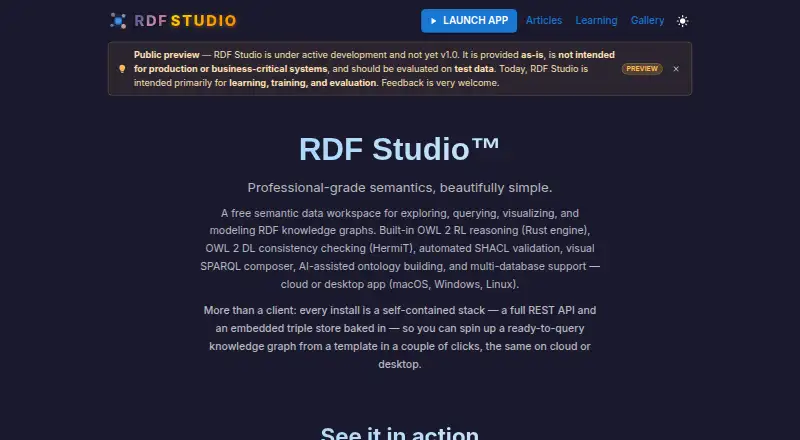
What RDF Studio is
RDF Studio is a semantic data workspace for exploring, querying, visualizing, and modeling RDF knowledge graphs. Its SPARQL editor includes syntax highlighting, autocomplete, PREFIX folding, a query library, and execution history. A visual editor supports creating and editing OWL/RDFS classes, properties, and restrictions. The SHACL editor can browse, edit, and generate shapes, then validate them through a dashboard with maturity scoring. RDF Studio includes an Oxigraph store and connects to GraphDB, Virtuoso, Stardog, Amazon Neptune, Apache Jena Fuseki, and SPARQL 1.1-compatible endpoints. Saved queries can be published as REST API endpoints. AI features can propose ontology changes for review and generate SPARQL from natural-language questions. The desktop app runs on macOS, Windows, and Linux; the maker says it can work offline. A Northwind training environment includes a SPARQL query library, guided CRUD tutorial, OWL 2 ontology, and SHACL shapes. This is a preview release under active development, provided as-is and not intended for production or business-critical systems. The maker advises evaluation on test data; full OWL 2 RL closure at the stated 133-million-triple scale remains slow.
Who it suits
RDF Studio is aimed at ontologists, data engineers, data analysts, knowledge graph engineers, and technical leaders working with RDF knowledge graphs. It is for evaluation rather than production or business-critical use, according to its maker.
What it does well
- Includes a SPARQL editor and visual ontology editor.
- Supports several external triple stores and SPARQL endpoints.
- Desktop app runs on macOS, Windows, and Linux.
- Can work offline, according to its maker.
What to know first
- Preview release is not intended for production systems.
- Maker advises evaluation on test data.
- Full OWL 2 RL closure at the stated scale remains slow.
Limits
The Free plan is listed as free, with no usage limits stated. Full OWL 2 RL closure at the stated 133-million-triple scale remains slow; the maker advises evaluation on test data because the preview release is not intended for production or business-critical systems.
Plans
| Plan | Billed and limits | Price |
|---|---|---|
| Free | Free semantic data workspace; no price or usage limits stated | Free |
As rdf-studio.com lists them, read 2 Oct 2026. The maker's own page has the final word.
Getting started
- Visit the RDF Studio website.
- Choose the web app or desktop app for macOS, Windows, or Linux.
- Use the Northwind training environment to explore the included query library, CRUD tutorial, ontology, and SHACL shapes.
- Connect to the built-in Oxigraph store or a supported external triple store or SPARQL endpoint.
Overview
RDF Studio combines RDF graph querying, ontology editing, and SHACL validation in a single workspace. It suits ontologists, data engineers, analysts, and knowledge graph teams evaluating or developing semantic-data workflows. Its preview release is explicitly not intended for production or business-critical systems.
Key features
The SPARQL 1.1 editor brings together syntax highlighting, autocomplete, PREFIX folding, a query library, and execution history. That combination can help users manage recurring queries, while saved queries can be exposed as REST API endpoints. RDF Studio connects to its built-in Oxigraph store and to GraphDB, Virtuoso, Stardog, Amazon Neptune, Apache Jena Fuseki, and compatible SPARQL 1.1 endpoints, making it useful as a shared working surface across different RDF stores.
For ontology work, the visual editor handles OWL/RDFS classes, properties, and restrictions. The SHACL editor can browse and edit shapes, generate them automatically, and validate them through a dashboard with maturity scoring. These tools bring modeling and validation into the same workflow, though the product’s preview status makes it a poor fit for business-critical reliance.
AI can generate SPARQL from natural-language questions and suggest ontology changes. Those ontology changes are drafts for review, so users still need to judge whether a proposed model is correct. Imports include Turtle, N-Triples, JSON-LD, CSV, Excel, JSON, and Parquet. The Northwind training environment includes a query library, guided CRUD tutorial, OWL 2 ontology, and SHACL shapes, giving learners material to explore. Each user gets an isolated database copy in that environment.
The desktop app runs on macOS, Windows, and Linux and works offline. RDF Studio also has web and API platforms, although the desktop offline capability is especially relevant to users who need to work without an internet connection. The maker says full OWL 2 RL closure at the stated 133-million-triple scale remains slow and is on the roadmap, a material constraint for workloads that depend on reasoning at that scale.
Pricing
The Free plan costs nothing and is described as a free semantic data workspace. No price or usage caps are stated for the plan, so it is a straightforward starting point for evaluation and individual exploration. The preview release is provided as-is, and the maker advises using test data rather than production or business-critical systems. No paid RDF Studio plan is described.
Platforms
RDF Studio supports API, Linux, macOS, web, and Windows. Its desktop app works offline on Linux, macOS, and Windows. Teams choosing it should distinguish that local desktop capability from its cloud deployment model.
Who it's for
Ontologists can use the visual OWL/RDFS editor and SHACL tools; data engineers and knowledge graph engineers can work with SPARQL, stores, and REST endpoints; analysts can use the query editor and natural-language SPARQL generation. The training environment also makes the product relevant to people learning RDF workflows. It is not the right choice for teams needing a production-ready or business-critical system, or for workloads that require fast full OWL 2 RL closure at the cited scale.
Pros and cons
- Pros: Querying, ontology editing, SHACL validation, and graph visualization are brought together, reducing the need to split those tasks across separate tools.
- Pros: Connections to multiple named stores, plus the built-in Oxigraph store, support work across different RDF environments.
- Pros: The free plan and offline desktop app make evaluation possible without a paid subscription or continuous internet connection.
- Cons: The product is a preview release provided as-is and is not intended for production or business-critical systems.
- Cons: Full OWL 2 RL closure at the stated 133-million-triple scale is still slow, limiting its fit for reasoning-heavy workloads at that size.
- Cons: AI-generated ontology changes remain drafts, so expert review is still necessary.
Alternatives
For a wider set of knowledge graph software, compare tools by whether you need a modeling workspace, a graph platform, or a managed database.
- Mendix is worth considering when a broader application-development platform and its free tier of one deployment environment per application better suit the project.
- AllegroGraph may suit teams that want a knowledge graph platform with a free tier capped at 5 million triples.
- GraphDB is an alternative for teams seeking a graph platform whose free plan has a single-core license and requires a valid license from GraphDB 11.0.0.
- Protégé is a free, open-source option for OWL 2 work across its desktop and WebProtégé offerings.
- RDFox may fit teams that want to evaluate a paid product through its 30-day, evaluation-only, non-commercial free license.
- Stardog offers a renewable one-year free license for up to 1 million stored edges and three databases, with community support and no high availability.
- TypeDB offers an Explore plan with 10 GB storage, 8 GB RAM, 2 vCPUs, and a fully managed dedicated database server.
- Apache Jena Fuseki is a free, Apache License 2.0 self-hosted server for users who want to run that component themselves.
Verdict
RDF Studio is a compelling free evaluation workspace for semantic-data practitioners who want SPARQL, ontology modeling, and SHACL tools together, plus offline desktop access. Choose it to explore or develop workflows on test data; look elsewhere when production readiness or fast full OWL 2 RL reasoning at the stated scale is essential.
Verdict
RDF Studio brings query, ontology, and SHACL work into a single semantic data workspace. Its preview status and stated reasoning limitation make the maker’s test-data guidance important.
Questions
How much does RDF Studio cost?
The Free plan is listed as free.
Which platforms does RDF Studio support?
It is listed for API, Linux, macOS, web, and Windows. The maker says its macOS, Windows, and Linux desktop app works offline.
Which RDF formats can it import?
It imports Turtle, N-Triples, JSON-LD, CSV, Excel, JSON, and Parquet.
Which triple stores can it connect to?
It supports its built-in Oxigraph store and connections to GraphDB, Virtuoso, Stardog, Amazon Neptune, Apache Jena Fuseki, and SPARQL 1.1-compatible endpoints.
Is RDF Studio ready for production use?
It is a preview release under active development and is not intended for production or business-critical systems. The maker advises evaluation with test data.
Who created RDF Studio?
The homepage credits M Barbieri as its creator.
Facts from RDF Studio's own pages
- AI features
- AI can propose ontology changes and generate SPARQL from natural-language questions; its proposed ontology changes are drafts for review. · rdf-studio.com, 2 Oct 2026
- API
- Saved SPARQL queries can be exposed as REST API endpoints. · rdf-studio.com, 2 Oct 2026
- Desktop platforms
- The maker says the desktop app runs on macOS, Windows, and Linux and works offline without an internet connection. · rdf-studio.com, 2 Oct 2026
- Intended users
- The maker identifies ontologists, data engineers, data analysts, knowledge graph engineers, and technical leaders as users it serves. · rdf-studio.com, 2 Oct 2026
- Known limit
- The maker says full OWL 2 RL closure at the stated 133-million-triple scale is still slow and on the roadmap. · rdf-studio.com, 2 Oct 2026
- Maker
- The homepage credits the product as created by M Barbieri. · rdf-studio.com, 2 Oct 2026
- Ontology editing
- The visual ontology editor supports creating and editing OWL/RDFS classes, properties, and restrictions. · rdf-studio.com, 2 Oct 2026
- Preview status
- RDF Studio is described as a preview release under active development, provided as-is and not intended for production or business-critical systems; the maker advises evaluation on test data. · rdf-studio.com, 2 Oct 2026
- Purpose
- RDF Studio is a semantic data workspace for exploring, querying, visualizing, and modeling RDF knowledge graphs. · rdf-studio.com, 2 Oct 2026
- Security and compliance
- The maker says each user gets an isolated database copy in the training environment; the page does not state a security certification or compliance standard. · rdf-studio.com, 2 Oct 2026
- SHACL
- The SHACL editor can browse, edit, and auto-generate shapes, and validate them with a validation dashboard and maturity scoring. · rdf-studio.com, 2 Oct 2026
- SPARQL
- Its SPARQL editor supports syntax highlighting, autocomplete, PREFIX folding, a query library, and execution history. · rdf-studio.com, 2 Oct 2026
- Training content
- The Northwind training environment includes a SPARQL query library, a guided CRUD tutorial, an OWL 2 ontology, and SHACL shapes. · rdf-studio.com, 2 Oct 2026
- Triple stores
- The product supports its built-in Oxigraph store and connections to GraphDB, Virtuoso, Stardog, Amazon Neptune, Apache Jena Fuseki, and SPARQL 1.1 compatible endpoints. · rdf-studio.com, 2 Oct 2026
Where RDF Studio stands on Freedom251
- Knowledge Graph Software#14 of 33