Freedom251 › Disaster Recovery Orchestration Software
Quorum onQ
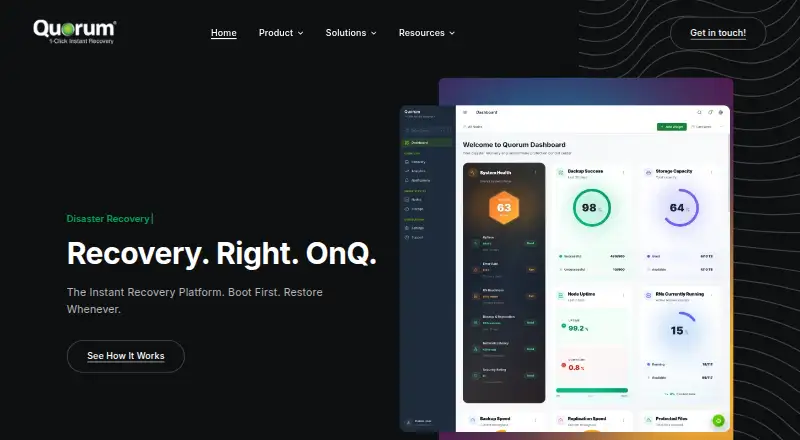
What Quorum onQ is
Quorum onQ is a recovery appliance that maintains ready-to-run virtual machine clones of physical and virtual servers. It is designed to help organizations recover after storage, system, or site failures, with one-click recovery to a selected point in time and the ability to boot protected servers from the appliance within minutes. Backups can run as often as every 15 minutes, with 30 days of retention; Archive Vault supports longer retention. Automated recovery testing starts servers after snapshots, and an included isolated clean room supports testing and ransomware investigation. Supported physical servers include Windows, Red Hat Linux, CentOS Linux, Oracle Enterprise Linux, and Ubuntu Linux; virtual coverage includes VMware and other hypervisors. Quorum also lists protection options for AWS, Azure, Microsoft 365, Google Workspace, Salesforce, and Dropbox. Its stated safeguards include immutable backups, encryption at rest and in transit, multi-factor authentication, and a zero-trust environment. Appliance models cover 5–120 protected machines, with recoverable-machine counts and storage varying by model. Pricing requires contacting Quorum for sizing and a quote.
Who it suits
Quorum onQ may suit organizations seeking recovery appliances for smaller distributed environments, growing centralized deployments, enterprise-scale recovery, or performance-intensive workloads. Model capacity varies by configuration.
What it does well
- Can boot protected servers within minutes.
- Backups can run every 15 minutes.
- Includes automated recovery testing and an isolated clean room.
- Supports several physical server systems and hypervisors.
- Uses immutable backups and encryption.
What to know first
- Pricing requires contacting Quorum for sizing and a quote.
- Machine capacity and storage depend on the model.
- Support excludes initial appliance installation and third-party products.
Limits
The appliance models cover 5–120 protected machines, with 3–90 instantly recoverable machines and storage varying by model. Standard backup retention is 30 days; Archive Vault supports longer retention.
Plans
| Plan | Billed and limits | Price |
|---|---|---|
| Quorum onQ Appliance (onQube, onQore, onQ, onQuick) | Contact Quorum for sizing and pricing; the appliance is configured to the customer’s environment. · Models span 5–120 protected machines · 3–90 instantly recoverable machines · model-dependent storage | On request |
As quorum.com lists them, read 4 Oct 2026. The maker's own page has the final word.
Getting started
- Visit Quorum’s onQ Appliance page.
- Contact Quorum for sizing and pricing based on your environment.
- Work with Quorum’s sales engineering team on a site survey.
- Receive the appliance preconfigured for your environment.
Quorum onQ is a hybrid disaster-recovery appliance that keeps ready-to-run copies of physical and virtual servers for rapid site, system, or storage recovery. It is best suited to organizations that need dependable failover across mixed environments and want recovery exercises built into the platform. The trade-off is a configured appliance and sales-led pricing rather than a self-serve purchase.
Overview
onQ maintains virtual-machine clones on a purpose-built appliance, allowing a protected server to boot from the appliance within minutes. One-click recovery returns a workload to a selected point in time, which is more practical than restoring an entire server manually when an outage is underway. Backups can run as often as every 15 minutes, with 30 days of retention; longer retention is available through Archive Vault.
Recovery testing is part of the design rather than an occasional manual project. Automated tests start servers after snapshots, while an isolated clean room provides a place to validate recovery and investigate ransomware without exposing production systems. Immutable backups, encryption in transit and at rest, multifactor authentication, and a zero-trust environment address common recovery and security concerns. Quorum also describes PCI- and HIPAA-compliant cloud locations and dedicated resources for cloud customers during a disaster.
Key features
Broad workload coverage
The appliance protects physical Windows, Red Hat Linux, CentOS Linux, Oracle Enterprise Linux, and Ubuntu Linux servers, as well as virtual machines running on VMware, Microsoft Hyper-V, Citrix XenServer, Oracle VM, and other hypervisors. VMware Integrated Protection and vMotion are named integrations. Cloud and SaaS protection options include AWS, Azure, Microsoft 365, Google Workspace, Salesforce, and Dropbox, making onQ more suitable for mixed estates than a platform limited to one hypervisor.
Recovery capacity and operations
Models scale from onQube for up to five protected machines and onQore for 20, through onQ for 30–80 and onQuick for 80–120. Across the range, Quorum cites three to 90 instantly recoverable machines, with storage and recoverable-machine counts varying by model. That capacity planning is useful for distributed offices and performance-intensive deployments, but buyers must size the appliance carefully rather than assume every model offers the same recovery headroom.
Appliances arrive preconfigured, and Quorum’s sales engineering team conducts a site survey. This can reduce deployment risk for organizations without spare infrastructure expertise, while making onQ less attractive to teams seeking a download-and-configure product. Off-site replication and a cloud backup target extend protection beyond the appliance itself.
Pricing
Quorum onQ Appliance (onQube, onQore, onQ, onQuick) uses custom pricing. You contact Quorum for sizing and a quote, and the appliance is configured to your environment. The model range covers five to 120 protected machines, three to 90 instantly recoverable machines, and model-dependent storage.
There is no published free tier, trial term, seat allowance, or renewal schedule. The practical cost question is therefore the capacity you require and the retention, replication, and cloud options included in your configuration. Smaller distributed environments may fit onQube or onQore; centralized or enterprise deployments should evaluate onQ and onQuick against their peak recovery requirements.
Platforms
onQ supports Linux and Windows workloads, with web access and a self-hosted appliance deployment. Its hybrid model combines on-site recovery capacity with cloud backup and replication options.
Who it's for
Choose onQ when a business needs rapid recovery for a mixed physical and virtual estate, frequent backup points, and repeatable recovery testing. The model lineup also gives smaller distributed environments a starting point while accommodating growing centralized deployments and demanding workloads. Organizations wanting transparent online pricing, a lightweight software-only install, or a small number of simple endpoint backups should look elsewhere.
Pros and cons
- Pros: Recovery can boot protected servers from the appliance within minutes, reducing downtime during a serious failure.
- Pros: Fifteen-minute backup cadence, 30-day retention, and Archive Vault support both operational recovery and longer retention needs.
- Pros: Automated tests and an isolated clean room make it possible to validate restores and investigate ransomware safely.
- Pros: Support covers emergency phone service 24/7/365, business-day email from 6am–6pm PT, and a one-business-day response target.
- Cons: Pricing is custom and requires a site survey, so budgeting and comparison take longer than with published subscriptions.
- Cons: Support excludes initial appliance installation and third-party product support, leaving those responsibilities outside the support plan.
Alternatives
Cloud Disaster Recovery Software is the broader category to review when you prefer cloud-first disaster recovery rather than a configured appliance. Virtual Machine Backup Software is a better starting point when VM backup, rather than appliance-based failover, is the primary requirement.
Veeam Kasten Disaster Recovery is the stronger fit for Kubernetes-oriented environments that want a free tier for up to five nodes plus an enterprise trial. Veeam Recovery Orchestrator is worth considering for Veeam users who need orchestration and can use its free demonstration or evaluation licenses.
Veeam Agent for Mac is aimed at Mac workstation backup, with a free edition limited to one backup job and no direct object-storage backup. Infrascale Backup and Disaster Recovery offers a paid, web-based alternative billed in 1 TB storage increments. Acronis Cyber Disaster Recovery Cloud fits organizations wanting pay-as-you-go DR cloud storage and compute. Dell APEX AIOps Incident Management is an incident-management subscription priced by customer quote. JetStream DR is another paid option with on-demand monthly subscription pricing and VM-level recovery SLAs.
Verdict
Quorum onQ is a strong choice for organizations that need fast, testable recovery across physical servers, virtual machines, and cloud services, with appliance capacity matched to their environment. Its main reason to choose it is the combination of near-immediate failover, immutable retention, and automated recovery testing. Look elsewhere if you require published pricing, a free trial, or a software-only deployment without sales-led sizing and appliance ownership.
Verdict
Quorum onQ combines server recovery, backup retention, and recovery testing on a purpose-built appliance. Organizations need to contact Quorum to size a model and obtain pricing.
Questions
How much does Quorum onQ cost?
Pricing is on request. Quorum asks customers to contact it for sizing and pricing based on their environment.
Which systems does Quorum onQ support?
Listed physical server environments include Windows, Red Hat Linux, CentOS Linux, Oracle Enterprise Linux, and Ubuntu Linux. Hypervisor coverage includes VMware, Microsoft Hyper-V, Citrix XenServer, Oracle VM, and other hypervisors.
How often can backups run, and how long are they retained?
Backups can run as frequently as every 15 minutes, with 30 days of retention. Archive Vault supports longer retention.
How many machines can an onQ appliance protect?
Models range from onQube for up to 5 protected machines to onQuick for 80–120. The listed appliance range is 5–120 protected machines and 3–90 instantly recoverable machines, depending on model.
Which cloud and SaaS services are named?
Quorum lists protection options for AWS, Azure, Microsoft 365, Google Workspace, Salesforce, and Dropbox.
What support does Quorum provide?
Quorum offers 24/7/365 emergency phone support, business-day email coverage from 6am–6pm PT, and a one-business-day response target for portal, voicemail, and email. Support plans exclude initial appliance installation and third-party product support.
Facts from Quorum onQ's own pages
- Backup cadence
- Backups can run as frequently as every 15 minutes, with 30 days of retention or longer retention through Archive Vault. · quorum.com, 4 Oct 2026
- Cloud compliance
- Quorum says its cloud locations are PCI and HIPAA compliant and that cloud customers receive dedicated resources during a disaster. · quorum.com, 4 Oct 2026
- Deployment
- The appliance arrives preconfigured, and Quorum says its sales engineering team conducts a site survey to assess the customer’s environment. · quorum.com, 4 Oct 2026
- Headquarters
- Santa Clara, California, United States · quorum.com, 28 Sept 2026
- Integrations
- The product page names VMware Integrated Protection and vMotion, and lists cloud and SaaS protection options including AWS, Azure, Microsoft 365, Google Workspace, Salesforce, and Dropbox. · quorum.com, 4 Oct 2026
- Intended customers
- Quorum describes appliance models for smaller distributed environments, growing centralized deployments, enterprise-scale recovery, and performance-intensive workloads. · quorum.com, 4 Oct 2026
- Purpose
- Quorum onQ maintains ready-to-run virtual machine clones of physical and virtual servers on a purpose-built appliance for recovery after storage, system, or site failure. · quorum.com, 4 Oct 2026
- Recovery
- The product offers one-click recovery to a selected point in time and can boot protected servers from the appliance within minutes. · quorum.com, 4 Oct 2026
- Security
- Quorum states that its solutions use immutable backups, encryption at rest and in transit, multi-factor authentication, and a zero-trust environment. · quorum.com, 4 Oct 2026
- Sizing limits
- The product page lists onQube for up to 5 protected machines, onQore for 20, onQ for 30–80, and onQuick for 80–120, with model-dependent recoverable-machine counts and storage. · quorum.com, 4 Oct 2026
- Support
- Quorum offers 24/7/365 emergency phone support, business-day email coverage from 6am–6pm PT, and a one-business-day response target for portal, voicemail, and email. · quorum.com, 4 Oct 2026
- Supported environments
- Quorum lists Windows, Red Hat Linux, CentOS Linux, Oracle Enterprise Linux, and Ubuntu Linux physical servers, plus VMware and other hypervisors for virtual servers. · quorum.com, 4 Oct 2026
- Support scope
- Quorum’s support page says support plans exclude initial appliance installation and third-party product support. · quorum.com, 4 Oct 2026
- Testing and sandbox
- Automated recovery testing starts servers after snapshots, and the included isolated clean room supports testing and ransomware investigation. · quorum.com, 4 Oct 2026
Where Quorum onQ stands on Freedom251
- Disaster Recovery Orchestration Software#9 of 17
- Cloud Disaster Recovery Software#17 of 27
- Virtual Machine Backup Software#20 of 26