Freedom251 › GUI Testing Software
pywinauto
What pywinauto is
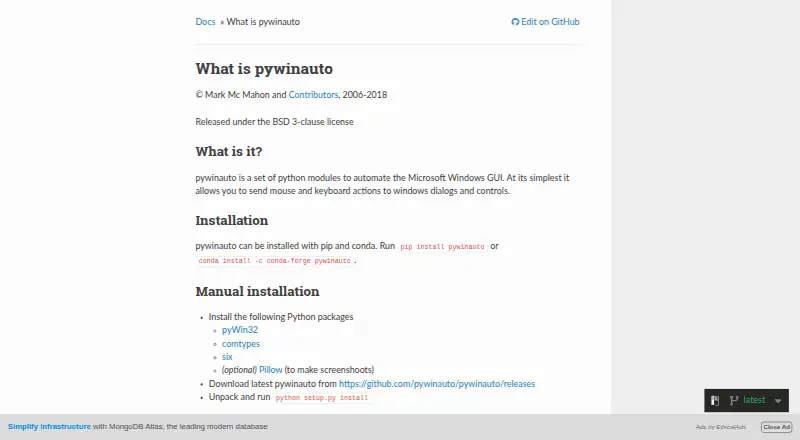
pywinauto is a free Python library for automating graphical applications on Microsoft Windows. It can send mouse and keyboard actions to dialogs and controls, retrieve text from applications, and either start an application or connect to one already running. Its Desktop object can navigate across process boundaries, allowing automation to reach controls in more than one process.
The library has two backends: Win32 API and Microsoft UI Automation. The documented Win32 application types include MFC, VB6, VCL, simple WinForms, and legacy apps. UI Automation covers WinForms, WPF, Store apps, Qt5, and browsers. Installation is documented with pip or conda; manual Windows installation lists pyWin32 and comtypes, with Pillow optional for screenshots. pywinauto is distributed under the BSD 3-clause license.
The project is focused on Windows. Its documentation describes mouse and keyboard input emulation modules as working on Linux, while Linux accessibility support and Apple Accessibility API support are long-term plans. UI Automation also has a restriction: custom properties and controls are unsupported because of comtypes Python library limitations. The project directs users to Stack Overflow and a mailing list for questions, and welcomes feature requests and discussion through GitHub issues.
Who it suits
pywinauto suits Python developers automating Windows applications through their graphical interfaces, especially when they need to interact with controls or retrieve on-screen text. Its documented backends cover a range of Windows application types, including browsers, Qt5, WPF, and legacy applications.
What it does well
- Automates Windows GUI controls with mouse and keyboard actions.
- Can retrieve text from applications.
- Supports Win32 API and Microsoft UI Automation backends.
- Can start applications or connect to running ones.
- Desktop navigation can cross process boundaries.
- Free and distributed under the BSD 3-clause license.
What to know first
- Linux accessibility support is a long-term plan.
- Apple Accessibility API support is a long-term plan.
- UI Automation does not support custom properties and controls.
Limits
UI Automation does not support custom properties and controls because of comtypes Python library restrictions. Linux accessibility support and Apple Accessibility API support are described as long-term plans.
Plans
| Plan | Billed and limits | Price |
|---|---|---|
| pywinauto | BSD 3-clause licensed Python library · Windows GUI automation | Free |
As pywinauto.readthedocs.io lists them, read 7 Oct 2026. The maker's own page has the final word.
Getting started
- Install pywinauto with pip or conda.
- For manual Windows installation, install pyWin32 and comtypes.
- Add Pillow if you need screenshot support.
- Choose the Win32 API or Microsoft UI Automation backend for the application types you are automating.
- Use the project’s Stack Overflow or mailing list channels for questions, or GitHub issues for feature requests and discussions.
Verdict
Pick pywinauto for Python-based GUI automation on Windows, with a choice of Win32 and UI Automation backends. Look elsewhere if you need supported accessibility automation on Linux or macOS, or UI Automation for custom properties and controls.
Questions
How much does pywinauto cost?
The pywinauto plan costs nothing. It is a BSD 3-clause licensed Python library.
Which platforms does pywinauto support?
It is for Windows GUI automation. The documentation also describes mouse and keyboard input emulation modules as working on Linux, while Linux accessibility and Apple Accessibility API support are long-term plans.
Which application types are covered?
Win32 documentation lists MFC, VB6, VCL, simple WinForms, and legacy apps. UI Automation lists WinForms, WPF, Store apps, Qt5, and browsers.
What are pywinauto’s installation options?
Installation is documented with pip or conda. Manual Windows installation lists pyWin32 and comtypes; Pillow is optional for screenshots.
What limitation applies to UI Automation?
Custom properties and controls are unsupported because of restrictions in the comtypes Python library.
Where can users ask questions or discuss changes?
The project points users to Stack Overflow and a mailing list for questions. It welcomes feature requests and discussions through GitHub issues.
Facts from pywinauto's own pages
- Actions and data
- The library can send mouse and keyboard actions to controls and can retrieve text data from applications. · github.com, 7 Oct 2026
- Backends
- It supports the Win32 API backend and Microsoft UI Automation backend. · pywinauto.readthedocs.io, 7 Oct 2026
- Cross-process access
- A Desktop object can be used to navigate across process boundaries. · pywinauto.readthedocs.io, 7 Oct 2026
- Dependencies
- Manual Windows installation lists pyWin32 and comtypes; Pillow is optional for screenshots. · github.com, 7 Oct 2026
- Founded
- 2006 · pywinauto.readthedocs.io, 28 Sept 2026
- Installation
- The project documents installation with pip or conda. · pywinauto.readthedocs.io, 7 Oct 2026
- License
- The repository states that pywinauto is distributed under the BSD 3-clause license. · github.com, 7 Oct 2026
- Linux limits
- The docs say Linux accessibility support is in the long-term plans; mouse and keyboard input emulation modules are described as working on Linux. · pywinauto.readthedocs.io, 7 Oct 2026
- macOS limits
- The docs say Apple Accessibility API support is in the long-term plans. · pywinauto.readthedocs.io, 7 Oct 2026
- Process control
- An Application object can start an application or connect to one that is already running. · pywinauto.readthedocs.io, 7 Oct 2026
- Project history
- The repository says native Windows pywinauto was initially written by Mark Mc Mahon and continued by contributors. · github.com, 7 Oct 2026
- Purpose
- pywinauto is a set of Python modules for automating the Microsoft Windows GUI, including mouse and keyboard actions on dialogs and controls. · pywinauto.readthedocs.io, 7 Oct 2026
- Support
- The repository points users to Stack Overflow and a mailing list for questions, and welcomes feature requests and discussions through GitHub issues. · github.com, 7 Oct 2026
- Supported app types
- The docs list MFC, VB6, VCL, simple WinForms and legacy apps for Win32, and WinForms, WPF, Store apps, Qt5 and browsers for UI Automation. · pywinauto.readthedocs.io, 7 Oct 2026
- UI Automation limitation
- The docs state that custom properties and controls are unsupported because of comtypes Python library restrictions. · pywinauto.readthedocs.io, 7 Oct 2026
Where pywinauto stands on Freedom251
- GUI Testing Software#21 of 34