Freedom251 › AI software testing tools
testRigor
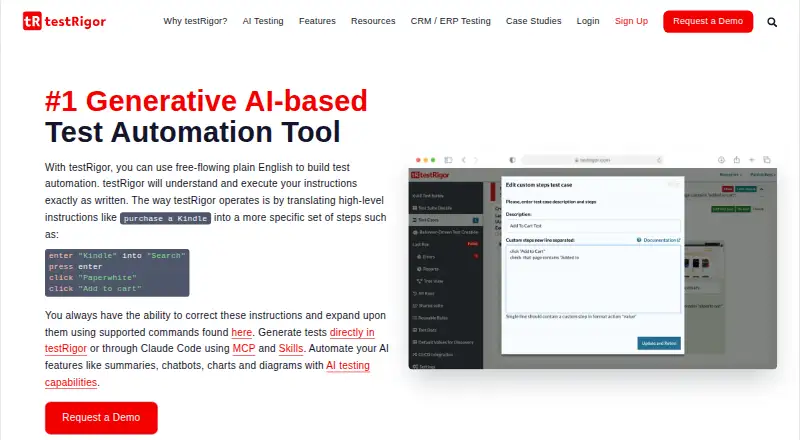
What testRigor is
testRigor uses generative AI to create and run software tests written in plain English. It can generate tests from documented cases, and users can revise or build tests with natural-language instructions. Web testing covers more than 3,000 browser and device combinations across multiple operating systems. It also supports native and hybrid mobile testing, physical devices through partners, and native desktop testing. Other listed capabilities include API testing and mocking, email and two-factor authentication checks, SMS and phone-call validation, data-driven tests, and downloaded-file validation. Integrations include Jira, TestRail, Zephyr, XRay, GitLab, GitHub Actions, Jenkins, CircleCI, Azure DevOps, BrowserStack, LambdaTest, and Twilio. The free public plan allows unlimited test cases, but makes tests and results public and shareable by unique URL. Private Linux Chrome is $300 a month and includes a 14-day trial; another Private Complete plan also lists a 14-day trial, but no price is provided. The homepage says testRigor does not test games. Its Trust Center lists compliance resources, with reports requiring an MNDA for access.
Who it suits
It is aimed at developers and QA teams, including fast-moving startups checking essential application functions. It may suit teams needing natural-language test authoring across web, mobile, desktop, or API coverage.
What it does well
- Generates tests from documented test cases
- Covers more than 3,000 browser and device combinations
- Supports API, mobile, desktop, and web testing
- Lists integrations with CI and test management tools
What to know first
- Free public plan makes tests and results public
- Private Linux Chrome costs $300 a month
- Does not test games
- Trust Center reports require an MNDA
Limits
The free public plan makes tests and results public and shareable by unique URL. Private Linux Chrome is limited to Linux Chrome. testRigor's homepage says it does not test games.
Plans
| Plan | Billed and limits | Price |
|---|---|---|
| Public Open Source | Tests and test results are public · Results can be shared using a unique public URL | On request |
| Free - Public | free forever · tests and results public · publicly searchable | Free |
| Private Linux Chrome | from $300 / month · Linux Chrome execution · AI generation and execution · 14-day trial | $300 a month |
| Enterprise | custom pricing · personalized enterprise offer | On request |
| Private Complete | 14-day trial · Ubuntu · Windows · Mac · Android · iOS · Windows Native · all AI capabilities | On request |
As testrigor.com lists them, read 21 Sept 2026. The maker's own page has the final word.
Getting started
- Open https://testrigor.com/.
- Choose the free public plan or review the private plans.
- For a 14-day trial, use the listed trial for Private Linux Chrome or Private Complete.
- Generate tests from documented test cases, or write and revise them in plain English.
- Connect relevant listed services such as Jira, Jenkins, or Twilio.
testRigor is an AI software-testing tool for developers and QA teams who want to write tests in plain English across several application types. Its broad coverage is a strong fit for teams validating web and mobile workflows, but private testing requires a paid plan.
Overview
Generative AI creates and runs tests from free-flowing English. Teams can also start with documented test cases and correct or extend tests using plain-English instructions, making it a practical option for fast-moving teams that need to verify essential application functions without making every test code-centric. It does not test games.
Key features
- Broad web coverage: testRigor supports more than 3,000 browser and device combinations across multiple operating systems. That breadth helps teams target varied web environments, while cross-browser testing is a clear strength.
- Mobile and desktop testing: Native and hybrid mobile tests, physical devices through partners, and native desktop testing make it relevant beyond browser-only products.
- Workflow and data checks: API testing and mocking, email and 2FA tests, SMS and phone-call validation, data-driven tests, and downloaded-file validation cover workflows that go beyond interface interactions.
- Integrations: Jira, TestRail, Zephyr, XRay, GitLab, GitHub Actions, Jenkins, CircleCI, Azure DevOps, BrowserStack, LambdaTest, and Twilio connect testRigor with issue tracking, development, and testing services.
- Security and privacy: Its Trust Center provides GDPR, HIPAA, ISO/IEC 27001, and SOC 2 Type 2 compliance resources; reports require signing an MNDA. The homepage says testRigor does not record or store users’ or companies’ private data.
Pricing
testRigor uses a freemium model, with a free plan and a 14-day trial. Plan choice matters most for teams deciding whether tests can be public and which operating systems they need.
- FREE - PUBLIC: free, billed Free forever. It includes unlimited test cases, but tests and results are public and shareable by unique URL. That is a meaningful privacy tradeoff, so it suits open-source or otherwise non-sensitive work rather than confidential application testing. Support is StackOverflow only.
- Private Linux Chrome: $300 a month, billed From $300 / month. This plan keeps tests private and includes AI-based generation and execution, but is limited to Linux Chrome. A 14-day trial is included. It is the clearest paid starting point for teams whose needs fit that environment.
- Private Complete: custom pricing. The plan offers a 14 day trial and covers Ubuntu, Windows, Mac, Android, iOS, and Windows Native, with all AI capabilities. Standard support makes it a broader private option for teams needing multiple environments.
- Enterprise: custom pricing with personalized enterprise offers. Enterprise support is based on Slack or MS Teams.
Public Open Source is also a public plan: tests and results can be shared using a unique public URL. For teams handling private work, the paid private plans are the relevant choices.
Platforms
testRigor supports Android, iOS, Linux, macOS, and Windows, as well as web, API, and extension use. Self-hosted support is also listed. The combination is useful for teams responsible for cross-platform applications, though the Private Linux Chrome plan narrows that reach substantially.
Who it's for
Developers and QA teams at fast-moving startups are a natural audience, particularly when they want to author tests in plain English and cover web, mobile, desktop, and API workflows. Teams with sensitive tests should budget for a private plan, while game-testing teams should choose another tool.
Pros and cons
- Pro: Plain-English authoring and AI generation can reduce reliance on code-centric test creation.
- Pro: More than 3,000 browser and device combinations, plus mobile, desktop, API, and communications checks, support broad application coverage.
- Pro: A free-forever plan with unlimited test cases offers a way to start without a subscription.
- Con: Free-plan tests and results are public, making that tier a poor fit for confidential work.
- Con: The $300 monthly private entry plan is limited to Linux Chrome; broader private coverage requires custom-priced Private Complete.
- Con: It does not test games.
Alternatives
Consider these alternatives if their pricing or platform scope better matches your testing needs:
- Autify has a free plan and supports Android, iOS, macOS, web, and API platforms; its Aximo Individual User plan provides 2,000 one-time, non-expiring credits with one web and one mobile concurrency.
- SmartestQA offers a free Solo plan for one user with one Local Agent and one parallel execution, making it an option for an individual starting with a constrained no-code setup.
- Momentic is a paid product with a free starting plan that requires no credit card; its platform list includes Android, iOS, web, and API.
- TestFirst offers a free plan with 100 one-time credits per workspace, one test at a time, and caps of 100 default test cases and 300 default test results.
- Autonoma offers a self-hosted plan described as free forever, with no limits or usage costs, for teams that want to run it on their own infrastructure.
- Functionize offers a free plan with 800,000 credits per month and five parallel runs, making its published free allowance worth comparing for teams that prioritize those limits.
- KushoAI offers a free Developer Edition for up to 50 API endpoints, with API contract testing, UI testing, and community support.
- Zequto is an alternative for teams prepared for a higher-priced team plan: its Team plan is $1,495 a month, billed ($299 / user / mo for 5 users).
Browse AI Software Testing Tools, GUI Testing Software, Functional Testing Software, and Browser Automation Tools for more options.
Verdict
testRigor is a strong choice for developers and QA teams that want plain-English test authoring alongside broad web, mobile, desktop, and API coverage. Its central tradeoff is clear: the free plan exposes tests and results publicly, while private cross-platform testing moves to custom pricing. Choose it when that workflow and coverage justify a paid private plan; look elsewhere if public tests are unacceptable and the private-plan scope or price does not fit.
Verdict
testRigor combines plain-English test authoring with broad web, mobile, desktop, and API coverage. Teams should weigh public visibility on the free plan and verify which private plan and trial terms fit their requirements.
Questions
Is there a free plan?
Yes. FREE - PUBLIC costs nothing, is billed free forever, and allows unlimited test cases. Tests and results are public and shareable through a unique URL.
What does the private Linux Chrome plan cost?
It starts at $300 a month and includes a 14-day trial. The plan is for private tests on Linux Chrome.
Is a 14-day trial available?
Yes. A 14-day trial is listed; Private Linux Chrome includes one, and Private Complete is listed with a 14-day trial.
Which platforms does testRigor support?
The listed platforms are Android, API, extension, iOS, Linux, macOS, self-hosted, web, and Windows.
Which integrations are listed?
Integrations include Jira, TestRail, Zephyr, XRay, GitLab, GitHub Actions, Jenkins, CircleCI, Azure DevOps, BrowserStack, LambdaTest, and Twilio.
Does testRigor test games?
No. testRigor's homepage FAQ says it does not test games.
Facts from testRigor's own pages
- API mocking
- The language supports mocked API responses with custom headers, bodies and HTTP codes. · testrigor.com, 15 Oct 2026
- API testing
- Tests can call HTTP APIs, inspect status codes, extract JsonPath values and save results for later steps. · testrigor.com, 15 Oct 2026
- Chrome extension
- The testRigor Test Case Recorder Chrome extension has 5,000 users, version 1.18 and a May 21, 2024 update date. · chromewebstore.google.com, 15 Oct 2026
- CLI and CI
- A command-line tool can trigger suites, pass CI tokens and variables, push test files and tunnel to localhost. · testrigor.com, 15 Oct 2026
- Company legal name
- Crunchbase identifies the maker as TestRigor, Inc. · crunchbase.com, 15 Oct 2026
- Company location and size
- LinkedIn lists San Francisco headquarters and 51–200 employees. · linkedin.com, 15 Oct 2026
- Desktop testing
- Native Windows desktop testing is available in paid versions. · testrigor.com, 15 Oct 2026
- Documentation depth
- The documentation site includes language commands, advanced JavaScript, CLI, MCP, Claude Code, release notes and how-to articles. · testrigor.com, 15 Oct 2026
- Email testing
- Email steps can send messages, attach files and verify deliverability. · testrigor.com, 15 Oct 2026
- Founded
- LinkedIn lists the company as founded in 2015. · linkedin.com, 15 Oct 2026
- Free plan limitation
- The free public plan makes tests and results public and shareable by unique public URL. · testrigor.com, 2 Oct 2026
- Funding news
- TechCrunch reported a $4.1 million seed round on August 24, 2021, after earlier angel and pre-seed financing. · techcrunch.com, 15 Oct 2026
- Headquarters
- San Francisco, California, United States · testrigor.com, 23 Sept 2026
- Integrations
- Documented integrations include TestRail, Zephyr, Xray, Jira, Pivotal Tracker, Jenkins, CircleCI, Azure DevOps, LambdaTest, BrowserStack, Sauce Labs, Slack, Microsoft Teams and PagerDuty. · testrigor.com, 15 Oct 2026
- Intended users
- The About page describes testRigor as built for developers and QA teams, including fast-moving startups that need to verify essential application functions. · testrigor.com, 2 Oct 2026
- Known limitation
- The homepage FAQ says testRigor does not test games. · testrigor.com, 2 Oct 2026
- Licence
- The hosted product is proprietary under a personal, nonexclusive, nonassignable software-use licence; auxiliary GitHub projects use open-source licences such as MIT. · testrigor.com, 15 Oct 2026
- Limit: code ownership
- A G2 reviewer says the proprietary codeless model limits access to underlying test code and developer-oriented collaboration. · g2.com, 15 Oct 2026
- Limit: performance and price
- Reviewers report slow UI or execution and say server pricing becomes difficult to justify for large suites. · g2.com, 15 Oct 2026
- Limit: reliability and debugging
- G2 reviewers report occasional flaky or false-positive failures, timing issues and error messages that make root-cause diagnosis difficult. · g2.com, 15 Oct 2026
- Limit: small-budget suitability
- Gartner comparison feedback says the product may not suit companies with small budgets and mentions occasional instability. · gartner.com, 15 Oct 2026
- Mainframe testing
- The product advertises plain-English automation for mainframe applications. · testrigor.com, 15 Oct 2026
- MCP and SDK extensibility
- The MCP server exposes management of suites, runs, variables, datasets and reusable rules for AI assistants. · testrigor.com, 15 Oct 2026
- Mobile and desktop
- It supports native and hybrid mobile testing, physical devices through partners, and native desktop testing. · testrigor.com, 2 Oct 2026
Where testRigor stands on Freedom251
- AI software testing tools#4 of 34
- Functional Testing Software#16 of 38
- AI Software Testing Tools#16 of 34
- Ai Code Testing#12 of 25
- Browser Automation Tools#34 of 63
- GUI Testing Software#19 of 34