Freedom251 › Keyboard and Mouse Customization Software
Ptions+
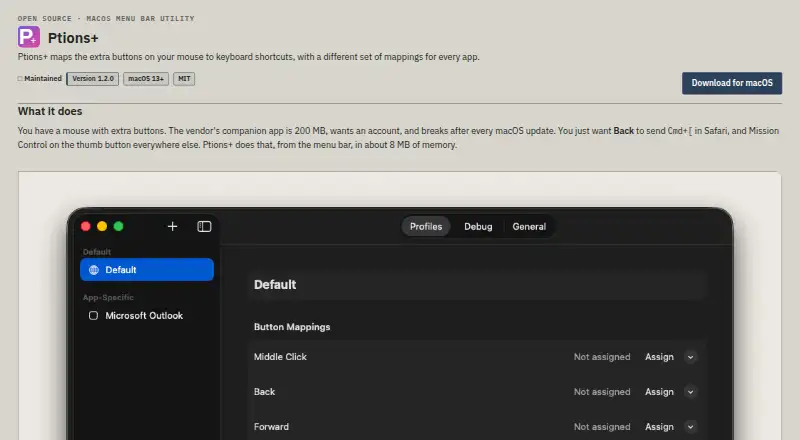
What Ptions+ is
Ptions+ is a free, open-source macOS utility that assigns extra mouse buttons to keyboard shortcuts. Separate profiles let apps such as Safari and Xcode use different mappings, while other apps can use defaults. It includes Mission Control, App Exposé, Show Desktop, and Launchpad actions, plus 18 preset actions such as switching Spaces, Spotlight, Screenshot Tool, Notification Center, and Lock Screen. Its shortcut recorder can capture combinations that macOS normally reserves, including Control plus Arrow. Ptions+ requires macOS 13 Ventura or later and supports Apple silicon and Intel Macs. Accessibility permission is required for mouse and keyboard events; Input Monitoring is optional when distinguishing multiple mice. Without that monitoring permission, connected mice share mappings. The maker lists Logitech MX and G models and generic three- or five-button mice, while other devices may work if they send the required HID event. Ptions+ cannot work alongside vendor software that captures the same buttons first. The maker says it makes no network requests and keeps configuration in a local JSON file.
Who it suits
Ptions+ suits Mac users who want app-specific shortcuts from extra mouse buttons. It is relevant to owners of supported or compatible mice on macOS 13 or later.
What it does well
- Free MIT-licensed app
- Per-app button profiles
- 18 preset actions
- Supports Apple silicon and Intel
- No network requests
What to know first
- Requires macOS 13 Ventura or later
- Accessibility permission required
- Vendor button-capture software conflicts
- Input Monitoring needed for separate mice
Plans
| Plan | Billed and limits | Price |
|---|---|---|
| Free | MIT-licensed app; macOS 13 Ventura or later; Accessibility permission required | Free |
As trsdn.github.io lists them, read 12 Oct 2026. The maker's own page has the final word.
Verdict
Ptions+ offers detailed mouse-button mappings, app profiles, and system actions without a listed cost. Compatibility depends on macOS permissions, mouse behavior, and avoiding software that captures the same buttons first.
Facts from Ptions+'s own pages
- Accessibility
- Settings are keyboard-operable and controls expose names to VoiceOver; recording a custom shortcut requires a physical key press. · github.com, 12 Oct 2026
- Actions
- It includes system actions such as Mission Control, App Exposé, Show Desktop, and Launchpad, plus 18 preset actions. · trsdn.github.io, 12 Oct 2026
- App profiles
- Per-app profiles let apps such as Safari and Xcode use different button mappings, with defaults for other apps. · trsdn.github.io, 12 Oct 2026
- Compatibility
- Ptions+ requires macOS 13 Ventura or later and supports Apple silicon and Intel Macs. · trsdn.github.io, 12 Oct 2026
- Download security
- The maker says release downloads are signed with a Developer ID certificate, notarised by Apple, and include a SHA-256 file for verification. · trsdn.github.io, 12 Oct 2026
- Free plan
- Yes · trsdn.github.io, 22 Sept 2026
- Mouse support
- The maker lists Logitech MX and G models and generic three- or five-button mice; other mice may work if they send HID otherMouseDown events. · trsdn.github.io, 12 Oct 2026
- Multiple mice
- Each connected mouse can have its own model and mappings; without Input Monitoring, mice use shared mappings. · trsdn.github.io, 12 Oct 2026
- Notable limitation
- Ptions+ cannot work alongside vendor mouse software that captures the same buttons before the app can see them. · trsdn.github.io, 12 Oct 2026
- Per-app profiles
- Yes · trsdn.github.io, 22 Sept 2026
- Permissions
- Accessibility permission is required for mouse and keyboard events, while Input Monitoring is optional and used to distinguish multiple mice. · trsdn.github.io, 12 Oct 2026
- Platform requirements
- Ptions+ requires macOS 13 Ventura or later and supports Apple silicon or Intel Macs. · trsdn.github.io, 12 Oct 2026
- Preset actions
- It includes 18 preset actions, including switching Spaces, Spotlight, Screenshot Tool, Notification Center, and Lock Screen. · trsdn.github.io, 12 Oct 2026
- Privacy
- The maker says the app makes no network requests and has no telemetry, analytics, crash reporting, update check, or account; configuration stays in a JSON file on the Mac. · trsdn.github.io, 12 Oct 2026
- Project license
- The maker describes Ptions+ as open source and lists the MIT license. · trsdn.github.io, 12 Oct 2026
- Purpose
- Ptions+ maps extra mouse buttons to keyboard shortcuts, with different mappings for each app. · trsdn.github.io, 12 Oct 2026
- Release security
- The maker says release downloads are signed with a Developer ID certificate, notarised by Apple, and accompanied by a SHA-256 file. · trsdn.github.io, 12 Oct 2026
- Shortcut recorder
- The shortcut recorder captures combinations that macOS normally reserves, including Control plus Arrow. · trsdn.github.io, 12 Oct 2026
- Support
- The project says issues and pull requests are read and links to its support guidance and issue tracker. · github.com, 12 Oct 2026
- Supported operating systems
- macos · trsdn.github.io, 22 Sept 2026
- System actions
- It supports Mission Control, App Exposé, Show Desktop, and Launchpad, with a fallback when macOS does not offer an action. · trsdn.github.io, 12 Oct 2026
- Vendor software limitation
- Ptions+ cannot work alongside vendor mouse software that captures the same buttons first. · trsdn.github.io, 12 Oct 2026
- What it does
- Ptions+ maps extra mouse buttons to keyboard shortcuts, with separate mappings for each app. · trsdn.github.io, 12 Oct 2026