Freedom251 › Game Playtesting Platforms
Pretty Good Playtesting
What Pretty Good Playtesting is
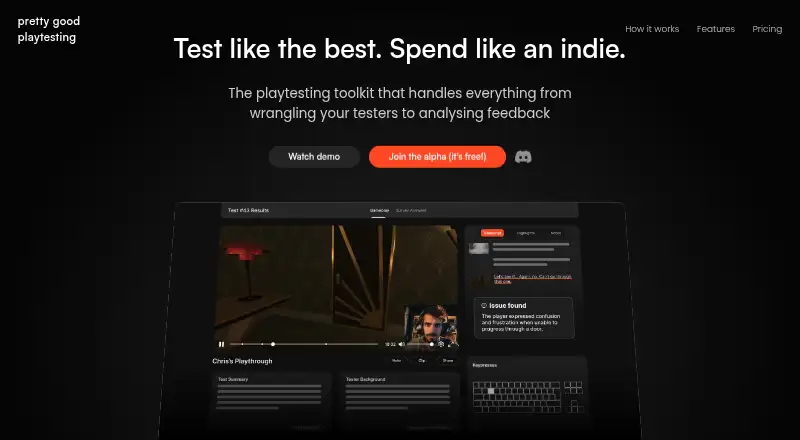
Pretty Good Playtesting is a Windows toolkit for indie game creators to coordinate testers and analyze player feedback. Creators can share an invite link, filter for a target audience, upload a game build, and prepare instructions and a survey. The survey presents one question at a time. The product keeps tester management in one place and sends automatic reminder emails. After play sessions, it analyzes recordings to produce reports on trends and highlights moments when players are confused or get stuck. Gameplay recording uses a custom-tuned OBS build, with a stated minimum specification of a 2015 laptop with integrated graphics. The toolkit is described as working with any game engine, and it can be used alongside any analytics solution. Privacy options include an included or bring-your-own NDA, anonymised tester data, and encrypted builds. Pretty Good Playtesting has a free tier, plus Hobbyists at $15 a month and Studios at $30 a month. Both paid plans allow unlimited testers and place limits on build and video storage. A 20% yearly discount is stated for paid plans, though the discounted prices are not provided in the plan facts. An optional API for timestamping game events on video is on the roadmap. Automatic tester rewards are also described as a future feature; suggested reward types include Steam keys or discounts, Discord roles, and credits.
Who it suits
Pretty Good Playtesting suits indie game creators who need to recruit testers, organize play sessions, and review feedback recordings. Its stated support for any game engine makes it relevant to teams using different engines, provided their recording setup meets the listed minimum specification.
What it does well
- Invite links and audience filters support tester recruitment.
- Automatic reports identify trends across recordings.
- The toolkit highlights moments when players are confused or stuck.
- Surveys present one question at a time.
- Any game engine will work.
- Builds are encrypted and tester data is anonymised.
What to know first
- The product is listed for Windows only.
- Paid plans have build and video storage limits.
- The event timestamping API is on the roadmap.
Limits
The Hobbyists plan, the least expensive paid plan, has build and video storage limits, while allowing unlimited testers. A 20% yearly discount is stated, but no discounted price is provided in the plan facts.
Plans
| Plan | Billed and limits | Price |
|---|---|---|
| Free tier | Described as a generous free tier; specific limits not stated | Free |
| Hobbyists | 20% yearly discount stated; discounted price not stated · Build and video storage limits; unlimited testers | $15 a month |
| Studios | 20% yearly discount stated; discounted price not stated · Build and video storage limits; unlimited testers | $30 a month |
As pgpt.dev lists them, read 7 Oct 2026. The maker's own page has the final word.
Getting started
- Visit the Pretty Good Playtesting website.
- Choose the free tier, Hobbyists, or Studios plan.
- Share an invite link and filter for your target audience.
- Upload a game build and prepare instructions and a survey.
- Use the Windows recording setup that meets the stated minimum specification.
Verdict
Choose Pretty Good Playtesting if you want a Windows toolkit that combines tester coordination with recording analysis and automatic reports. The main plan constraint to weigh is the build and video storage limits on both paid tiers.
Questions
Is Pretty Good Playtesting free?
Yes. It offers a free tier, listed as free.
How much do the paid plans cost?
Hobbyists costs $15 a month and Studios costs $30 a month. Both list a 20% yearly discount, with no discounted prices stated.
Which platform does it support?
The listed platform is Windows.
Does it work with every game engine?
The product says any game engine will work.
Are testers limited on the paid plans?
Hobbyists and Studios both allow unlimited testers, though each plan has build and video storage limits.
Does it offer an API for game events?
An optional API for timestamping game events on video is described as being on the roadmap.
Facts from Pretty Good Playtesting's own pages
- Confusion detection
- It automatically highlights moments when players are confused or get stuck. · pgpt.dev, 7 Oct 2026
- Engine support
- The site says any game engine will work. · pgpt.dev, 7 Oct 2026
- Feedback reports
- The product finds trends across recordings with automatic reports. · pgpt.dev, 7 Oct 2026
- Integrations
- The site says an optional API for timestamping game events on video is on the roadmap and that the product is otherwise compatible with any analytics solution. · pgpt.dev, 7 Oct 2026
- Playtest setup
- Creators upload a build and create playtest instructions and a survey. · pgpt.dev, 7 Oct 2026
- Privacy and security
- The site lists an included or bring-your-own NDA, anonymised tester data, and encrypted builds. · pgpt.dev, 7 Oct 2026
- Purpose
- Pretty Good Playtesting is a playtesting toolkit for indie games that handles tester coordination and feedback analysis. · pgpt.dev, 7 Oct 2026
- Recording
- Gameplay recording uses a custom tuned OBS build; the stated minimum specification is a 2015 laptop with integrated graphics. · pgpt.dev, 7 Oct 2026
- Surveys
- Surveys present one question at a time instead of a wall of questions. · pgpt.dev, 7 Oct 2026
- Tester management
- The product manages testers in one place and sends automatic reminder emails. · pgpt.dev, 7 Oct 2026
- Tester recruitment
- Creators can share an invite link and filter for their target audience. · pgpt.dev, 7 Oct 2026
- Tester rewards
- Automatic tester rewards are described as a future feature; suggested rewards include Steam keys or discounts, Discord roles, and credits. · pgpt.dev, 7 Oct 2026
Where Pretty Good Playtesting stands on Freedom251
- Game Playtesting Platforms#14 of 23
- Game Testing Software#11 of 18