Freedom251 › Poster Maker Software
PosterMaker.com
What PosterMaker.com is
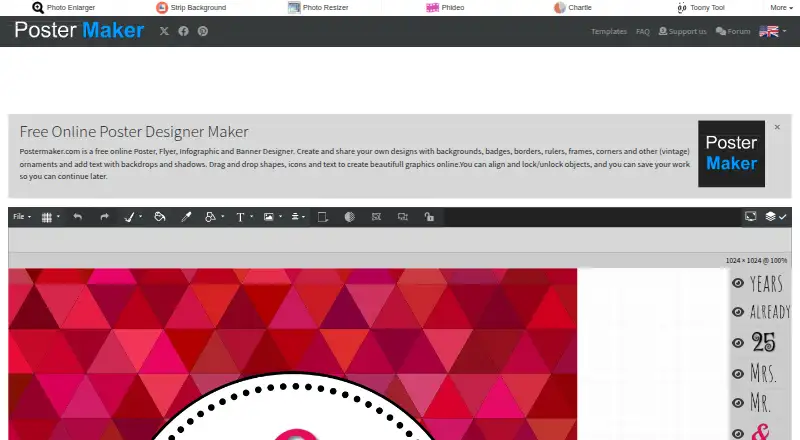
PosterMaker.com is a free web-based editor for posters, flyers, infographics, banners, and quote cards. Its tools include backgrounds, badges, borders, rulers, frames, ornaments, text backdrops, shadows, and drag-and-drop shapes, icons, and text. Text can use different fonts and colors, strokes, drop shadows, or background colors, and can be curved or warped. Users can upload an image or choose a background image, and the editor supports custom dimensions and built-in stock assets. Designs can be saved as images, downloaded as JPG or PNG, printed, or shared online. To continue editing later, save a local .poster file and reopen it. Quote card templates are also available for designs with added images and text. On touch screens, one finger moves an object; two fingers scale and rotate it. The free plan is listed as free. PosterMaker.com is published and maintained by Zygomatic.nl, which says it has been an online publisher since 2003. Questions can be sent through the contact form, and the site suggests checking its FAQ first.
Who it suits
It suits people who want a free browser-based editor for print or digital designs, including quote cards. Touch-screen users can move, scale, and rotate objects with gestures.
What it does well
- Free online poster, flyer, infographic, and banner design.
- Text can be curved or warped.
- Downloads are available as JPG or PNG.
- Local .poster files can be reopened for editing.
- Custom dimensions and built-in stock assets are supported.
What to know first
- The editor is web-based.
- The site uses third-party advertising cookies and Google Analytics.
- Designs saved locally require reopening the .poster file to edit later.
Plans
| Plan | Billed and limits | Price |
|---|---|---|
| Free | Free online poster, flyer, infographic and banner designer | Free |
As postermaker.com lists them, read 10 Oct 2026. The maker's own page has the final word.
Getting started
- Open PosterMaker.com in a web browser
- Choose a poster, flyer, infographic, banner, or quote-card design
- Add backgrounds, shapes, icons, images, or text
- Style and arrange the elements
- Save, download, print, or use Save/Share online
Verdict
PosterMaker.com provides a broad set of editor tools and several ways to save, print, or share a design. It is a free web option, with locally saved projects reopened from their .poster files.
Questions
How much does PosterMaker.com cost?
The Free plan is listed as free.
What can I create with it?
The editor supports posters, flyers, infographics, banners, and quote cards.
Which export formats are available?
You can save a design as an image, download it as JPG or PNG, or print it.
Can I continue editing later?
Yes. Save the design as a local .poster file and reopen it later.
Does it support images and custom sizes?
Yes. You can upload an image or choose a background image, use custom dimensions, and access built-in stock assets.
Who publishes PosterMaker.com?
Zygomatic.nl publishes and maintains the site and describes itself as an online publisher since 2003.
Facts from PosterMaker.com's own pages
- Advertising and analytics
- The privacy policy says the site uses third-party advertising cookies and Google Analytics, with IP addresses anonymized for Analytics. · postermaker.com, 10 Oct 2026
- Company history
- Zygomatic says it has been an online publisher since 2003. · postermaker.com, 10 Oct 2026
- Company location
- Zygomatic lists its address as Rigaweg 19, 3825 PP Amersfoort, The Netherlands. · postermaker.com, 10 Oct 2026
- Design tools
- The site describes backgrounds, badges, borders, rulers, frames, ornaments, text backdrops and shadows, plus drag-and-drop shapes, icons and text. · postermaker.com, 10 Oct 2026
- Export and print
- The editor offers saving as an image, downloading posters as JPG or PNG, and printing. · postermaker.com, 10 Oct 2026
- Image uploads
- The editor includes an option to upload an image and choose a background image. · postermaker.com, 10 Oct 2026
- Privacy and security
- Zygomatic says it follows applicable data protection laws including GDPR and takes security measures to reduce misuse and unauthorized access to personal data. · postermaker.com, 10 Oct 2026
- Publisher
- PosterMaker.com is published and maintained by Zygomatic.nl. · postermaker.com, 10 Oct 2026
- Purpose
- PosterMaker.com is a free online designer for posters, flyers, infographics and banners. · postermaker.com, 10 Oct 2026
- Save and resume
- Users can save a design as a .poster file locally and reopen it for later editing. · postermaker.com, 10 Oct 2026
- Sharing
- The editor includes a Save/Share online option. · postermaker.com, 10 Oct 2026
- Support
- Users can send questions or remarks through the PosterMaker.com contact form, and the site suggests checking its FAQ first. · postermaker.com, 10 Oct 2026
- Templates and use cases
- The site provides quote card templates and describes making quote cards with added images and text. · postermaker.com, 10 Oct 2026
- Text styling
- Text can use different fonts and colors, strokes, drop shadows or background colors, and can be curved or warped. · postermaker.com, 10 Oct 2026
- Touch support
- On touch screens, one finger moves an object and two fingers scale and rotate it. · postermaker.com, 10 Oct 2026
Where PosterMaker.com stands on Freedom251
- Poster Maker Software#28 of 41
- Poster Design Software#31 of 39