Freedom251 › Portfolio Management Software
Portfolio Performance
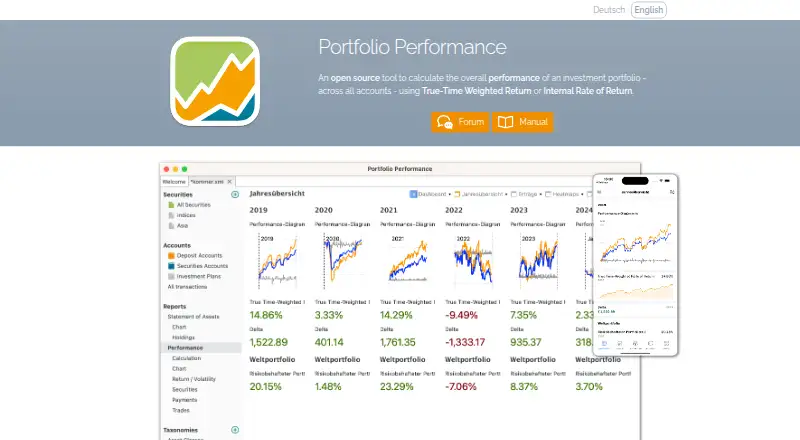
What Portfolio Performance is
Portfolio Performance tracks securities across accounts and calculates returns using true-time weighted return and internal rate of return. Its desktop tools include portfolio overviews, key figures, charts, historical prices, security classification, allocation analysis, and rebalancing. Users can record purchases, sales, taxes, fees, and other transactions, or import statements from online banks and brokers. Historical prices can be drawn from sources such as Yahoo Finance, CoinGecko, Quandl, AlphaVantage, HTML, and JSON. Portfolio data is stored in XML and can be exported as CSV or JSON. The desktop application is free and available for Linux, macOS, and Windows. Mobile apps for Android and iOS read desktop portfolio files for viewing and analysis, but do not allow edits. The mobile apps support password-protected files with AES256 encryption and process financial bookings on the phone. The project began in 2012; its source code uses the Eclipse Public License 1.0. Optional mobile subscriptions cost $3 a month or $25 a year.
Who it suits
It suits investors who want to track securities across accounts and review performance, allocation, risk, and tax lots. Mobile users can view and analyze a desktop portfolio, but need the desktop app to edit its data.
What it does well
- Free desktop application.
- Calculates time-weighted and internal-rate-of-return performance.
- Imports statements from online banks and brokers.
- Exports portfolio data as CSV or JSON.
- Supports allocation, risk, and tax-lot analysis.
What to know first
- Mobile app cannot edit portfolio data.
- Mobile app supports 36 of 48 desktop dashboard widgets.
- Mobile app does not use latest-price configurations.
- Complex calculations or large files may need a more powerful device.
Limits
The free Desktop plan is the desktop application. On mobile, portfolio files are view-only, and the app supports 36 of 48 desktop dashboard widgets; larger files and complex calculations may require a more powerful device.
Plans
| Plan | Billed and limits | Price |
|---|---|---|
| Desktop | Open-source desktop application | Free |
| Premium (Yearly) | Automatically renews unless canceled at least 24 hours before the current period ends · Optional mobile subscription; unlocks dashboards | $25 a year |
| Premium (Monthly) | Automatically renews unless canceled at least 24 hours before the current period ends · Optional mobile subscription; unlocks dashboards | $3 a month |
As portfolio-performance.info lists them, read 4 Oct 2026. The maker's own page has the final word.
Getting started
- Visit the Portfolio Performance website.
- Choose the desktop application for Linux, macOS, or Windows, or the mobile app for iOS or Android.
- Create or open a portfolio on desktop and record transactions or import statements.
- For mobile viewing, make the desktop portfolio file accessible through the mobile operating system or a third-party cloud app.
- Consider a Premium mobile subscription at $3 a month or $25 a year to unlock dashboards.
Overview
Portfolio Performance is a portfolio tracker for investors who want transaction-level records and detailed return analysis across securities accounts. It is strongest for people willing to maintain their portfolio in a desktop app; its phone app is a companion for viewing and analysis, not a replacement for editing.
The desktop application is free and open source, with performance calculations, allocation and risk analysis, tax-lot tracking, and exports. The trade-off is a desktop-centered workflow: mobile access depends on the portfolio file, and some analysis and dashboard features differ between platforms.
Key features
Portfolio Performance calculates both true time-weighted return and internal rate of return. Those measures help investors assess performance from different angles, while portfolio overviews, key figures, charts, historical prices, security classification, allocation analysis and rebalancing help explain results and portfolio composition. Risk analysis and tax-lot tracking add useful depth for investors managing more than a simple holdings list.
Users can record purchases, sales, taxes, fees and other transactions, or import statements from online banks and brokers. Historical price sources include HTML, JSON, Yahoo Finance, Quandl, AlphaVantage and CoinGecko, as well as a built-in provider for German and US stocks. This range can serve portfolios with varied holdings, but the price history depends on the sources configured.
Portfolio data is stored in XML and can be exported as CSV or JSON, giving users portable formats for their records. The project began in 2012, and its source code is licensed under the Eclipse Public License 1.0.
The mobile app reads the desktop portfolio file for viewing and analysis, but editing remains on desktop. Mobile supports configured historical-price sources such as Portfolio Report, Yahoo Finance, HTML, JSON, CoinGecko and Eurostat HICP, but does not use latest-price configurations. It supports 36 of the desktop app’s 48 dashboard widgets; volatility and portfolio fee rate are among the unsupported widgets. Larger files and complex calculations may need a more powerful phone or tablet.
Mobile file access uses the operating system and third-party cloud apps; users report success with iCloud, Google Drive, OneDrive and Jottacloud. The app says password-protected files use AES256 encryption, financial bookings are processed on the phone, and basic local use does not transmit portfolio files to the service. Desktop help is directed to the maker’s forum, while mobile support is provided by email.
Pricing
The Desktop plan costs nothing and provides the open-source desktop application. It is the natural choice for investors who want the full editing workflow without a software subscription.
Premium mobile subscriptions are optional and unlock dashboards: Premium (Monthly) costs $3 a month, and Premium (Yearly) costs $25 a year. Both renew automatically unless canceled at least 24 hours before the current period ends. These plans are for users who want the additional mobile dashboards; the mobile app remains a viewing and analysis tool rather than an editor.
Platforms
Portfolio Performance is available on Linux, macOS and Windows desktop, with mobile apps for Android and iOS. The mobile app supports iOS 12 and Android 7 or later. Its file-based workflow means mobile users need access to the desktop portfolio file, commonly through a cloud app.
Who it's for
Choose Portfolio Performance if you want a free desktop tool for tracking securities transactions across accounts and examining returns, risk, asset allocation and tax lots. It is particularly suited to investors comfortable managing a portfolio file and configuring price sources. Look elsewhere if you need to edit holdings on a phone or expect the desktop dashboard and calculations to carry over unchanged to mobile.
Pros and cons
- Pros: The free desktop app combines transaction tracking with time-weighted and internal-rate-of-return calculations, supporting more detailed performance review than a simple holdings list.
- Pros: XML storage and CSV or JSON export give users options for keeping and reusing portfolio data.
- Pros: Multiple historical-price sources and coverage of allocation, risk and tax lots suit investors who want to examine portfolio composition as well as returns.
- Cons: The mobile app cannot edit the portfolio, so changes still require the desktop application.
- Cons: Mobile lacks some desktop dashboard widgets and does not use latest-price configurations, limiting parity for users who rely on those views.
- Cons: Larger files and complex calculations may require a more powerful mobile device.
Alternatives
Compare portfolio management software if you want to consider a broader set of tools.
- Sharesight is worth considering if a free plan capped at one portfolio, 10 holdings including closed holdings, and one custom group fits your needs.
- Snowball Analytics offers a free plan for beginners and index fund investors, limited to one portfolio and 10 holdings.
- Stock Rover may suit readers looking for free basic research on individual stocks and market monitoring.
- Finary offers a Finary Plus plan at €149.99 a year, with unlimited linked accounts and tracked goals.
- getquin is an option for readers seeking a free plan with unlimited bank and broker connections, real-time financial data and a net-worth overview.
- rotki may suit users seeking a free, self-hosted option; its free plan includes 1,000 recent events and 10 user notes.
- Wealthfolio has a Basic plan at $2.99 a month, billed monthly, with one person, up to six devices and device sync, but no broker connections.
- Temenos Wealth Front Office is another option for readers considering paid wealth software.
Verdict
Portfolio Performance is a strong choice for investors who want free, desktop-based transaction tracking and substantive return and portfolio analysis. Its combination of return methods, risk and allocation views, tax-lot tracking and export formats is the main reason to choose it. Look elsewhere if mobile editing is essential or if you need the desktop dashboard experience in full on a phone.
Verdict
Portfolio Performance combines transaction tracking with portfolio analysis and multiple return calculations. The free desktop application is the editing option; mobile is for viewing and analysis, with paid optional subscriptions for mobile features.
Questions
Is Portfolio Performance free?
The Desktop plan costs nothing. Optional mobile subscriptions are listed at $3 a month or $25 a year.
Which platforms does it support?
The desktop application is available for Linux, macOS, and Windows. The mobile app supports iOS and Android, with compatibility stated for iOS 12 and Android 7 or later.
Can I edit my portfolio on mobile?
No. The mobile app reads a desktop portfolio file for viewing and analysis, but does not allow portfolio edits.
Is Portfolio Performance open source?
Yes. Its source code is licensed under the Eclipse Public License 1.0.
How does the mobile app access portfolio files?
It uses the mobile operating system and third-party cloud apps for file access. Users report success with iCloud, Google Drive, OneDrive, and Jottacloud.
Who makes Portfolio Performance?
The maker is Portfolio Performance, based in Mannheim, Germany. The project began in 2012.
Facts from Portfolio Performance's own pages
- Allocation analysis
- Yes · portfolio-performance.info, 20 Sept 2026
- Asset class coverage
- multi_asset · portfolio-performance.info, 20 Sept 2026
- Cloud storage
- The mobile app uses the mobile operating system and third-party cloud apps for file access; users report success with iCloud, Google Drive, OneDrive, and Jottacloud. · portfolio-performance.app, 4 Oct 2026
- Data and export
- Portfolio data is stored in XML and can be exported as CSV or JSON. · portfolio-performance.info, 4 Oct 2026
- Founded
- 2012 · portfolio-performance.info, 28 Sept 2026
- Free plan
- Yes · portfolio-performance.info, 20 Sept 2026
- License and history
- The project began in 2012 and its source code is licensed under the Eclipse Public License 1.0. · help.portfolio-performance.info, 4 Oct 2026
- Mobile app
- The mobile app reads the desktop portfolio file for viewing and analysis, but users cannot edit portfolio data in the app. · portfolio-performance.app, 4 Oct 2026
- Mobile compatibility
- The app is compatible with iOS 12 and Android 7 or later, and the FAQ says larger files and complex calculations may require a more powerful device. · portfolio-performance.app, 4 Oct 2026
- Mobile limits
- The FAQ says the mobile app supports 36 of 48 desktop dashboard widgets and lists several unsupported widgets, including volatility and portfolio fee rate. · portfolio-performance.app, 4 Oct 2026
- Mobile price feeds
- The mobile app supports configured historical price sources including Portfolio Report, Yahoo Finance, HTML, JSON, CoinGecko, and Eurostat HICP, but does not use latest-price configurations. · portfolio-performance.app, 4 Oct 2026
- Performance reporting
- Yes · portfolio-performance.info, 20 Sept 2026
- Portfolio analysis
- It provides portfolio overviews, key figures, charts, historical price tracking, security classification, asset allocation, and rebalancing. · help.portfolio-performance.info, 4 Oct 2026
- Price sources
- The desktop app supports historical prices from sources including HTML, JSON, Yahoo Finance, Quandl, AlphaVantage, CoinGecko, and a built-in provider for German and US stocks. · portfolio-performance.info, 4 Oct 2026
- Purpose
- The desktop application tracks securities portfolios across accounts and calculates performance using true-time weighted return and internal rate of return. · help.portfolio-performance.info, 4 Oct 2026
- Risk analysis
- Yes · portfolio-performance.info, 20 Sept 2026
- Security and privacy
- The mobile app says password-protected files use AES256 encryption, financial bookings are processed on the phone, and basic local app usage does not transmit portfolio files to the service. · portfolio-performance.app, 4 Oct 2026
- Support
- The maker directs users to its forum for help with the desktop product and provides support by email for the mobile app. · help.portfolio-performance.info, 4 Oct 2026
- Tax-lot tracking
- Yes · portfolio-performance.info, 20 Sept 2026
- Transactions
- Users can record purchases, sales, taxes, fees, and other transactions, or import statements from online banks and brokers. · portfolio-performance.info, 4 Oct 2026
Where Portfolio Performance stands on Freedom251
- Portfolio Management Software#3 of 81
- Stock Market software#1 of 17
- Investment Tools#3 of 17
- Stock Portfolio Management#4 of 14