POP Peeper
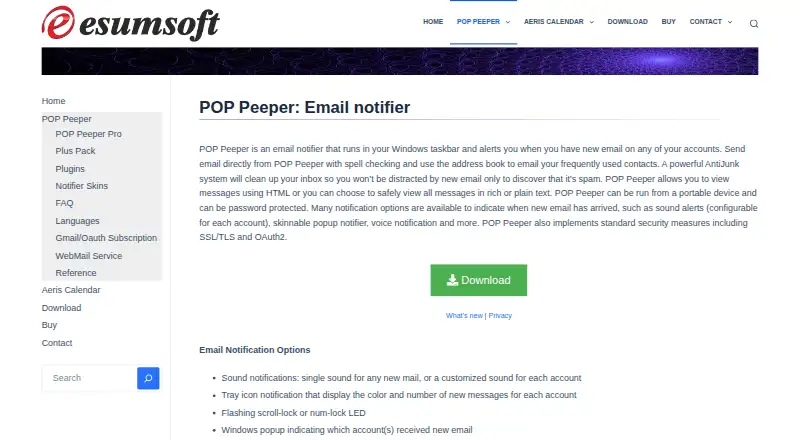
What POP Peeper is
POP Peeper is a Windows taskbar notifier that monitors new email across accounts and can send messages. It supports POP3 and IMAP, including IMAP push notifications, and sends through SMTP. Alerts can use sounds, a tray icon, keyboard LED flashing, popup messages, or automatic launching of POP Peeper or another email client. The free edition supports unlimited accounts, POP3/IMAP, SSL/TLS, and OAuth2; commercial use is not included. POP Peeper Pro adds message search, AntiJunk filters, rules, spell checking, themes, sender pictures, IMAP management, and auto-update. Its 30-day trial returns to the freeware edition afterward. The Plus Pack adds voice and RSS notifications, a sent-mail viewer, remote IMAP folders, and backup and restore. Data is encrypted and stored locally. Windows 10 or newer is listed; Windows 7 may have limited functionality. Gmail OAuth requires a separate subscription from September 1, 2026.
Who it suits
POP Peeper suits Windows users who monitor several POP3 or IMAP accounts from the taskbar. It also fits people wanting portable use, local storage, and optional notification add-ons.
What it does well
- Supports POP3, IMAP, and SMTP
- Multiple notification styles
- Unlimited accounts in free edition
- Encrypted local data storage
- Portable and password-protected use
What to know first
- Windows-only application
- Commercial use excluded from free plan
- WebMail uptime depends on providers
- Gmail OAuth needs separate subscription
Plans
| Plan | Billed and limits | Price |
|---|---|---|
| Free | Unlimited accounts · POP3/IMAP · SSL/TLS · OAuth2 · commercial use not included | Free |
| Plus Pack | Voice notifications · RSS protocol · Sent Mail Viewer · Remote-folder access · Backup and restore · Auto-update | On request |
| POP Peeper Pro | License for the current major version; not a subscription unless otherwise stated. · Adds message searching · AntiJunk · rules · spell checker · commercial use | On request |
| POP Peeper Plus Pack | License for the current major version; not a subscription unless otherwise stated. · Add-on for Free or Pro · voice notifications · RSS · sent mail viewer · remote IMAP folder access | On request |
| Gmail/Oauth Subscription — Unlimited | Annual subscription; price was not displayed in the opened page. · Unlimited Gmail/OAuth accounts · requires POP Peeper v6 or newer | On request |
| Gmail/Oauth Subscription — Limited | Annual subscription; price was not displayed in the opened page. · Up to 3 Gmail/OAuth accounts · requires POP Peeper v6 or newer | On request |
As esumsoft.com lists them, read 12 Oct 2026. The maker's own page has the final word.
Verdict
POP Peeper combines broad account support with configurable alerts and paid upgrades. Check your Windows version, provider compatibility, and Gmail OAuth requirements before relying on it.
Facts from POP Peeper's own pages
- App coverage
- desktop · esumsoft.com, 22 Sept 2026
- Email integrations
- The WebMail service lists Outlook/LiveMail/Hotmail, Yahoo, RediffMail, Juno, and NetZero; Gmail WebMail support was discontinued, while Gmail can use IMAP or POP3. · esumsoft.com, 12 Oct 2026
- Free plan
- Yes · esumsoft.com, 22 Sept 2026
- Notifications
- Notification options include sounds, a tray icon, keyboard LED flashing, popup alerts, and launching POP Peeper or another email client when new email arrives. · esumsoft.com, 12 Oct 2026
- OAuth handling
- When Google OAuth is used, POP Peeper does not receive or store the Google Account password, and Gmail data is processed on the user's computer. · esumsoft.com, 12 Oct 2026
- OAuth subscription
- As of September 1, 2026, Gmail OAuth requires a separate subscription and POP Peeper v6 or newer; the subscription is not required for Gmail app passwords or OAuth accounts such as Outlook and Yahoo. · esumsoft.com, 12 Oct 2026
- Plus Pack
- The Plus Pack adds voice notifications, RSS feed notifications, a sent mail viewer, special access to remote IMAP folders, and backup and restore. · esumsoft.com, 12 Oct 2026
- Portable use
- POP Peeper can run from a portable device and can be password protected. · esumsoft.com, 12 Oct 2026
- Pro features
- POP Peeper Pro adds message searching, AntiJunk filters, rules, spell checking, themes, sender profile pictures, IMAP message management, and auto-update. · esumsoft.com, 12 Oct 2026
- Protocols
- The product supports POP3 and IMAP, including IMAP push notifications, and supports sending email using SMTP. · esumsoft.com, 12 Oct 2026
- Purpose
- POP Peeper is a Windows taskbar email notifier that alerts users to new email across their accounts and can send email. · esumsoft.com, 12 Oct 2026
- Security
- The maker says account and email data is encrypted and stored locally, not transmitted to Esumsoft, and recommends encrypted connections such as SSL/TLS or STARTTLS. · esumsoft.com, 12 Oct 2026
- Support
- Esumsoft directs users with technical support needs or general questions to its contact form and says it will try to respond within 24 hours. · esumsoft.com, 12 Oct 2026
- System requirements
- The current download page lists Windows 10 or newer, with Windows 7 potentially having limited functionality. · esumsoft.com, 12 Oct 2026
- Trial
- The download page says POP Peeper Pro reverts to the freeware edition after its 30-day trial expires. · esumsoft.com, 12 Oct 2026
- WebMail limitation
- The maker says WebMail support depends on providers' presumed interfaces, so uptime is not guaranteed and provider changes may require a fix. · esumsoft.com, 12 Oct 2026
Where POP Peeper stands on Freedom251
- Email clients#74 of 142