Freedom251 › Podcast Analytics Software
PodcastStats.com
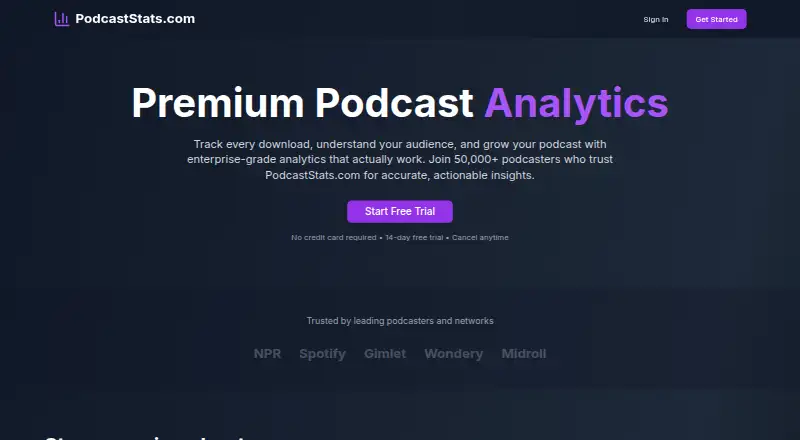
What PodcastStats.com is
PodcastStats.com provides podcast analytics for tracking downloads and examining audiences. Its tracking system uses IAB-compliant bot filtering and deduplication to reduce bot traffic and duplicate downloads, and the site describes download activity as updating live. Audience analytics cover geography, devices, platforms, apps, retention, and engagement, including city-level detail. Users can connect by adding tracking URLs to an RSS feed or sending data through the REST API, which includes webhooks, embeds, and custom integrations. Historical data can be imported from Libsyn, Anchor, and Buzzsprout. The Free plan costs nothing and allows up to 10K downloads per month, with basic dashboard analytics, seven-day data retention, bot filtering, and email support. Premium costs $19 a month and allows up to 1M downloads monthly, with advanced insights, unlimited retention, API access, webhooks, embeddable widgets, geographic insights, and priority support. Enterprise costs $99 a month and lists unlimited downloads, white-labeling, custom reporting and integrations, multi-user accounts, a dedicated support manager, and a 99.99% SLA guarantee. A 14-day Premium trial is offered without a credit card requirement.
Who it suits
The Free plan is described for new podcasters, Premium for growing podcasts, and Enterprise for podcast networks. Its analytics and API options may suit teams that need audience detail or custom integrations.
What it does well
- Download tracking includes bot filtering and deduplication.
- Audience reports include city-level geographic detail.
- Historical data imports include Libsyn, Anchor, and Buzzsprout.
- Free plan allows up to 10K downloads monthly.
- Premium includes unlimited data retention and API access.
What to know first
- Free plan retains data for seven days.
- Free plan is limited to 10K downloads monthly.
- Premium costs $19 a month.
- Enterprise costs $99 a month.
Limits
The Free plan allows up to 10K downloads per month and keeps data for seven days. It includes basic dashboard analytics; advanced insights, unlimited retention, and API access are listed with Premium at $19 a month.
Plans
| Plan | Billed and limits | Price |
|---|---|---|
| Free | Up to 10K downloads/month · Basic analytics dashboard · 7-day data retention · Email support · Bot filtering | Free |
| Premium | Up to 1M downloads/month · Advanced analytics & insights · Unlimited data retention · API access & webhooks · Embeddable widgets · Geographic insights · Priority support | $19 a month |
| Enterprise | Unlimited downloads · White-label solution · Custom integrations · Dedicated support manager · 99.99% SLA guarantee · Custom reporting · Multi-user accounts | $99 a month |
As podcaststats.com lists them, read 5 Oct 2026. The maker's own page has the final word.
Getting started
- Open podcaststats.com in a web browser.
- Choose the Free plan or start the 14-day Premium trial; no credit card is required for the trial.
- Add PodcastStats tracking URLs to your RSS feed, or send data through its API.
- Import historical data from Libsyn, Anchor, or Buzzsprout if applicable.
PodcastStats.com is an analytics service for podcasters who want to understand downloads and listener behavior, rather than count downloads alone. It suits independent shows moving beyond basic measurement and networks that need reporting across users. Its depth and import options are appealing, but the free plan’s 7-day retention is a sharp limit for tracking trends.
Overview
PodcastStats combines download tracking with audience, retention, and engagement analytics. Its IAB-compliant bot filtering and deduplication are intended to reduce automated and repeated downloads, which can make counts more useful for judging audience activity. Live updates suit creators who want to monitor downloads as they arrive; they matter less to shows that review performance periodically.
Shows can connect by adding tracking URLs to an RSS feed or sending data through the API. Historical imports from Libsyn, Anchor, and Buzzsprout can bring earlier performance into the analysis, a useful way to avoid beginning with only post-signup data.
Key features
- Audience detail: Geographic, device, platform, app, retention, and engagement analytics help explain how listeners access a show. City-level breakdowns add useful local granularity.
- Integrations: The REST API, webhooks, embeds, and custom integrations support workflows beyond the dashboard. API access and webhooks are included in Premium; Enterprise adds custom integrations.
- Performance claims: PodcastStats claims sub-second response times and a 99.99% uptime guarantee. Enterprise separately includes a 99.99% SLA guarantee.
Pricing
The Free plan costs nothing and includes up to 10K downloads per month, a basic analytics dashboard, 7-day data retention, email support, and bot filtering. It is a sensible entry point for new podcasters, but the download ceiling and brief retention make it a poor fit for a growing show that wants to compare longer-term performance.
Premium costs $19 a month and raises the limit to 1M downloads per month. It adds advanced analytics and insights, unlimited data retention, API access and webhooks, embeddable widgets, geographic insights, and priority support. This is the stronger fit for growing podcasts that need historical continuity and integration options. The 14-day Premium trial requires no credit card, and users can cancel anytime.
Enterprise costs $99 a month and includes unlimited downloads, white-labeling, custom integrations and reporting, multi-user accounts, a dedicated support manager, and a 99.99% SLA guarantee. It is aimed at podcast networks; its higher price is justified by network-oriented controls and support rather than a modest increase in individual-show analytics.
Platforms
PodcastStats is available on the web and through an API. That combination suits teams that want a browser-based analytics view or need to pass data into other systems.
Who it's for
New podcasters can start on Free if their volume stays below 10K monthly downloads and a week of history is enough. Premium is better for growing shows that need longer-term analysis, higher volume, or API-connected workflows. Enterprise is the clearest fit for networks needing multiple accounts, white-labeling, custom reports, and dedicated support.
Pros and cons
- Pro: Bot filtering and deduplication address automated and repeated downloads, strengthening the usefulness of download counts.
- Pro: Historical imports from Libsyn, Anchor, and Buzzsprout help preserve context when switching or adding analytics.
- Pro: Premium combines unlimited retention with API access and webhooks at $19 a month.
- Con: Free retains data for only 7 days, limiting its value for meaningful comparisons over time.
- Con: The Free tier caps downloads at 10K per month, so a successful show may need to upgrade to avoid that ceiling.
Alternatives
Podcast Analytics Software is the broader category to browse when comparing podcast analytics options. Choose Apple Podcasts if access to millions of free shows across iOS, macOS, web, and Windows matters more than a dedicated analytics service. Hypecast Analytics offers a free desktop plan for Windows 10/11 with three cameras and three microphones, making it a different option for desktop production. Podash is an alternative for Apple-platform users. Magellan AI offers a free verified-download prefix, while full platform access requires a demo. OP3 is a free podcast-prefix analytics service with public stats pages and no signup or login. Podtrac offers free basic measurement and paid growth options. Spotify Ad Analytics is free of charge. Podchaser may suit API users who need a defined request allowance, with its Starter plan providing 1,000 requests per month.
Verdict
PodcastStats.com is a strong fit for independent podcasters who need richer audience analytics and historical continuity, especially at Premium’s $19 a month. Choose it for its combination of filtered download tracking, retention insights, imports, and integration options. Look elsewhere if a free plan must retain data longer than a week, or if your needs center on a different podcast tool rather than analytics.
Verdict
PodcastStats.com combines download tracking with audience, retention, and engagement analytics, plus API and import options. The free tier has a 10K monthly download limit and seven-day retention; higher tiers expand those allowances and support options.
Questions
Is PodcastStats.com free?
Yes. The Free plan costs nothing and allows up to 10K downloads monthly.
How much do the paid plans cost?
Premium costs $19 a month, and Enterprise costs $99 a month.
Is there a free trial?
Yes. The 14-day Premium trial requires no credit card, and users can cancel anytime.
Which platforms does it support?
PodcastStats.com lists web and API platforms.
How can a podcast connect its data?
Users can add tracking URLs to an RSS feed or send data through the REST API. The API includes webhooks, embeds, and custom integrations.
What does Enterprise include?
Enterprise lists unlimited downloads, white-labeling, custom integrations and reporting, multi-user accounts, a dedicated support manager, and a 99.99% SLA guarantee.
Facts from PodcastStats.com's own pages
- API
- The site advertises a REST API with webhooks, embeds, and custom integrations. · podcaststats.com, 5 Oct 2026
- Audience analytics
- It lists geographic, device, platform, app, retention, and engagement analytics, including city-level geographic breakdowns. · podcaststats.com, 5 Oct 2026
- Download tracking
- It says its tracking system uses IAB-compliant bot filtering and deduplication to reduce bot traffic and duplicate downloads. · podcaststats.com, 5 Oct 2026
- Enterprise
- The Enterprise plan lists unlimited downloads, white-labeling, custom reporting, multi-user accounts, and a 99.99% SLA guarantee. · podcaststats.com, 5 Oct 2026
- Historical data
- It says users can import and analyze historical data, and names Libsyn, Anchor, and Buzzsprout among supported hosting platforms. · podcaststats.com, 5 Oct 2026
- Intended customers
- The pricing page describes Free for new podcasters, Premium for growing podcasts, and Enterprise for podcast networks. · podcaststats.com, 5 Oct 2026
- Performance claims
- The site claims sub-second response times and a 99.99% uptime guarantee. · podcaststats.com, 5 Oct 2026
- Purpose
- PodcastStats describes its product as podcast analytics for tracking downloads, understanding audiences, and growing podcasts. · podcaststats.com, 5 Oct 2026
- Real-time analytics
- The site says downloads are tracked with live updates and instant insights. · podcaststats.com, 5 Oct 2026
- RSS setup
- The site says users can integrate by adding its tracking URLs to an RSS feed or by sending data through its API. · podcaststats.com, 5 Oct 2026
- Support
- The Free plan lists email support, Premium lists priority support, and Enterprise lists a dedicated support manager. · podcaststats.com, 5 Oct 2026
- Trial
- PodcastStats offers a 14-day Premium trial with no credit card required and says users can cancel anytime. · podcaststats.com, 5 Oct 2026
Where PodcastStats.com stands on Freedom251
- Podcast Analytics Software#7 of 26