PocketLab Logo Maker
What PocketLab Logo Maker is
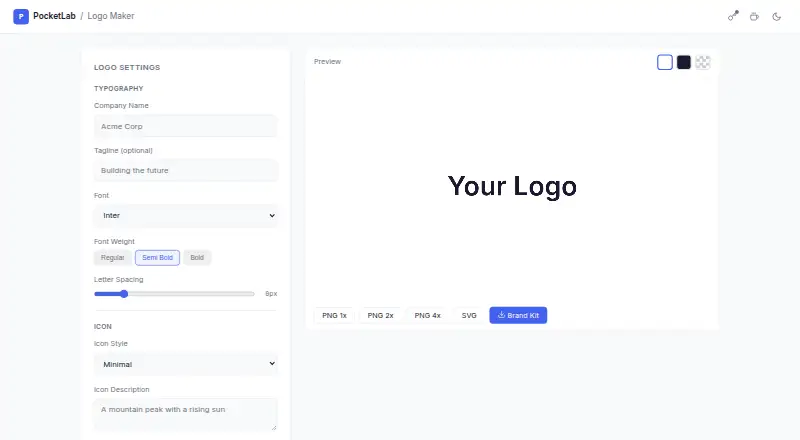
PocketLab Logo Maker is a free web tool for creating logos from a company name, optional tagline, typography, and an icon. You can set the font, font weight, and letter spacing, then generate an icon, choose a quick-pick category, or upload your own. The editor provides left or top layouts, color controls, and an icon-size setting. Downloads include PNG at 1×, 2×, and 4×, as well as SVG; a Brand Kit option is also offered. AI icon generation uses OpenAI and requires you to enter an API key. PocketLab says the key is encrypted and stored locally, and leaves the browser only for API calls. Its privacy policy says tool content is processed in the browser rather than sent to PocketLab, though AI features can send submitted content directly to the provider. The maker describes its browser-based utilities as free, registration-free, and usable for personal or commercial purposes. PocketLab says it is made in Berlin, Germany.
Who it suits
This tool suits individuals or businesses that want to make a logo in a browser without registering, including for commercial use. AI icon generation is an option for users prepared to provide an OpenAI API key.
What it does well
- Free browser-based tool with no registration.
- Offers PNG downloads at 1×, 2×, and 4×.
- Supports SVG and a Brand Kit option.
- Logo settings include font, weight, letter spacing, and layout.
- Described as usable for personal or commercial purposes.
What to know first
- AI icon generation requires an OpenAI API key.
- AI features can send submitted content directly to the provider.
Plans
| Plan | Billed and limits | Price |
|---|---|---|
| Free | Browser-based utility · no registration · no cost | Free |
As logo.pocketlabtools.com lists them, read 11 Oct 2026. The maker's own page has the final word.
Getting started
- Open PocketLab Logo Maker in a web browser.
- Enter a company name and optionally add a tagline.
- Choose a font, font weight, and letter spacing.
- Generate an icon, select a quick-pick category, or upload an icon.
- Set a left or top layout, colors, and icon size.
- Download PNG or SVG, or use the Brand Kit option.
Verdict
PocketLab Logo Maker offers logo customization and PNG or SVG exports at no cost and without registration. Consider the API-key requirement and provider data sharing if you plan to use AI icon generation.
Questions
Is PocketLab Logo Maker free?
Yes. PocketLab lists a free plan at no cost, with no registration and no cost.
Does it require an account?
PocketLab describes its browser utilities as working without accounts and requiring no registration.
What file formats can it export?
The page offers PNG downloads at 1×, 2×, and 4×, plus SVG. A Brand Kit option is also available.
Can I use logos commercially?
PocketLab describes its browser-based utilities as usable for personal or commercial purposes.
Does AI icon generation need an API key?
Yes. AI icon generation uses OpenAI and requires you to enter an OpenAI API key.
Where is PocketLab based?
PocketLab says the tool is made in Berlin, Germany.
Facts from PocketLab Logo Maker's own pages
- AI integration
- The product page names OpenAI as the API for AI icon generation. · logo.pocketlabtools.com, 11 Oct 2026
- AI requirement
- AI icon generation requires the user to enter an OpenAI API key. · logo.pocketlabtools.com, 11 Oct 2026
- Data storage
- PocketLab says optional API keys are encrypted with AES-GCM in browser local storage and are not transmitted to its servers. · pocketlabtools.com, 11 Oct 2026
- Exports
- The page offers PNG downloads at 1×, 2×, and 4×, plus SVG and a Brand Kit option. · logo.pocketlabtools.com, 11 Oct 2026
- Headquarters
- Berlin, Germany · logo.pocketlabtools.com, 28 Sept 2026
- Icon design
- Users can generate an icon, choose a quick pick, or upload their own icon. · logo.pocketlabtools.com, 11 Oct 2026
- Icons
- Users can generate an icon, choose from quick-pick categories, or upload their own icon. · logo.pocketlabtools.com, 11 Oct 2026
- Intended approach
- PocketLab describes its tools as single-purpose utilities designed to work without accounts. · pocketlabtools.com, 11 Oct 2026
- Key handling
- The product page says the OpenAI key is encrypted and stored locally, and leaves the browser only for API calls. · logo.pocketlabtools.com, 11 Oct 2026
- Key storage
- The tool says the OpenAI key is encrypted and stored locally, and leaves the browser only for API calls. · logo.pocketlabtools.com, 11 Oct 2026
- Layout and color
- Users can choose left or top layouts, set colors, and adjust icon size. · logo.pocketlabtools.com, 11 Oct 2026
- Layout and colors
- The editor offers left or top layouts and controls for colors and icon size. · logo.pocketlabtools.com, 11 Oct 2026
- Maker location
- PocketLab says it is made in Berlin, Germany. · pocketlabtools.com, 11 Oct 2026
- Privacy
- PocketLab’s privacy policy says tool content is processed in the browser and is not transmitted to its servers; AI features can send submitted content directly to the provider when used. · pocketlabtools.com, 11 Oct 2026
- Purpose
- The tool creates logos using AI-generated icons and custom typography. · pocketlabtools.com, 11 Oct 2026
- Support
- PocketLab’s privacy policy provides an email contact for questions about privacy or data. · pocketlabtools.com, 11 Oct 2026
- Terms
- PocketLab describes its browser-based utilities as free, requiring no registration, and usable for personal or commercial purposes. · pocketlabtools.com, 11 Oct 2026
- Typography
- Users can set a company name, optional tagline, font, font weight, and letter spacing. · logo.pocketlabtools.com, 11 Oct 2026
Where PocketLab Logo Maker stands on Freedom251
- AI Logo Makers#45 of 65