Freedom251 › Game Visual Scripting Software

Pocket Code
What Pocket Code is
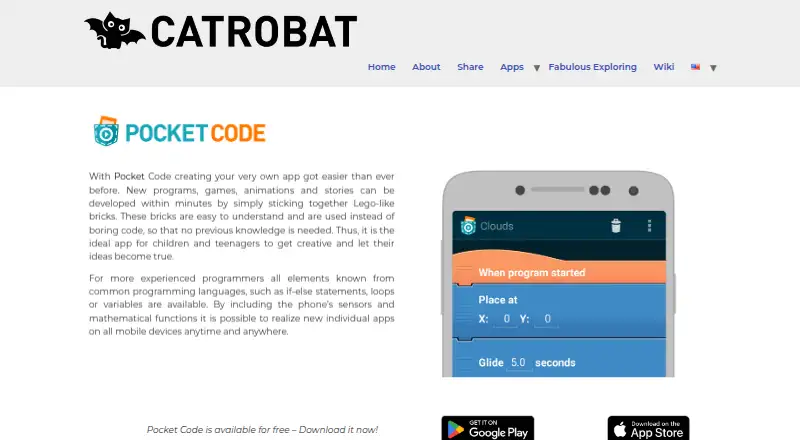
Pocket Code is a free mobile app for making programs, games, animations, and stories by connecting visual programming bricks. Catrobat describes it as suitable for children and teenagers with no programming background, as well as more experienced programmers. Its blocks cover if-else statements, loops, variables, mathematical functions, and phone sensor access. Users can explore, download, review, and remix community programs in the app’s Explore section and on pocketcode.org. Hardware extensions connect projects to Arduino, LEGO Mindstorms, Phiro robots, and Raspberry Pi: the Arduino extension works over Bluetooth with digital and PWM pin changes and analog readings; Mindstorms robots connect to a device over Bluetooth; and Raspberry Pi bricks read and set pins for IoT programs. Catrobat presents Pocket Code as a constructive learning tool for classroom use and provides a wiki and a free MOOC in English and German. The app is available for Android and iOS, and its programming language is Catrobat. The project is free and open source, driven by the International Catrobat Association and Graz University of Technology’s Institute of Software Technology. Project hosting is no longer available as a service, though the media library remains accessible through the wiki. Catrobat is based in Graz, Austria.
Who it suits
Pocket Code suits children and teenagers learning programming, classroom activities, and more experienced programmers who want to build projects with visual bricks. It also fits learners interested in connecting programs to supported robots or hardware extensions.
What it does well
- Free app for Android and iOS.
- Visual bricks cover loops, variables, conditions, math, and phone sensors.
- Community projects can be explored, downloaded, reviewed, and remixed.
- Extensions support Arduino, Mindstorms, Phiro, and Raspberry Pi projects.
- Free MOOC available in English and German.
What to know first
- Project hosting is no longer available as a service.
- The listed platforms are Android and iOS.
Plans
| Plan | Billed and limits | Price |
|---|---|---|
| Pocket Code | Free app; no paid tiers stated on the opened pages | Free |
As catrobat.org lists them, read 8 Oct 2026. The maker's own page has the final word.
Getting started
- Visit the Pocket Code website.
- Get the app for Android or iOS.
- Use the wiki or the free MOOC in English or German to learn.
- Create a project by joining visual programming bricks.
- Explore community projects in the app or on pocketcode.org, or use a supported hardware extension.
Verdict
Choose Pocket Code for free visual programming on a mobile device, particularly for learning, classroom projects, or experimenting with supported hardware extensions. Look elsewhere if your projects depend on Pocket Code hosting, which is no longer offered as a service.
Questions
Is Pocket Code free?
Yes. Pocket Code is listed as a free app, with no paid tiers stated.
Which devices can run Pocket Code?
It is available on Android and iOS.
Is Pocket Code open source?
Yes. It is described as a free open source project driven by the International Catrobat Association and Graz University of Technology’s Institute of Software Technology.
Can users share or remix projects?
Users can explore, download, review, and remix community programs through the app’s Explore section and pocketcode.org. Project hosting is no longer available as a service.
What learning resources are available?
Catrobat points users to a wiki and a free Pocket Code MOOC offered in English and German.
What hardware can Pocket Code connect with?
Its extensions support Arduino, LEGO Mindstorms, Phiro, and Raspberry Pi projects.
Facts from Pocket Code's own pages
- Arduino integration
- The Arduino extension connects over Bluetooth and can change digital and PWM pins and read analog pins. · catrobat.org, 8 Oct 2026
- Community projects
- Users can explore, download, review, and remix community programs through Pocket Code’s Explore section and pocketcode.org. · catrobat.org, 8 Oct 2026
- Education
- Catrobat presents Pocket Code as a tool for constructive learning and use in classrooms. · catrobat.org, 8 Oct 2026
- Headquarters
- Graz, Austria · catrobat.org, 28 Sept 2026
- LEGO Mindstorms integration
- The Mindstorms plugin connects robots to a device over Bluetooth so users can program and control them with Pocket Code. · catrobat.org, 8 Oct 2026
- Maker
- Catrobat is described as a nonprofit Free Open Source Software project driven by the International Catrobat Association and Graz University of Technology’s Institute of Software Technology. · catrobat.org, 8 Oct 2026
- Phiro integration
- The Phiro plugin lets users create programs for Phiro robots using Pocket Code’s brick-based framework. · catrobat.org, 8 Oct 2026
- Programming features
- The app includes if-else statements, loops, variables, mathematical functions, and access to phone sensors. · catrobat.org, 8 Oct 2026
- Project hosting limit
- Catrobat says project hosting is no longer available as a service, though its media library remains accessible through the wiki. · catrobat.org, 8 Oct 2026
- Raspberry Pi integration
- The Raspberry Pi extension provides bricks to read and set Raspberry Pi pins for IoT programs. · catrobat.org, 8 Oct 2026
- Support and learning
- Catrobat points users to its wiki and a free Pocket Code MOOC available in English and German. · catrobat.org, 8 Oct 2026
- What it does
- Pocket Code lets users create programs, games, animations, and stories by joining visual, Lego-like programming bricks. · catrobat.org, 8 Oct 2026
- Who it is for
- Catrobat describes Pocket Code as suitable for children and teenagers with no prior programming knowledge, as well as more experienced programmers. · catrobat.org, 8 Oct 2026
Where Pocket Code stands on Freedom251
- Game Visual Scripting Software#11 of 26
- Coding Learning Software#27 of 42