Freedom251 › Automated Savings Apps
Piggo
What Piggo is
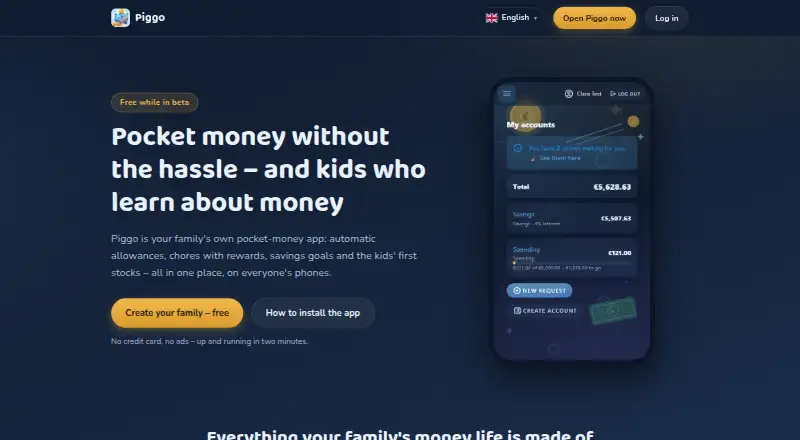
Piggo is a family pocket money app for managing allowances, chores, savings goals and children's stock portfolios. Parents can schedule weekly or monthly transfers for each child, in either direction. Families can create recurring chores, one-off tasks and open tasks available on a first-come basis; a parent approves completed chores before rewards reach the child's account. Children can request deposits or withdrawals with a note and receipt photo for a parent to approve or decline. Parents can set savings goals and pay interest on a child's savings account. Each child can have a small portfolio with real prices updated daily, but this feature is educational and informational: it does not trade securities or provide investment advice. Piggo does not hold, move or pay out real money. It is available on Android, iOS and the web, and supports Danish, English, Spanish, German, Italian, French, Swedish and Norwegian. The app is free while in beta, listed as free. An adult creates and manages the family. Piggo says it shows no ads, sells no data and uses no tracking or analytics cookies; it uses essential login and theme cookies.
Who it suits
Piggo suits families who want an adult-managed way to keep track of children's pocket money, chores and savings. Its portfolio feature is for information and education, not trading or investment advice.
What it does well
- Schedules weekly or monthly pocket money transfers.
- Supports recurring, one-off and open chores.
- Children can submit requests with a note and receipt photo.
- Offers eight supported languages.
What to know first
- Does not hold, move or pay out real money.
- Stock portfolios do not trade securities.
- An adult must create and manage the family.
Limits
Piggo is free while the app is in beta at no cost. It is intended for family bookkeeping and does not handle real money; withdrawals are manual.
Plans
| Plan | Billed and limits | Price |
|---|---|---|
| Free while in beta | Free while the app is in beta | Free |
As piggo.money lists them, read 5 Oct 2026. The maker's own page has the final word.
Getting started
- Open piggo.money or use Piggo on Android or iOS.
- Have an adult create and manage the family.
- Set up children’s accounts and choose allowance schedules, chores or savings goals.
- Optionally enable push notifications for payments, approvals and requests.
Verdict
Piggo brings family bookkeeping for allowances, tasks and savings into one app, with requests and approvals built into the workflow. Families should note that it tracks money rather than handling payments, and that it is free while in beta.
Questions
How much does Piggo cost?
Piggo lists a Free while in beta plan at no cost.
Which platforms does Piggo support?
Piggo is available on Android, iOS and the web.
Does Piggo move real money?
No. Piggo says it does not hold, move or pay out real money.
Can children trade stocks through Piggo?
No. The small portfolios show real prices updated daily for informational and educational purposes; they do not trade securities or provide investment advice.
Who creates and manages a family?
An adult creates and manages the family. Parents can view, correct and delete family data.
What languages does Piggo support?
Danish, English, Spanish, German, Italian, French, Swedish and Norwegian.
Facts from Piggo's own pages
- Account control
- Parents can view, correct and delete family data, and deleting a family removes its data entirely while backups are rotated over time. · piggo.money, 5 Oct 2026
- Audience and notable limit
- Piggo is intended for a family's own bookkeeping, with an adult creating and managing the family; it does not guarantee uptime or error-free service. · piggo.money, 5 Oct 2026
- Automatic allowances
- Parents can schedule recurring pocket money transfers for each child weekly or monthly, in or out. · piggo.money, 5 Oct 2026
- Chores
- Families can set recurring, one-off and first-come open tasks; parents approve completed chores and rewards go to the child's account. · piggo.money, 5 Oct 2026
- Data storage and protection
- Family data is stored in Piggo's own database in Denmark, families are technically separated, and traffic is protected by Cloudflare encryption and attack protection. · piggo.money, 5 Oct 2026
- Headquarters
- Denmark · piggo.money, 28 Sept 2026
- Integrations and money handling
- Piggo does not hold, move or pay out real money, and its stock feature does not trade securities. · piggo.money, 5 Oct 2026
- Languages
- Piggo supports Danish, English, Spanish, German, Italian, French, Swedish and Norwegian. · piggo.money, 5 Oct 2026
- Notifications
- Optional phone push notifications cover allowance payments, chore approvals and requests, including when the app is closed. · piggo.money, 5 Oct 2026
- Platforms
- Piggo is a web app that can be installed from a phone browser on iPhone and Android, and also works on computers and tablets. · piggo.money, 5 Oct 2026
- Privacy
- Piggo says it shows no ads, sells no data and uses no tracking or analytics cookies; it uses only essential login and theme cookies. · piggo.money, 5 Oct 2026
- Requests
- Children can request deposits or withdrawals with a note and receipt photo for a parent to approve or decline. · piggo.money, 5 Oct 2026
- Savings
- Parents can set account savings goals and pay interest on a child's savings account. · piggo.money, 5 Oct 2026
- Stocks
- Each child can have a small portfolio with real prices updated daily; the feature is informational and educational and does not trade securities or provide investment advice. · piggo.money, 5 Oct 2026
- Support
- Piggo lists email as its contact channel for questions and personal data matters. · piggo.money, 5 Oct 2026
- What it does
- Piggo is a family pocket money app for allowances, chores, savings goals and children's stock portfolios. · piggo.money, 5 Oct 2026
Where Piggo stands on Freedom251
- Automated Savings Apps#8 of 17