Freedom251 › Photo Metadata Editors
PhotoME
What PhotoME is
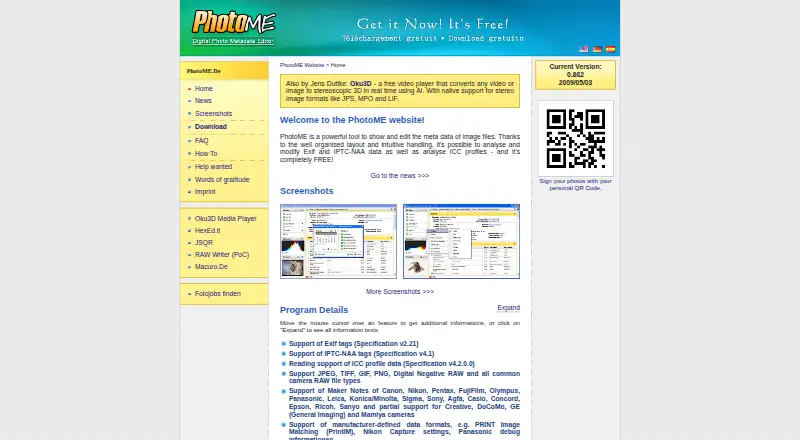
PhotoME is a free Windows desktop application for viewing and editing image metadata. It handles Exif and IPTC-NAA data and analyzes ICC profiles across JPEG, TIFF, GIF, PNG, Digital Negative RAW, and common camera RAW files. It reads maker notes from numerous camera makers, including Canon, Nikon, Pentax, Fujifilm, Olympus, Panasonic, Leica, and Sony. If an image contains GPS data, PhotoME can locate it through Google Earth, Google Maps, and other mapping services. A histogram displays individually selectable color channels. Metadata can be exported as unformatted text for conversion to HTML or BBCode, and Exif and IPTC-NAA data can be saved for later import; this recovery option is limited to JPEG files. Browser context-menu integration can open website images in PhotoME, while Windows Explorer integration is specified for the 32-bit version. Its listed 0.8ß2 beta is dated 2009/05/03. Batch processing and Exif tag editing are unavailable, and IPTC writing is disabled in that beta.
Who it suits
PhotoME suits Windows users who need to inspect image metadata, including camera notes or GPS data, across several image formats. Its limited editing functions and JPEG-only recovery option matter for anyone planning metadata changes.
What it does well
- Supports JPEG, TIFF, GIF, PNG, and camera RAW formats
- Reads maker notes from numerous camera makers
- Can locate present GPS data with mapping services
- Displays a histogram with selectable color channels
What to know first
- Batch processing is unavailable
- Exif text-tag editing is unavailable
- Adding or removing Exif tags is unavailable
- IPTC writing is disabled in the listed beta
Limits
The free version's download page says batch processing, Exif text-tag editing, and adding or removing Exif tags are unavailable. In the listed 0.8ß2 beta, IPTC writing is disabled; saving metadata for later recovery is limited to JPEG files.
Plans
| Plan | Billed and limits | Price |
|---|---|---|
| Freeware | Free to download, copy, and use commercially · Sale of the software prohibited | Free |
As photome.de lists them, read 7 Oct 2026. The maker's own page has the final word.
Getting started
- Visit the PhotoME website.
- Download the Windows version.
- Install and open PhotoME.
- Open an image in a supported format to inspect its metadata.
Verdict
PhotoME brings broad metadata viewing and several export and location tools to Windows. Its listed beta has significant editing limits, so it may not suit workflows that require batch processing or writing IPTC data.
Questions
How much does PhotoME cost?
The Freeware plan is free. It is free to download, copy, and use commercially; sale of the software is prohibited.
Which platforms does PhotoME support?
PhotoME is listed for Windows desktop use. Windows Explorer context-menu integration is specified for the 32-bit version.
Which image formats can it open?
It supports JPEG, TIFF, GIF, PNG, Digital Negative RAW, and common camera RAW formats.
Can PhotoME work with GPS metadata?
When an image contains GPS data, PhotoME can locate it using Google Earth, Google Maps, and other mapping services.
Can metadata be saved or exported?
PhotoME can export metadata as unformatted text for conversion to HTML or BBCode. It can save Exif and IPTC-NAA data for later import, with that recovery function limited to JPEG files.
Who makes PhotoME?
The site identifies PhotoME as a project by Jens Duttke and gives an address in Warstein, Germany.
Facts from PhotoME's own pages
- Beta version
- The listed 0.8ß2 beta has IPTC writing disabled. · photome.de, 7 Oct 2026
- Browser integration
- The site lists integration with Internet Explorer, Firefox, Thunderbird, SeaMonkey, Netscape 9, Flock, and Opera so website images can be opened in PhotoME from a context menu. · photome.de, 7 Oct 2026
- GPS
- When GPS data is present, PhotoME can locate it using Google Earth, Google Maps, and other mapping services. · photome.de, 7 Oct 2026
- Headquarters
- Warstein, Germany · photome.de, 28 Sept 2026
- Histogram
- It displays a histogram with individually selectable color channels. · photome.de, 7 Oct 2026
- Image formats
- It supports JPEG, TIFF, GIF, PNG, Digital Negative RAW, and common camera RAW formats. · photome.de, 7 Oct 2026
- Limits
- The download page says batch processing, editing Exif text tags, and adding or removing Exif tags are not currently available. · photome.de, 7 Oct 2026
- Maker
- The site identifies PhotoME as a project by Jens Duttke and gives an address in Warstein, Germany. · photome.de, 7 Oct 2026
- Maker notes
- It supports maker notes from numerous camera makers, including Canon, Nikon, Pentax, Fujifilm, Olympus, Panasonic, Leica, and Sony. · photome.de, 7 Oct 2026
- Metadata export
- PhotoME can export metadata as unformatted text for conversion to HTML or BBCode, and supports importing and exporting Exif and IPTC-NAA data for later import; that recovery function is currently limited to JPEG files. · photome.de, 7 Oct 2026
- Purpose
- PhotoME shows and edits image metadata, including Exif and IPTC-NAA data, and analyzes ICC profiles. · photome.de, 7 Oct 2026
- Security
- The FAQ says package files are tested with 32 antivirus engines before each release and describes antivirus detections as possible false positives. · photome.de, 7 Oct 2026
- Support
- The FAQ invites users to contact [email protected] with questions, unsupported camera information, and feature ideas. · photome.de, 7 Oct 2026
- Version
- The home page lists version 0.8ß2 dated 2009/05/03 as the current version. · photome.de, 7 Oct 2026
- Windows integration
- PhotoME can integrate with the Windows Explorer context menu; the site specifies the 32-bit version. · photome.de, 7 Oct 2026
Where PhotoME stands on Freedom251
- Photo Metadata Editors#19 of 31