Freedom251 › AI Photo Colorization Software
Photo Colorizer
What Photo Colorizer is
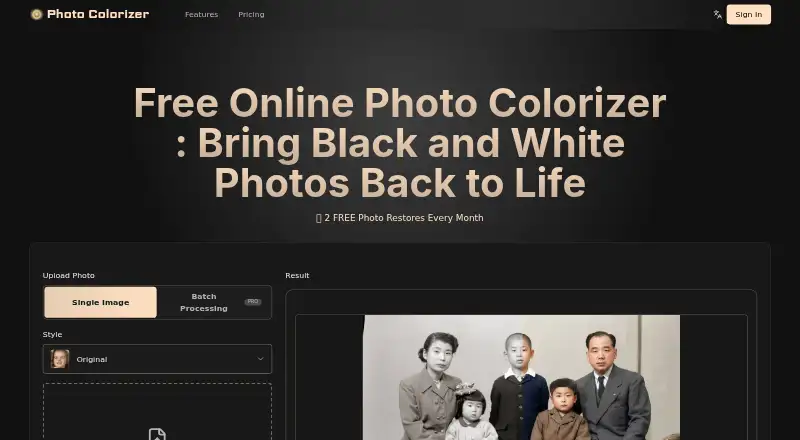
Photo Colorizer is a web service for adding color to old images and restoring damage in the same process. Its AI uses details such as historical era, fabric, lighting, and skin tone to guide its color choices. It can detect scratches, stains, and torn sections, then reconstruct missing details while colorizing. Users upload an image once and receive an automatic result in seconds. The tool handles family albums, historical archives, artwork, manga, and scanned documents. Uploads can be PNG, JPG, or WEBP files up to 200MB. Users can process one image at a time, while Batch Processing PRO is also available. Standard processing uses one credit; High PRO quality uses two credits. The service has a free plan, with paid access from $4/mo when billed annually. Its Annual Credits Plan is listed at $156 a year and includes 240 credits per month, output up to 3000px, batch processing, and all AI features. Interfaces are offered in nine languages, including English, French, Japanese, and Spanish.
Who it suits
Photo Colorizer suits people restoring family photos, as well as users working with archives, artwork, manga, or scanned documents. The site also identifies creative projects, presentations, businesses, museums, schools, and research institutions as use cases.
What it does well
- Restores scratches, stains, and torn areas while colorizing.
- Accepts PNG, JPG, and WEBP uploads.
- Supports images up to 200MB.
- Offers single-image and batch processing.
- Provides a free plan.
What to know first
- High PRO quality uses two credits per image.
- Batch Processing is labeled PRO.
- Web platform only.
Limits
Standard processing costs one credit, while High PRO quality costs two credits. The Annual Credits Plan includes 240 credits per month and output up to 3000px.
Plans
| Plan | Billed and limits | Price |
|---|---|---|
| Annual Credits Plan | Bill $156/year. $0.05 per credit · 240 credits per month · Up to 3000px · Up to 10 times faster · Batch Processing · All AI features · Single Processing · One-time payment · No Ads | $156 a year |
As photocolorizer.net lists them, read 1 Oct 2026. The maker's own page has the final word.
Getting started
- Open https://www.photocolorizer.net/en
- Choose the free plan or a paid plan
- Upload a PNG, JPG, or WEBP image up to 200 MB
- Select Single Image processing or Batch Processing PRO
- Choose Standard quality or High PRO quality
- Download the processed colorized image
Verdict
Photo Colorizer combines colorization with repair of visible damage and accepts several common image formats. Its free plan offers an entry point, while batch processing and higher-quality processing use the stated plan or credit options.
Questions
Is Photo Colorizer free?
Yes. A free plan is available, and paid access starts from $4/mo when billed annually.
What files can I upload?
The uploader accepts PNG, JPG, and WEBP files up to 200 MB.
How many credits does processing use?
Standard processing uses one credit. High PRO quality uses two credits.
Does it support batch processing?
Yes. Batch Processing PRO is available.
Which languages are offered?
The interface supports English, Traditional Chinese, Japanese, French, German, Italian, Korean, Spanish, and Arabic.
How can I contact support?
Support is available at [email protected].
Facts from Photo Colorizer's own pages
- AI colorization
- The AI studies historical era, fabric, lighting, and skin tone to produce faithful, realistic color. · photocolorizer.net, 1 Oct 2026
- Languages
- The site offers English, Traditional Chinese, Japanese, French, German, Italian, Korean, Spanish, and Arabic interfaces. · photocolorizer.net, 1 Oct 2026
- Output quality
- Standard processing costs 1 credit, while High PRO quality costs 2 credits. · photocolorizer.net, 1 Oct 2026
- Photo restoration
- The service detects scratches, stains, and torn areas and rebuilds missing details while colorizing. · photocolorizer.net, 1 Oct 2026
- Pricing positioning
- The pricing page calls its plans simple and safe plans for restoring memories. · photocolorizer.net, 1 Oct 2026
- Processing modes
- The interface offers Single Image processing and Batch Processing PRO. · photocolorizer.net, 1 Oct 2026
- Processing speed
- Users upload an image once and receive a fully colorized photo automatically in seconds. · photocolorizer.net, 1 Oct 2026
- Support
- The site provides [email protected] for contact and support. · photocolorizer.net, 1 Oct 2026
- Supported images
- The online tool handles old family albums, historical archives, artwork, manga, and scanned documents. · photocolorizer.net, 1 Oct 2026
- Target users
- The site describes use for family memories, creative projects, presentations and business materials, and museums, schools, and research institutions. · photocolorizer.net, 1 Oct 2026
- Upload formats
- The uploader accepts PNG, JPG, and WEBP files up to 200MB. · photocolorizer.net, 1 Oct 2026
Where Photo Colorizer stands on Freedom251
- AI Photo Colorization Software#17 of 26