Freedom251 › Rich Text Editor Software
Pell
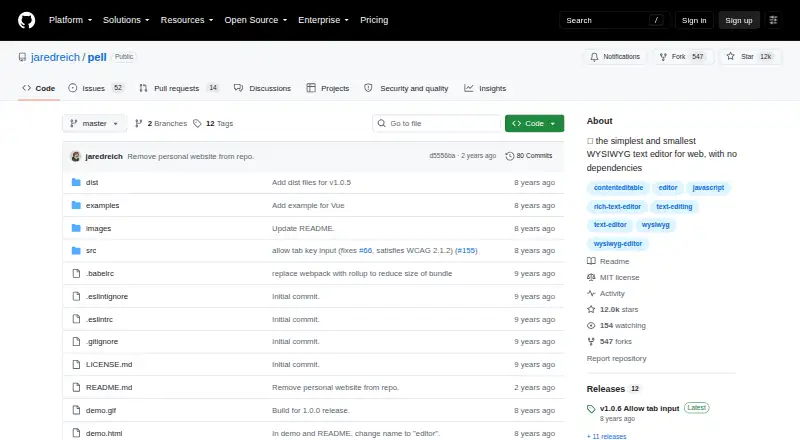
What Pell is
Pell is a small, dependency-free WYSIWYG text editor for web projects, written in pure JavaScript using ES6. It is self-hosted and free, with no usage limits stated. Its built-in actions cover common text formatting and content insertion, including bold, italic, underline, strikethrough, headings, paragraphs, quotes, lists, code, horizontal rules, links, and images. Developers can create custom actions and decide which controls appear and in what order. Styling can be adjusted through its Sass file or by overriding CSS. Pell’s onChange callback provides the editor’s HTML output, and the project demonstrates turning that HTML into Markdown with Turndown. The README gives its size as 1.38 kB minified and gzipped, or 3.54 kB minified. Installation is documented through npm or a browser script and stylesheet, with React and Vue examples linked. Listed browser support includes IE 9+, Chrome 5+, Firefox 4+, Safari 5+, and Opera 11.6+. Pell uses the MIT license, which provides the software as-is without warranty.
Who it suits
Pell suits developers who want a lightweight, self-hosted editor for web content and need control over available formatting actions. Its React and Vue examples may help teams working with those frameworks.
What it does well
- Free plan with no usage limits stated.
- No dependencies; 1.38 kB minified and gzipped.
- Custom actions and action ordering are supported.
- HTML output can be converted to Markdown.
- React and Vue examples are linked.
What to know first
- MIT license provides the software without warranty.
- Browser support is limited to the versions listed.
Plans
| Plan | Billed and limits | Price |
|---|---|---|
| pell | No price or usage limits stated | Free |
As github.com lists them, read 10 Oct 2026. The maker's own page has the final word.
Getting started
- Open the Pell project at https://github.com/jaredreich/pell.
- Install Pell through npm or include its browser script and stylesheet in an HTML page.
- Use the linked React or Vue examples if relevant to your project.
- Configure the actions and styles you want to use.
- Read the editor HTML from its onChange callback.
Verdict
Pell offers a compact set of editing controls with room to customize actions and styling. Its published license disclaims warranty, and its browser support is specified by version.
Questions
Is Pell free?
Yes. Pell is listed as free under the MIT license.
How is Pell installed?
The README documents installation through npm or by including CSS and JavaScript from unpkg in an HTML page.
Can I customize Pell's controls and styling?
Yes. Developers can create custom actions, choose which actions appear and set their order. Styling can be changed through the Sass file or CSS overrides.
What output does Pell provide?
Its onChange callback receives the editor's HTML output. The README also demonstrates converting that HTML to Markdown with Turndown.
Which browsers does Pell support?
The README lists IE 9+, Chrome 5+, Firefox 4+, Safari 5+ and Opera 11.6+.
Who maintains Pell, and what does its license say?
Package metadata names Jared Reich as author. Pell is released under the MIT license, which provides the software as-is without warranty.
Facts from Pell's own pages
- Browser support
- The README lists IE 9+, Chrome 5+, Firefox 4+, Safari 5+, and Opera 11.6+ as supported browsers, describing IE support as theoretical. · github.com, 10 Oct 2026
- Custom actions
- The README says developers can create custom actions and choose which actions appear and in what order. · github.com, 10 Oct 2026
- Customization
- Pell can be styled by editing its Sass file or overriding its CSS, and its class names can be customized. · github.com, 10 Oct 2026
- Formatting
- Included actions cover bold, italic, underline, strike-through, headings, paragraphs, quotes, lists, code, horizontal rules, links, and images. · github.com, 10 Oct 2026
- Implementation
- Pell is written in pure JavaScript using ES6 and has no dependencies. · github.com, 9 Oct 2026
- Installation
- The README documents installation with npm or by including CSS and JavaScript from unpkg in an HTML page. · github.com, 10 Oct 2026
- Integration
- The README links React and Vue framework examples. · github.com, 10 Oct 2026
- License
- Pell is released under the MIT License, which permits use, copying, modification, distribution, sublicensing, and sale subject to its stated conditions. · github.com, 10 Oct 2026
- Maintainer
- The package metadata names Jared Reich as the author. · github.com, 10 Oct 2026
- Output
- The editor's onChange callback provides HTML output, and the README demonstrates converting that HTML to Markdown with Turndown. · github.com, 10 Oct 2026
- Purpose
- Pell is a small WYSIWYG text editor for the web with no dependencies. · github.com, 10 Oct 2026
- Security
- The repository's Security and quality page displays zero security advisories. · github.com, 9 Oct 2026
- Size
- The README lists Pell at 1.38 kB minified and gzipped, and 3.54 kB minified. · github.com, 9 Oct 2026
- Technology
- It is written in pure JavaScript and ES6, with no dependencies. · github.com, 10 Oct 2026
- Warranty
- The MIT license provides the software “AS IS” without warranty. · github.com, 10 Oct 2026
Where Pell stands on Freedom251
- Rich Text Editor Software#12 of 37