Freedom251 › Rich Text Editor Software
MDXEditor
What MDXEditor is
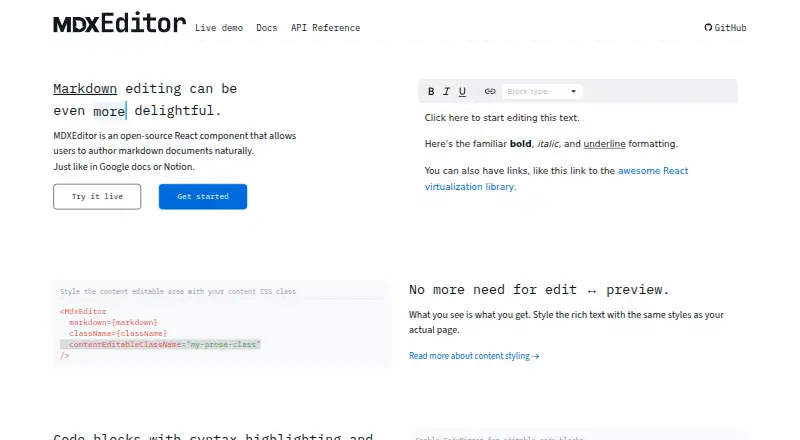
MDXEditor is a free, open-source React component for authoring Markdown documents in a WYSIWYG editor. It accepts Markdown as a string and emits Markdown as a string, without an intermediate HTML representation. Its editing engine is built on Lexical, and developers enable capabilities through plugins or add plugins for other Markdown constructs. Listed features include headings, quotes, links, lists, images, tables, code blocks, front matter, shortcuts, directives, JSX components, source editing, diff views, and a customizable toolbar. Tables can contain Markdown; controls include adding or removing rows and columns and changing alignment, but HTML tables are unsupported. Images can be inserted from a URL or local device, pasted or dropped, and passed to a configurable upload handler. Code blocks support syntax highlighting and language-aware editing, with CodeMirror available for editable blocks. The package is installed from npm in a React project, with setup guides for Next.js, Vite, Remix, and Create React App. It does not support server rendering, and it is tailored to Markdown rather than text font size, color, or family controls.
Who it suits
MDXEditor suits React developers building Markdown authoring into technical documentation or other projects. Its plugin system also gives developers a path to extend the editor for additional Markdown constructs.
What it does well
- Markdown remains a string without intermediate HTML.
- Plugins enable features and additional Markdown constructs.
- Supports source editing and document diff views.
- Image insertion includes URL, local, paste, and drop options.
- Code blocks offer syntax highlighting and language-aware editing.
What to know first
- Server rendering is unsupported.
- HTML tables are not supported.
- Text font size, color, and family cannot be changed.
Limits
The free plan is the open-source React component. Its limitations include no server rendering, no HTML table support, and no controls for changing text font size, color, or family.
Plans
| Plan | Billed and limits | Price |
|---|---|---|
| Open-source MDXEditor | React component for authoring Markdown · features enabled through plugins | Free |
As mdxeditor.dev lists them, read 8 Oct 2026. The maker's own page has the final word.
Getting started
- Install the package from npm in a React project.
- Choose a documented setup for Next.js, Vite, Remix, or Create React App.
- Enable the plugins needed for the Markdown features in your editor.
- Configure an upload handler if your image workflow needs one.
- Use the editor with client-side rendering; server rendering is unsupported.
Verdict
MDXEditor provides a plugin-based Markdown editing component with source, diff, table, image, and code-block features. Its Markdown focus and lack of server rendering or font styling controls are important fit considerations.
Questions
Is MDXEditor free?
Yes. Its listed plan is Open-source MDXEditor at no cost.
Is MDXEditor open source?
Yes. The GitHub repository lists an MIT license.
Which frameworks are covered by its setup guides?
The documentation covers Next.js, Vite, Remix, and Create React App.
Does MDXEditor support server rendering?
No. It does not support server rendering, and its Next.js App Router guide requires client-side rendering for the editor.
Can it edit HTML tables?
No. The table editor supports Markdown content in cells, but HTML tables are unsupported.
Can the editor change font size, color, or family?
No. It does not support changing text font size, color, or font family.
Facts from MDXEditor's own pages
- Code blocks
- Code blocks support syntax highlighting and language-aware editing, with CodeMirror available for editable code blocks. · mdxeditor.dev, 7 Oct 2026
- Editing engine
- The rich-text editing engine is built on the Lexical editor framework. · mdxeditor.dev, 7 Oct 2026
- Extensibility
- Developers can extend the editor with plugins and custom logic, including custom editors for Markdown directives. · mdxeditor.dev, 8 Oct 2026
- Features
- Its plugin-based features include headings, quotes, links, lists, images, tables, code blocks, front matter, and Markdown shortcuts. · mdxeditor.dev, 8 Oct 2026
- Formatting limitation
- The editor does not support changing text font size, color, or font family because it is tailored to Markdown syntax constraints. · mdxeditor.dev, 8 Oct 2026
- Framework setup
- The package is installed from npm in a React project, works with Vite, and the documentation says it does not support server rendering. · mdxeditor.dev, 7 Oct 2026
- Image handling
- The image plugin supports inserting images from the web or a local device, pasting and dropping images, and a configurable upload handler. · mdxeditor.dev, 7 Oct 2026
- Images
- The image plugin supports images from URLs or local devices, paste and drop, and an upload handler supplied by the integrator. · mdxeditor.dev, 8 Oct 2026
- Integrations
- The package is installed from npm in a React project, and the getting-started guide documents Next.js, Vite, Remix, and Create React App setups. · mdxeditor.dev, 8 Oct 2026
- Intended users
- The built-in plugins are geared toward technical documentation, while the editor can be extended for other use cases. · mdxeditor.dev, 8 Oct 2026
- License
- The GitHub repository lists an MIT license. · github.com, 7 Oct 2026
- Links
- The link dialog can edit and remove links and provide configured autocomplete suggestions; its keyboard shortcut is Ctrl+K on Windows and Cmd+K on Mac. · mdxeditor.dev, 8 Oct 2026
- Markdown features
- The feature overview lists tables, links, images, front matter, Markdown shortcuts, diff/source view, directives, JSX components, and a customizable toolbar. · mdxeditor.dev, 7 Oct 2026
- Markdown format
- The component accepts and emits Markdown as a string and does not use an intermediate HTML representation. · mdxeditor.dev, 8 Oct 2026
- Markdown input and output
- The component accepts and emits Markdown as a string, without an intermediate HTML representation. · mdxeditor.dev, 7 Oct 2026
- Markdown output
- The editor exposes options to configure Markdown output formatting, including bullet style, whitespace, and emphasis markers. · mdxeditor.dev, 8 Oct 2026
- Notable limitation
- The editor is tailored to Markdown syntax and does not support changing text font size, color, or font family. · mdxeditor.dev, 7 Oct 2026
- Product
- MDXEditor is an open-source React component for authoring Markdown documents in a WYSIWYG manner. · mdxeditor.dev, 8 Oct 2026
- Rendering limitation
- MDXEditor does not support server rendering and its Next.js App Router guide requires client-side rendering for the editor. · mdxeditor.dev, 8 Oct 2026
- Source and diff
- A plugin lets users switch to Markdown source editing or compare the document with an initial version, with read-only options for diff mode or the whole editor. · mdxeditor.dev, 8 Oct 2026
- Support
- The maker invites users to open a GitHub issue or discussion and lists an email contact for reaching out. · mdxeditor.dev, 8 Oct 2026
- Table editing
- The table editor supports inserting and removing rows and columns, changing column alignment, and Markdown content in cells; HTML tables are not supported. · mdxeditor.dev, 7 Oct 2026
- Tables
- The table editor supports inserting and removing rows and columns, changing column alignment, and Markdown content in cells; HTML tables are unsupported. · mdxeditor.dev, 8 Oct 2026
Where MDXEditor stands on Freedom251
- Rich Text Editor Software#11 of 37