Freedom251 › Peer Assessment Software
PeerEvals
What PeerEvals is
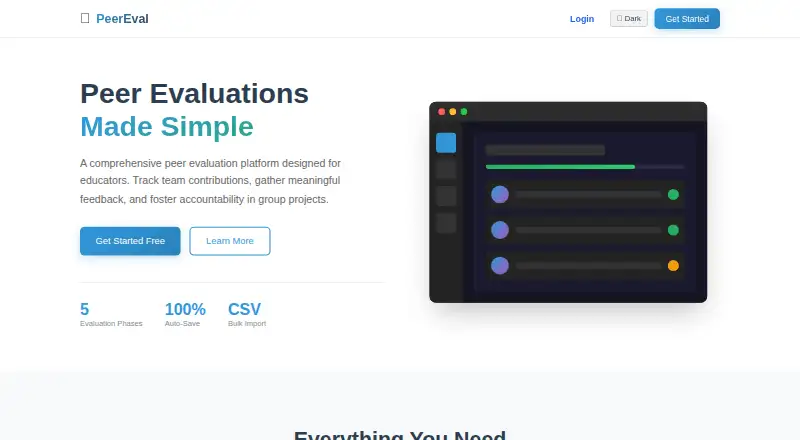
PeerEvals is a web-based peer assessment platform for educators coordinating group projects and team-based learning. Instructors can define rubric criteria and arrange evaluation work across multiple phases, with a deadline and timezone support for each phase. Dashboards and heat maps show progress, while reports and data exports help instructors review results. CSV imports bring in student and group data, and separate student, teacher, and administrator roles divide access. PeerEvals includes rubric scoring and has a free plan at no cost, with no paid tier required for the core job. It is accessed through the web and does not include AI-assisted evaluation features. Instructors request accounts through a process in which an administrator reviews the request. Students do not register through that page; their instructor adds them to the class.
Who it suits
PeerEvals suits educators running group projects or team-based learning who need phased peer evaluations, rubrics, and progress tracking. Students join through their instructor rather than registering on the instructor account page.
What it does well
- Free plan covers the core job.
- Configurable rubric criteria and rubric scoring.
- Phases can have deadlines with timezone support.
- Dashboards and heat maps track progress.
- CSV imports support student and group data.
What to know first
- No AI-assisted evaluation features.
- Instructor account requests require administrator review.
- Students cannot register through the instructor registration page.
Limits
The Free plan costs nothing, and no paid tier is required for the core job. AI-assisted evaluation features are not included.
Plans
| Plan | Billed and limits | Price |
|---|---|---|
| Free | No paid tier required for the core job | Free |
As peerevals.app lists them, read 4 Oct 2026. The maker's own page has the final word.
Getting started
- Visit https://peerevals.app/
- Request an instructor account; an administrator reviews requests
- Import student and group data from CSV
- Have the instructor add students to the class
- Define rubric criteria and organize evaluations into phases
PeerEvals is a web-based peer-assessment workspace for educators coordinating group projects and team learning. It suits instructors who need structured rubrics, several review stages, and class-level reporting. Its strongest case is a complete assessment workflow at no cost, while controlled account access and the lack of AI assistance may rule it out for some teaching setups.
Overview
PeerEvals brings rubric scoring, phased evaluations, progress monitoring, and reporting into one classroom process. Instructors can define the criteria students use to assess one another, split an activity into multiple phases, and assign a deadline to each phase. Timezone support makes those deadlines workable for classes spread across regions.
CSV import handles student and group data, which is useful when a roster already exists elsewhere. Dashboards and heat maps show how an evaluation is progressing, while reports and data exports support later review or record keeping. Role-based access separates student, teacher, and administrator workflows, giving managed courses clearer boundaries than a single shared account.
There is an access trade-off. Instructor account requests are reviewed by an administrator, and students join through their instructor rather than registering through the instructor sign-up route. That arrangement can fit institutions wanting oversight, but it adds a gate before a course can start.
Key features
Rubrics and evaluation phases
Configurable rubric criteria let teachers align peer scoring with the learning goals of a particular assignment instead of relying on a fixed template. Multiple phases support staged review, such as successive checkpoints in a team project. Per-phase deadlines and timezone handling are valuable when feedback must arrive in a defined sequence; for a one-off, informal peer comment activity, that structure may be more administration than necessary.
Tracking, data, and roles
Progress dashboards and heat maps give instructors a visual view of participation and completion. CSV roster import can reduce setup for student and group lists, and evaluation reports plus exports make the results usable outside the live workspace. Student, teacher, and administrator roles keep responsibilities distinct, although the instructor-managed student onboarding means teachers remain responsible for adding learners.
What it does not include
AI-assisted evaluation is not part of PeerEvals. Choose it for transparent, rubric-led human assessment, not for automated suggestions or machine-generated scoring support.
Pricing
The Free plan costs nothing, and no paid tier is required for the core job. It includes the platform's rubric scoring, phased evaluations, progress views, roster handling, reporting, exports, and role-based workflows. With no paid alternative described, PeerEvals is a straightforward fit for educators who need these functions without a software budget. The practical condition is access control: instructors must submit an account request for administrator review, and students are added to classes by their instructor.
Platforms
PeerEvals runs on the web, so it is suited to browser-based teaching environments rather than a platform-specific desktop or mobile deployment. The web model can simplify access across student devices, but the service depends on the instructor managing class membership.
Who it's for
PeerEvals is a strong match for teachers running team assignments that need more than one peer-review checkpoint, especially when rubrics, deadlines, and progress visibility matter. It also suits programs that import existing student and group rosters and need exportable assessment records. It is less suitable for instructors seeking instant self-service registration, direct student sign-up, or AI-supported evaluation.
Pros and cons
Pros
- Full core workflow at no cost: The Free plan covers rubric scoring, phases, tracking, and reporting without a required paid tier.
- Good support for staged projects: Multiple phases, individual deadlines, and timezone support fit extended team assignments.
- Useful operational data: CSV imports, dashboards, heat maps, reports, and exports connect setup, monitoring, and review.
- Clear role separation: Student, teacher, and administrator workflows suit courses with formal oversight.
Cons
- Instructor access is not immediate: Administrator review of account requests can delay setup.
- Students cannot self-register through the instructor route: Teachers must add students to each class.
- No AI-assisted evaluation: Educators wanting automated assessment support will need another tool.
Alternatives
For a broader comparison, see Peer Assessment Software.
- Marka is worth choosing if Android access matters or a free Basic plan capped at three classes and 50 students per class is sufficient; fuller reporting is limited to preview on that tier.
- CrowdGrader suits assignment-based use with a free instructor-sponsored option for up to 20 students, while student-supported assignments cost $1.99 a year.
- Eli Review fits educators wanting unlimited courses and all platform features at no instructor charge, with student access sold per term.
- Kritik360 is a choice for professors seeking always-free educator access plus a separate paid Kritik Scholar option.
- Student Peer Review offers a six-month free tier for one course, 50 students, and 10 assessments, with unlimited features.
- TEAMMATES is another free web option, though its service may change or end at the provider's discretion.
- Expertiza is preferable when self-hosting, Linux or macOS support, and an MIT-licensed open-source codebase are priorities.
- ComPAIR is a free web or self-hosted alternative.
Verdict
Choose PeerEvals if you are an educator managing rubric-based, multi-stage team assessment and want dashboards, exports, and roster tools without paying for the core workflow. Look elsewhere if immediate instructor signup, student self-registration, or AI-assisted evaluation is central to your course.
Verdict
PeerEvals brings rubrics, phased evaluations, progress views, and reporting together for educators managing team assessment. Its free plan and web access are useful, though student access depends on the instructor adding students to the class.
Questions
How much does PeerEvals cost?
Its Free plan costs nothing. No paid tier is required for the core job.
Is PeerEvals available on the web?
Yes. PeerEvals is web-based.
How do instructors get access?
Instructor account requests are reviewed by an administrator.
How do students join a class?
Students do not register through the instructor registration page. Their instructor adds them to the class.
Can instructors use rubrics and phased evaluations?
Yes. Instructors can define configurable rubric criteria and organize evaluations across multiple phases, with deadlines and timezone support for each phase.
Does PeerEvals include AI-assisted evaluation?
No. AI-assisted evaluation features are not included.
Facts from PeerEvals's own pages
- Deadlines
- The product listing says evaluations can have per-phase deadlines with timezone support. · itechguides.com, 4 Oct 2026
- Evaluation phases
- The product listing says instructors can organize evaluations across multiple phases. · itechguides.com, 4 Oct 2026
- Instructor access
- The maker's registration page says instructor account requests are reviewed by an administrator. · peerevals.app, 4 Oct 2026
- No AI features
- The product listing says AI-assisted evaluation features are not included. · itechguides.com, 4 Oct 2026
- Progress tracking
- The product listing names dashboards and heat maps for tracking progress. · itechguides.com, 4 Oct 2026
- Purpose
- A third-party product listing describes PeerEvals as a free web-based peer assessment platform for educators managing group projects and team-based learning. · itechguides.com, 4 Oct 2026
- Reports and exports
- The product listing names evaluation reports and data exports. · itechguides.com, 4 Oct 2026
- Roster data
- The product listing says CSV imports support student and group data. · itechguides.com, 4 Oct 2026
- Rubrics
- The product listing says instructors can define configurable rubric criteria. · itechguides.com, 4 Oct 2026
- Student access
- The maker's registration page says students do not register there and that their instructor adds them to the class. · peerevals.app, 4 Oct 2026
- User roles
- The product listing says role-based access separates student, teacher, and administrator workflows. · itechguides.com, 4 Oct 2026
- Web access
- A third-party listing identifies web as the platform and says access is web-based. · techyorker.com, 4 Oct 2026
Where PeerEvals stands on Freedom251
- Peer Assessment Software#8 of 17