Freedom251 › AI Quiz Generators
PDFToQuiz
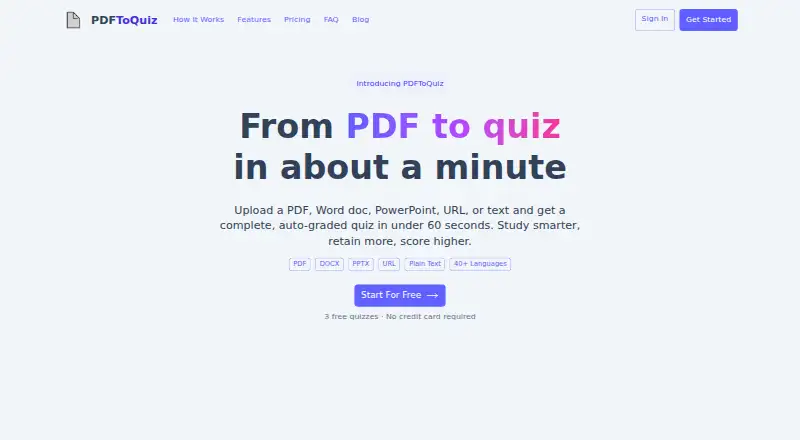
What PDFToQuiz is
PDFToQuiz is a web service that turns study material into interactive quizzes with automatic grading. It accepts PDF, DOCX, and PPTX files, webpage URLs, and pasted text; OCR reads scanned and handwritten pages. Quizzes can include multiple-choice, true/false, fill-in-the-blank, and long-answer questions. The site says generation uses OpenAI GPT-5 models, and missed answers can include an AI explanation of the concept. Users can track scores across sessions and see topics they have mastered or need to revisit. Document chat provides answers, summaries, and clarifications about uploaded material. The service lists support for more than 40 languages, including English, Spanish, Arabic, Chinese, French, and Japanese. Quizzes can be shared by link without requiring recipients to have an account. Pro users can export quizzes as PDF, CSV, or XLSX. The free plan allows three quizzes, documents up to five pages, uploads up to 1 GB, and ten AI chat messages. The site recommends reviewing generated quizzes before relying on them.
Who it suits
PDFToQuiz may suit teachers, students, researchers, academics, and trainers who want to turn documents or other study material into quizzes. It can also fit users who want score tracking, document chat, or link-based quiz sharing.
What it does well
- Accepts documents, webpage URLs, and pasted text
- OCR reads scanned and handwritten pages
- Tracks scores across sessions
- Quiz links do not require recipient accounts
What to know first
- Free plan allows three quizzes
- Free documents are limited to five pages
- Generated quizzes should be reviewed before use
Limits
The Free plan includes three quizzes, documents up to five pages, uploads up to 1 GB, and ten AI chat messages. Pro includes unlimited quizzes, uploads up to 5 GB, documents up to 100 pages, and unlimited AI chat messages.
Plans
| Plan | Billed and limits | Price |
|---|---|---|
| Free | 3 quizzes · 1 GB max upload · 5 pages · 10 AI chat messages | Free |
| Pro | billed annually at $44.99/month · Unlimited quizzes · 5 GB max upload · 100 pages · Unlimited AI chat messages | $44.99 a month |
As pdftoquiz.com lists them, read 8 Oct 2026. The maker's own page has the final word.
Getting started
- Visit https://www.pdftoquiz.com/ in a web browser.
- Choose the Free plan or Pro plan.
- Upload a PDF, DOCX, or PPTX, provide a webpage URL, or paste text.
- Generate a quiz from the study material.
- Share the quiz by link, or use Pro to export it.
Verdict
PDFToQuiz combines quiz generation with score tracking, document chat, and link sharing. The free plan has limits, and the site advises checking generated quizzes before relying on them.
Questions
Is PDFToQuiz free?
Yes. The Free plan costs nothing and includes three quizzes, a 1 GB maximum upload, documents up to five pages, and ten AI chat messages.
How much does Pro cost?
Pro is listed at $3.75 a year, billed billed annually at $44.99/month.
What platforms does PDFToQuiz support?
PDFToQuiz is available on the web.
What material can I use to make a quiz?
It accepts PDF, DOCX, and PPTX files, webpage URLs, and pasted plain text. OCR reads scanned and handwritten pages.
Can I export quizzes?
Pro users can export quizzes as PDF, CSV, or XLSX.
Do quiz takers need an account?
No. Recipients can take a quiz shared by link without an account.
Facts from PDFToQuiz's own pages
- Accuracy note
- The site recommends reviewing generated quizzes before relying on them. · pdftoquiz.com, 8 Oct 2026
- AI model
- The site says quiz generation uses OpenAI GPT-5 models. · pdftoquiz.com, 8 Oct 2026
- Audience
- The maker presents PDFToQuiz for teachers, students, researchers, academics, and trainers. · pdftoquiz.com, 8 Oct 2026
- Document chat
- Users can ask questions about an uploaded document and get answers, summaries, and clarifications. · pdftoquiz.com, 8 Oct 2026
- Explanations
- Missed questions include an AI explanation of the concept behind the answer. · pdftoquiz.com, 8 Oct 2026
- Exports and integrations
- Pro users can export quizzes as PDF, CSV, or XLSX for printing, data analysis, or LMS importing. · pdftoquiz.com, 8 Oct 2026
- Free limits
- The free plan includes three quizzes and accepts documents up to 5 pages and 1 GB. · pdftoquiz.com, 8 Oct 2026
- Inputs
- It accepts PDF, DOCX, PPTX, webpage URLs, and pasted plain text; scanned and handwritten pages are read with OCR. · pdftoquiz.com, 8 Oct 2026
- Languages
- The site lists support for 40+ languages, including English, Spanish, Arabic, Chinese, French, and Japanese. · pdftoquiz.com, 8 Oct 2026
- Progress
- Users can track scores across sessions and see topics they have mastered or need to work on. · pdftoquiz.com, 8 Oct 2026
- Purpose
- PDFToQuiz turns uploaded study material into interactive, auto-graded quizzes. · pdftoquiz.com, 8 Oct 2026
- Question types
- It generates multiple-choice, true/false, fill-in-the-blank, and long-answer questions. · pdftoquiz.com, 8 Oct 2026
- Sharing
- Generated quizzes can be shared by link, and recipients do not need an account to take them. · pdftoquiz.com, 8 Oct 2026
Where PDFToQuiz stands on Freedom251
- AI Quiz Generators#13 of 29