Freedom251 › PDF Flipbook Software
PDF2flip
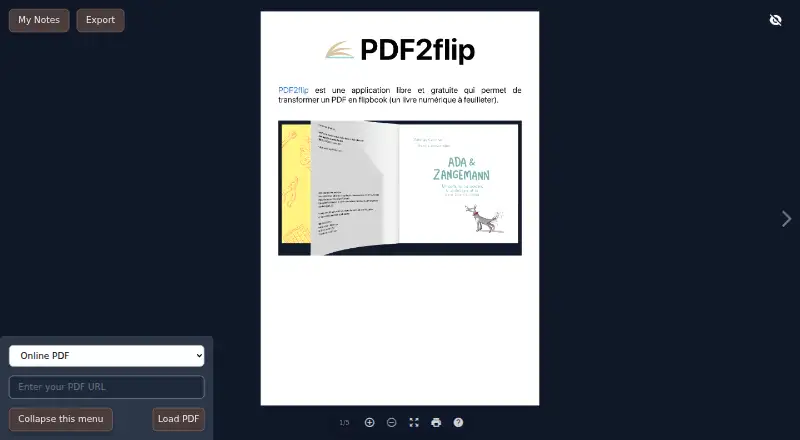
What PDF2flip is
PDF2flip is a free, open-source web application that presents PDF files as page-turning digital books. It can open a PDF stored on your computer or one hosted online, and it lets you make notes while reading and export them afterward. To share a PDF that is on your computer, first place it at a public direct file link; Nuage via Apps Éducation is one example given by the project. URL options can open a chosen page, display one page at a time, restrict the book to a page, or hide the viewer controls. If a PDF cannot be reached directly because of CORS restrictions, PDF2flip uses a CORS proxy automatically. When you control the PDF server, the project recommends enabling access through CORS headers. The application is based on Paginis and uses the lite version of the dflip library. It is distributed under the GPL, so modified versions that are redistributed must use that same license. The project invites feature suggestions, bug reports, and development discussion through tickets or email.
Who it suits
PDF2flip suits readers who want to view local or online PDFs in a page-turning format and take exportable notes. It may also suit people sharing PDFs through public direct links.
What it does well
- Opens PDFs from a computer or the internet
- Notes can be exported after reading
- URL options control page display and viewer controls
- Automatically uses a CORS proxy when direct access fails
- Free and open source
What to know first
- Shared local PDFs must first be placed at a public direct link
- Modified redistributed versions must use the GPL
- The project recommends CORS configuration when you control the server
Plans
| Plan | Billed and limits | Price |
|---|---|---|
| Free | Free application; no specific usage limits stated | Free |
As pdf2flip.forge.apps.education.fr lists them, read 11 Oct 2026. The maker's own page has the final word.
Getting started
- Open the PDF2flip website in a web browser.
- Choose a PDF stored on your computer or available online.
- For a shareable local PDF, place it online at a public direct file link.
- Use URL parameters to set a page, single-page view, page limit, or hidden controls as needed.
- Create notes while reading and export them afterward.
Verdict
PDF2flip offers a focused way to read PDFs as digital books, with notes and display options. Sharing a local file requires a public direct link, and the GPL applies to modified redistributed versions.
Questions
How much does PDF2flip cost?
PDF2flip is free. The project lists a free plan at no cost.
Is PDF2flip open source?
Yes. It is distributed under the GPL; modified versions that are redistributed must use the same license.
Can I open a PDF stored on my computer?
Yes, you can read a PDF stored on your computer. To share it, first place it online at a public direct file link.
Can I take notes while reading?
Yes. You can create notes and export them afterward.
Which platforms are available?
PDF2flip is available on the web.
What software is PDF2flip based on?
The project says it is based on Paginis and uses the lite version of the dflip library.
Facts from PDF2flip's own pages
- Audience
- The maintainer lists PDF2flip among free online software tools and describes it as turning PDFs into browsable digital books. · eyssette.forge.apps.education.fr, 11 Oct 2026
- CORS
- PDF2flip automatically uses a CORS proxy when a PDF cannot be accessed directly; configuring CORS on the PDF server is recommended when you control it. · github.com, 4 Oct 2026
- CORS handling
- PDF2flip automatically uses a CORS proxy when a PDF cannot be accessed directly; the README recommends enabling direct access with CORS headers when possible. · github.com, 11 Oct 2026
- Display options
- URL parameters can open a specific page, show one page at a time, set an end page, or hide the menu and interface toggle. · github.com, 11 Oct 2026
- Embedding
- The README documents sharing a PDF through a URL hash and opening it without menus using the m=0 parameter. · github.com, 11 Oct 2026
- Implementation
- The README says PDF2flip is based on Paginis and uses the lite version of the dflip library. · github.com, 11 Oct 2026
- License
- The project is distributed under the GPL free software license, which permits use, study, modification, and redistribution subject to its stated terms. · github.com, 11 Oct 2026
- Notes
- Readers can create notes and export them after reading. · github.com, 11 Oct 2026
- PDF sources
- It can read PDFs stored locally or available on the internet. · github.com, 11 Oct 2026
- Pricing
- The project describes PDF2flip as free; no paid plans or trial terms are stated on the opened project pages. · github.com, 11 Oct 2026
- Purpose
- PDF2flip turns a PDF into a flipbook, or digital book that can be browsed page by page. · github.com, 11 Oct 2026
- Sharing requirement
- To share a PDF from the app, the PDF must be online at a public direct file link; the README gives Nuage via Apps Éducation as an example. · github.com, 11 Oct 2026
- Support
- The project directs users to submit suggestions, report bugs, discuss the project through tickets, or contact the maintainer. · github.com, 11 Oct 2026
- Underlying software
- PDF2flip is based on Paginis and uses the lite version of the dflip library. · github.com, 4 Oct 2026
Where PDF2flip stands on Freedom251
- PDF Flipbook Software#12 of 30
- Flipbook Software#10 of 22