Freedom251 › Email Encryption Software
PDF Postman
by PDF Postman
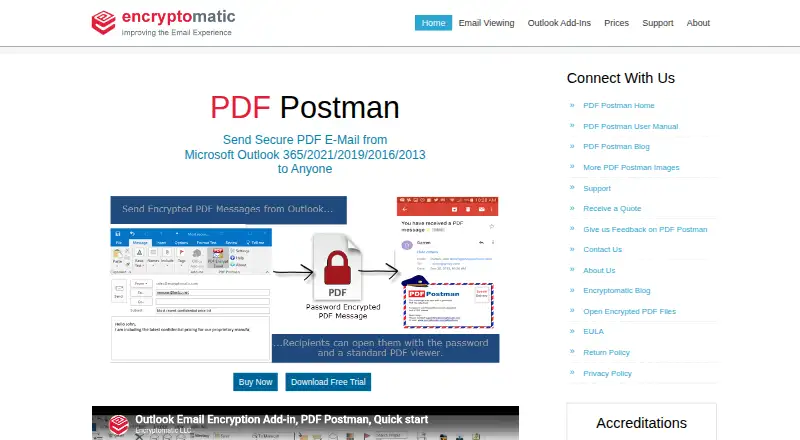
What PDF Postman is
PDF Postman is a Windows Outlook add-in that converts email messages and attachments into encrypted PDFs for delivery. It supports AES-128 or AES-256 encryption, and recipients can open protected files with a PDF viewer and password, without special software or registration. HTML, rich-text, and plain-text messages can become formatted PDFs. Users can encrypt attachments within a PDF, protect attachments without the message, or create PDFs from attached files. The listed Outlook Desktop versions are 365, 2021, 2019, 2016, and 2013 on 32-bit or 64-bit Windows. Requirements include Windows 11 or 10, .NET Framework 4.8 or later, 4 GB RAM, and 2 GB of disk space. A 15-day trial is followed by a free mode capped at five encrypted PDF messages per month. Paid options list $79.99 a month for one license and $349.95 a month for five; the licensing terms describe licenses as perpetual, with maintenance and upgrades optionally renewable at 25%. Enterprise deployment via MSI and a centralized password database are also listed.
Who it suits
It suits Windows users who send protected messages or attachments from Outlook, including small office or home office users and corporate professionals. Its enterprise deployment options may also fit organizations with IT departments.
What it does well
- Encrypts with AES-128 or AES-256.
- Recipients need only a PDF viewer and password.
- Converts HTML, rich-text, and text messages.
- Supports multiple attachment protection workflows.
- Offers MSI deployment and centralized password storage.
What to know first
- Windows and listed Outlook versions required.
- Free mode allows five encrypted PDF messages monthly.
- Trial lasts 15 days.
- System requirements include 4 GB RAM and 2 GB disk space.
Limits
After the 15-day trial, free mode permits up to five encrypted PDF messages per month. Paid plans start at $79.99 a month for one license; licenses are described as perpetual, with maintenance and upgrades optionally renewable at 25%.
Plans
| Plan | Billed and limits | Price |
|---|---|---|
| 25 Licenses | Perpetual licenses; includes 1 year of maintenance/upgrades · 25 licenses | $1,249.75, paid once |
| 50 Licenses | Perpetual licenses; includes 1 year of maintenance/upgrades · 50 licenses | $2,199.50, paid once |
| 75 Licenses | Perpetual licenses; includes 1 year of maintenance/upgrades · 75 licenses | $3,149.25, paid once |
| 5 Licenses | Perpetual licenses; includes 1 year of maintenance/upgrades · 5 licenses | $349.95, paid once |
| 100 Licenses | Perpetual licenses; includes 1 year of maintenance/upgrades · 100 licenses | $3,999, paid once |
| 10 Licenses | Perpetual licenses; includes 1 year of maintenance/upgrades · 10 licenses | $589.90, paid once |
| 1 License | Perpetual license; includes 1 year of maintenance/upgrades · 1 license | $69.99, paid once |
| Unlimited Site License | Request a quote · Unlimited site license | On request |
As encryptomatic.com lists them, read 7 Oct 2026. The maker's own page has the final word.
Getting started
- Visit https://www.encryptomatic.com/pdfpostman/.
- Check that your Windows and Outlook versions meet the listed compatibility and system requirements.
- Download and install the Windows Outlook add-in.
- Start with the 15-day trial; afterward, use the free mode or choose a paid license plan.
- For enterprise deployment, use the MSI file and centralized password database option.
Verdict
PDF Postman focuses on turning Outlook messages and attachments into password-protected PDFs, with several ways to handle attachments. Check the listed Windows and Outlook requirements and the post-trial message limit before choosing a plan.
Questions
Does PDF Postman have a free plan or trial?
Yes. It offers a 15-day trial, then reverts to free mode with up to five encrypted PDF messages per month.
How much do the paid plans cost?
The listed plans are $79.99 a month for 1 license, $349.95 a month for 5, $589.90 a month for 10, $1,249.75 a month for 25, $2,199.50 a month for 50, $3,149.25 a month for 75, and $3,999 a month for 100. An unlimited site license is also listed, with no price given.
Which platforms and Outlook versions are supported?
PDF Postman is for Windows. Its download page lists Outlook Desktop 365, 2021, 2019, 2016, and 2013 on 32-bit or 64-bit Windows, with Windows 11 or 10 requirements.
How are messages and attachments protected?
It converts email messages and attachments into password-protected PDFs using AES-128 or AES-256 encryption. Recipients can open the PDFs with a PDF viewer and password, without special software or registration.
Who makes PDF Postman?
PDF Postman is associated with Encryptomatic LLC, headquartered in Fargo, North Dakota, United States. The maker was founded in 2005.
Does PDF Postman support enterprise deployment?
Yes. Enterprise deployment is available through an MSI file, and users can work from a centralized password database.
Facts from PDF Postman's own pages
- Admin access controls
- Yes · encryptomatic.com, 20 Sept 2026
- Attachments
- Users can encrypt attachments inside the PDF, protect attachments without the message, or create PDFs from attached files. · encryptomatic.com, 7 Oct 2026
- Encryption
- It protects messages and attachments with AES-128 or AES-256 bit encryption. · encryptomatic.com, 7 Oct 2026
- Enterprise deployment
- The feature list says enterprise deployment is available through an MSI file and users can work from a centralized password database. · encryptomatic.com, 7 Oct 2026
- Export status
- The download page says PDF Postman is approved for export by the U.S. Department of Commerce as a mass-market encryption product. · encryptomatic.com, 7 Oct 2026
- Formatting
- It converts HTML, rich-text, or text email messages into formatted encrypted PDFs. · encryptomatic.com, 7 Oct 2026
- Founded
- 2005 · encryptomatic.com, 28 Sept 2026
- Free mode
- After the 15-day trial, the software reverts to a free mode that allows up to 5 encrypted PDF messages per month. · encryptomatic.com, 7 Oct 2026
- Free plan
- Yes · encryptomatic.com, 20 Sept 2026
- Headquarters
- Fargo, North Dakota, United States · encryptomatic.com, 28 Sept 2026
- Intended users
- The maker describes PDF Postman as suitable for small office or home office users and corporate professionals, including those with experienced IT departments. · encryptomatic.com, 7 Oct 2026
- Local processing
- The maker says its Windows desktop products do not send email information to the cloud and emails remain on the user's PC. · encryptomatic.com, 7 Oct 2026
- Outlook compatibility
- The download page lists Microsoft Outlook Desktop 365, 2021, 2019, 2016, and 2013 on 32-bit or 64-bit Windows. · encryptomatic.com, 7 Oct 2026
- Outlook integration
- Yes · encryptomatic.com, 20 Sept 2026
- Purpose
- PDF Postman is an Outlook add-in that converts email messages and attachments into password-protected PDF files for sending securely. · encryptomatic.com, 7 Oct 2026
- Recipient access
- Recipients can open encrypted PDF files using a PDF viewer and password, without special software or registration. · encryptomatic.com, 7 Oct 2026
- Recipient verification
- password · encryptomatic.com, 20 Sept 2026
- Secure delivery
- attachment · encryptomatic.com, 20 Sept 2026
- Support
- The maker provides an online support ticket link and lists support by Encryptomatic LLC. · encryptomatic.com, 7 Oct 2026
- Windows requirements
- The download page specifies Windows 11 or 10, .NET Framework 4.8 or later, 4 GB RAM, and 2 GB of disk space. · encryptomatic.com, 7 Oct 2026
Where PDF Postman stands on Freedom251
- Email Encryption Software#14 of 31
- File encryption tools#13 of 28