Freedom251 › Payment Link Software
Paydios Payment Links
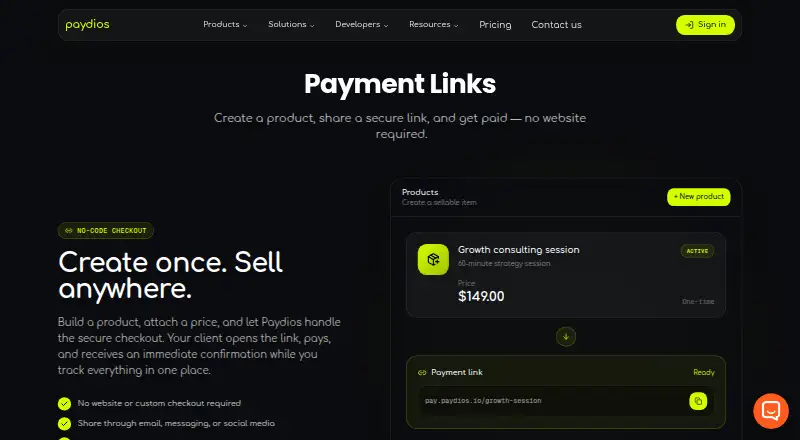
What Paydios Payment Links is
Paydios Payment Links gives merchants a way to sell without building a website or custom checkout. Create a product, set its price, and share the resulting checkout link with customers by email, messaging, social media, or another channel. A price can be set in the chosen amount and currency, for either a one-time charge or a recurring payment. The product page says merchants can monitor payment status and settlement in real time and release an order once payment is confirmed. Paid funds go to a Paydios balance and settle on the merchant’s payout schedule.
The pricing page lists major cards, Apple Pay, Google Pay, and cryptocurrencies as payment methods. Paydios describes TLS transmission, tokenization, real-time and machine-learning fraud detection, and 3D Secure support, and states that it is PCI DSS Level 1 compliant. Startup and Professional have no monthly subscription fee, but charge processing and additional fees, with monthly volume thresholds. Enterprise is aimed at processing more than $1M USD per month and uses custom volume rates. The product is available on web and through an API. Paydios lists several platform integrations, all marked coming soon, and says it can provide custom integration using REST APIs and webhooks.
Who it suits
Payment Links suits freelancers, creators, startups, and small businesses that need to collect one-time or recurring payments through a shareable checkout. Professional is described for scaling businesses, digital platforms, agencies, and high-growth companies; merchants needing more than $1M USD in monthly processing can contact Paydios about Enterprise.
What it does well
- Create checkout links without a website or custom checkout.
- Set prices for one-time or recurring payments.
- Share links through email, messaging, or social media.
- Track payment status and settlement in real time.
- Accept major cards, Apple Pay, Google Pay, and cryptocurrencies.
- Paydios states it is PCI DSS Level 1 compliant.
What to know first
- Startup processing is limited to up to $5,000/month.
- Professional processing is limited to up to $100,000/month.
- Listed platform integrations are marked coming soon.
- Plans list additional payout, risk, tax, and recovery fees.
Limits
Startup is listed for up to $5,000/month, with a 5.50% processing fee. Professional is listed for up to $100,000/month, with a 4.0% processing fee; both plans also list 2.00% payout/settlement, 2.00% fraud and risk assessment, 1.00% GST/tax, and 1.50% revenue protection and recovery fees. Enterprise is for processing more than $1M USD/month and has custom volume rates and custom payout/settlement and fraud/risk fees.
Plans
| Plan | Billed and limits | Price |
|---|---|---|
| Startup | No monthly subscription fee; 5.50% processing fee plus listed additional fees · Up to $5,000/month · payout/settlement 2.00% · fraud and risk assessment 2.00% · GST/tax 1.00% · revenue protection and recovery 1.50% | Free |
| Professional | No monthly subscription fee; 4.0% processing fee plus listed additional fees · Up to $100,000/month · payout/settlement 2.00% · fraud and risk assessment 2.00% · GST/tax 1.00% · revenue protection and recovery 1.50% | Free |
| Enterprise | Custom tailored volume rates; contact sales · For processing more than $1M USD/month · no processing limits (>$1M USD/month) · custom payout/settlement and fraud/risk fees | On request |
As paydios.io lists them, read 8 Oct 2026. The maker's own page has the final word.
Getting started
- Visit the Paydios Payment Links website.
- Choose a Startup or Professional plan, or contact sales about Enterprise.
- Create a product and set its amount, currency, and one-time or recurring payment type.
- Share the checkout link with customers through a chosen channel.
- Use the web product or API and configure any custom integration with Paydios.
Verdict
Choose Paydios Payment Links if you want shareable checkouts, recurring payment options, and payment tracking without building a checkout. Review the listed processing and additional fees against your expected volume; businesses processing above $1M USD per month can ask about Enterprise custom rates.
Questions
Does Paydios Payment Links have a free plan?
Startup and Professional are each listed as free with no monthly subscription fee. They charge processing fees and additional listed fees.
What does Startup cost?
Startup is free, with a 5.50% processing fee plus the listed additional fees. It is listed for up to $5,000/month.
What payment methods does it accept?
The pricing page lists major cards, Apple Pay, Google Pay, and cryptocurrencies.
Can it handle recurring payments?
Yes. Merchants can set a price for either a one-time or recurring payment.
Which integrations are available?
WordPress and WooCommerce, Shopify, React, Next.js, PHP and Laravel, and PHP Native are listed as coming soon. Paydios also says it supports custom integrations, REST APIs, webhooks, and documentation.
What platforms can I use?
Paydios Payment Links lists web and API platforms.
Facts from Paydios Payment Links's own pages
- Audience
- The pricing page describes Startup as suitable for startups, freelancers, creators, and small businesses, and Professional for scaling businesses, digital platforms, agencies, and high-growth companies. · paydios.io, 8 Oct 2026
- Compliance
- Paydios states that it is PCI DSS Level 1 compliant. · paydios.io, 8 Oct 2026
- Customer sharing
- Payment links can be shared through email, messaging, social media, or other customer channels. · paydios.io, 8 Oct 2026
- Custom integration
- Paydios says its team can create custom integrations and supports REST APIs, webhooks, and documentation. · paydios.io, 8 Oct 2026
- Headquarters
- Dover, New Jersey, United States · paydios.io, 28 Sept 2026
- Integrations
- The integrations page lists WordPress and WooCommerce, Shopify, React, Next.js, PHP and Laravel, and PHP Native; each is labeled coming soon. · paydios.io, 8 Oct 2026
- No-code checkout
- Payment Links lets merchants create a product, attach a price, and share a secure checkout link without a website or custom checkout. · paydios.io, 8 Oct 2026
- Payment methods
- The pricing page lists major cards, Apple Pay, Google Pay, and cryptocurrencies among the accepted payment methods. · paydios.io, 8 Oct 2026
- Payment options
- When setting a price, merchants can choose the amount, currency, and whether payment is one-time or recurring. · paydios.io, 8 Oct 2026
- Payment tracking
- The product page says merchants can track real-time payment status and settlement, and release an order after payment confirmation. · paydios.io, 8 Oct 2026
- Security
- The security page describes TLS transmission, tokenization, real-time fraud monitoring, machine-learning fraud detection, and 3D Secure support. · paydios.io, 8 Oct 2026
- Settlement
- Payment Links says paid funds move into the Paydios balance and settle on the merchant’s payout schedule. · paydios.io, 8 Oct 2026
- Support
- The Enterprise plan includes dedicated integration and support engineering teams, 24/7 SLA support, and a dedicated account manager. · paydios.io, 8 Oct 2026
Where Paydios Payment Links stands on Freedom251
- Payment Link Software#13 of 32