Freedom251 › Partition recovery software
partrevive
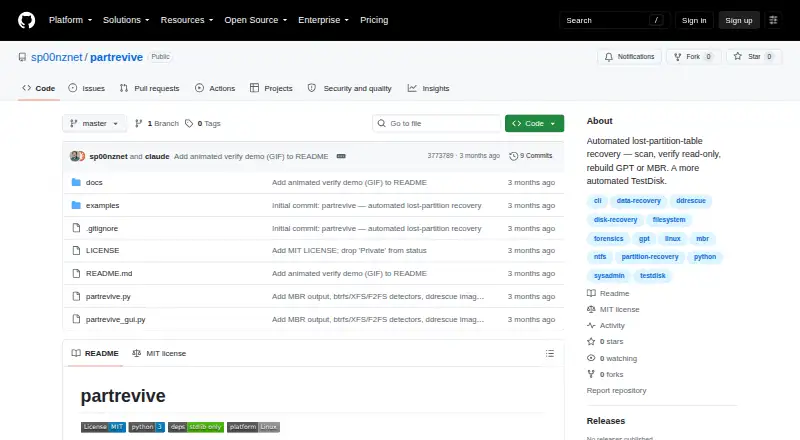
What partrevive is
partrevive is a free, MIT-licensed utility for scanning disks for filesystem signatures to help recover a lost or deleted partition table. Its verification process checks candidates using read-only loop devices and mounts, classifying filesystems with data as live and unmountable candidates as ghosts. Commands cover scanning, verification, planning, file rescue, table restoration, automatic recovery, undo, and disk imaging; a Tkinter interface guides users through scanning, verification, planning, and restoration. The project lists NTFS, FAT12/16/32, exFAT, ext2/3/4, btrfs, XFS, F2FS, and Linux swap as detected formats; it reports LVM2 and LUKS but does not rebuild them. GPT is the default restore format, while MBR can be written with `--mbr` and is limited to four primary partitions. Imaging uses ddrescue in two passes with a mapfile, and a disk image can be used as input. Before writing, restore and auto save the existing table and check SMART health. The single-file Python 3 program requires root and Linux system tools on PATH.
Who it suits
It suits Linux users comfortable with root access and command-line disk tools who need to inspect or restore a partition table. Users should check recovered data, since heavily fragmented or partially overwritten filesystems may be incomplete.
What it does well
- Verification uses read-only views of candidate filesystems.
- Includes scan, rescue, restore, undo, and image commands.
- Can work from a disk image.
- Saves the existing table before writing.
- Supports GPT and limited MBR restoration.
What to know first
- Requires root and several Linux system tools.
- LVM2 and LUKS are reported but not rebuilt.
- Project is described as early.
- Fragmented or overwritten filesystems may be incomplete.
Limits
LVM2 and LUKS are detected and reported but are not rebuilt. MBR output is limited to four primary partitions. Heavily fragmented or partially overwritten filesystems may mount while remaining incomplete.
Plans
| Plan | Billed and limits | Price |
|---|---|---|
| MIT licensed | Single-file Python utility · requires root and Linux system tools | Free |
As github.com lists them, read 9 Oct 2026. The maker's own page has the final word.
Getting started
- Open the project website on GitHub.
- Use a Linux system and install the required tools: sgdisk, blkid, losetup, mount, partprobe, and blockdev.
- Run the single-file Python 3 program with root access.
- Use scan and verify to inspect candidates, then plan the recovery.
- Use rescue, restore, auto, undo, or image as needed.
Verdict
partrevive provides a cautious recovery workflow with verification, table backups, and undo support. It requires Linux system tools and root access, and its project notes describe the software as early.
Questions
How much does partrevive cost?
The free plan costs nothing. The project is MIT licensed.
Which operating system does it support?
Linux is listed as a supported platform. The program requires root and Linux system tools.
Which partition and filesystem formats does it handle?
It restores GPT by default and can write MBR with `--mbr`. It detects NTFS, FAT12/16/32, exFAT, ext2/3/4, btrfs, XFS, F2FS, and Linux swap; LVM2 and LUKS are reported but not rebuilt.
Can it work with a disk image or a failing drive?
Yes. A disk image file can be used as the recovery input, and its image command uses ddrescue in two passes with a mapfile.
What safeguards apply when restoring a table?
Restore saves the existing table, prompts before writing by default, refuses to operate on a mounted target, and checks SMART health. Restore and auto refuse a failing drive unless `--force` is supplied.
Who makes partrevive, and what license does it use?
The maintainer profile identifies Ned Heller, based in the Bay Area. The project is MIT licensed.
Facts from partrevive's own pages
- Dependencies
- The single-file Python 3 program uses the standard library and requires root plus sgdisk, blkid, losetup, mount, partprobe, and blockdev on PATH. · github.com, 8 Oct 2026
- Disk images
- A disk image file can be used as the device input, and the image command uses ddrescue in two passes with a mapfile. · github.com, 9 Oct 2026
- Disk imaging
- The image command uses ddrescue in two passes with a mapfile, and the tool can recover against a disk image file. · github.com, 8 Oct 2026
- Download and requirements
- The project is a single Python 3 file using the standard library and requires root plus sgdisk, blkid, losetup, mount, partprobe, and blockdev on PATH. · github.com, 9 Oct 2026
- Filesystem support
- It detects NTFS, FAT12/16/32, exFAT, ext2/3/4, btrfs, XFS, F2FS, and Linux swap; LVM2 and LUKS are reported but not rebuilt. · github.com, 9 Oct 2026
- GUI
- An optional Tkinter GUI presents a guided scan and verify, plan, and restore workflow. · github.com, 9 Oct 2026
- License
- The repository states that partrevive is MIT licensed. · github.com, 9 Oct 2026
- Limitations
- LUKS and LVM2 volumes are flagged but not sized, mounted, or included in the proposed partition table. · github.com, 9 Oct 2026
- Maker
- The maintainer profile identifies the maker as Ned Heller and lists Bay Area as the location. · github.com, 9 Oct 2026
- Maturity
- The README describes the project as early and reports testing recovery of a deleted GPT on a 240 GB SATA SSD. · github.com, 8 Oct 2026
- Partition formats
- It restores GPT by default and can write an MBR table with --mbr, limited to four primary partitions. · github.com, 9 Oct 2026
- Project maturity
- The README describes the project as early and says it has been tested on a 240 GB SATA SSD recovery involving Windows partitions over stale Linux partitions. · github.com, 9 Oct 2026
- Purpose
- partrevive scans raw disks for filesystem signatures, verifies candidate partitions read-only, and helps rebuild a lost partition table. · github.com, 9 Oct 2026
- Read-only verification
- Its verify command checks candidates using read-only loop devices and mounts, classifying filesystems with data as live and unmountable candidates as ghosts. · github.com, 8 Oct 2026
- Recovery steps
- Its commands support scanning, verification, planning, rescuing files, restoring a table, undoing a saved table, and imaging a failing drive. · github.com, 9 Oct 2026
- Recovery workflow
- The CLI provides scan, verify, plan, rescue, restore, auto, undo, and image commands. · github.com, 8 Oct 2026
- Safety
- Restore backs up the existing partition table, prompts before writing by default, refuses to act on a mounted target, and can be undone from the saved backup. · github.com, 8 Oct 2026
- SMART check
- Before writing, restore and auto check SMART health and refuse a failing drive unless --force is supplied. · github.com, 9 Oct 2026
- Verification
- It creates read-only views of candidates and mount-tests them to distinguish live filesystems from stale ghosts. · github.com, 9 Oct 2026
- Write safety
- Only restore and auto write the partition table; the tool saves the existing table first and restore refuses to operate on a mounted target. · github.com, 9 Oct 2026
Where partrevive stands on Freedom251
- Partition recovery software#6 of 33
- Partition Recovery Software#13 of 34