Freedom251 › Transcription Software
Parlatype
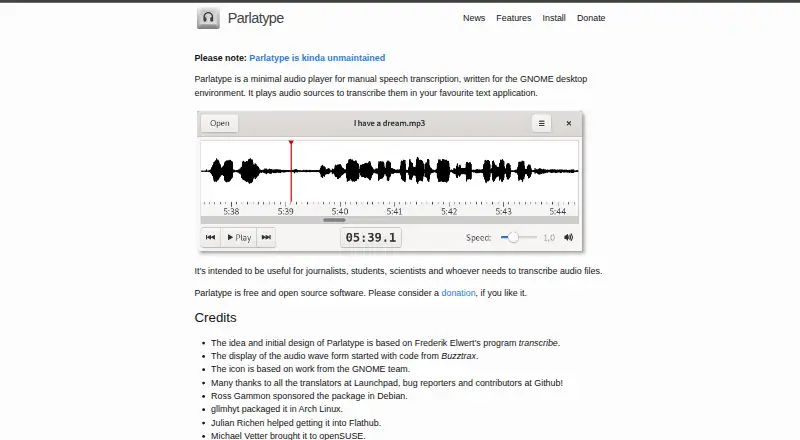
What Parlatype is
Parlatype is a free audio player for manual speech transcription on the GNOME desktop environment, available for Linux. It helps users work through local recordings rather than relying on automatic transcription. A waveform makes it easier to navigate audio, anticipate what comes next and spot silence. Playback speed is adjustable without changing pitch, and users can set how far the player rewinds when paused or disable that rewind. Parlatype can insert timestamps into a transcription and jump to a timestamped position.
A LibreOffice extension links media to a document, supports timestamp navigation and provides macros that can be assigned to key bindings. With required GStreamer plugins, the player supports almost any local audio file, but not streaming media. Its multimedia keyboard Play button can control playback without focus, and foot pedals can be assigned to that button. Installation options include Flatpak, Arch Linux, Debian, openSUSE and Ubuntu, with source installation for other distributions. The maker describes the software as “kinda unmaintained,” and says speech recognition support is no longer available.
Who it suits
Parlatype suits journalists, students, scientists and others transcribing audio manually on Linux. It may also fit users who want timestamp navigation alongside a LibreOffice document.
What it does well
- Waveform helps locate silence and navigate recordings.
- Playback speed changes without changing pitch.
- Can insert and jump to timestamps.
- LibreOffice extension links media to documents.
- Free and open source.
What to know first
- Streaming media is unsupported.
- Requires GStreamer plugins for audio formats.
- Maker describes the software as “kinda unmaintained.”
- Speech recognition support is no longer available.
Limits
The free plan is for manual transcription and does not support streaming media. Speech recognition support is no longer available, and the project is described as kinda unmaintained.
Plans
| Plan | Billed and limits | Price |
|---|---|---|
| Parlatype | Free and open source software · manual speech transcription · donation-supported | Free |
As parlatype.xyz lists them, read 11 Oct 2026. The maker's own page has the final word.
Getting started
- Choose a Linux installation route such as Flatpak, Arch Linux, Debian, openSUSE, or Ubuntu
- Install Parlatype, or build it from source on another distribution
- Open a local audio file with the required GStreamer plugins
- Adjust playback speed or pause-rewind behavior
- Use the waveform and timestamp controls while transcribing
- Install the LibreOffice extension if you want document linking and macros
Verdict
Parlatype focuses on playback controls and timestamp navigation for manual transcription, with a LibreOffice extension for document-based workflows. Its stated maintenance status and lack of streaming support are important considerations.
Questions
How much does Parlatype cost?
The Parlatype plan costs nothing. It is free and open source and donation-supported.
Which platforms support Parlatype?
It runs on Linux and is designed for the GNOME desktop environment.
Does Parlatype transcribe speech automatically?
Its purpose is manual speech transcription. Speech recognition support is no longer available.
Can it play streaming media?
No. Parlatype supports local audio files with required GStreamer plugins, while streaming media is unsupported.
Does Parlatype provide timestamps?
Yes. It can insert timestamps into a transcription and jump to timestamped positions.
Is there a LibreOffice integration?
Yes. An extension links media to a document, supports timestamp jumping, and offers assignable macros.
Facts from Parlatype's own pages
- API access
- No · parlatype.xyz, 23 Sept 2026
- Audience
- The maker says it is intended for journalists, students, scientists, and anyone who needs to transcribe audio files. · parlatype.xyz, 11 Oct 2026
- Audio formats
- Using GStreamer, Parlatype supports almost any local audio file with the required plugins, but streaming media is unsupported. · parlatype.xyz, 11 Oct 2026
- Controls
- The multimedia keyboard Play button can control Parlatype without focus, and foot pedals can be assigned to that button. · parlatype.xyz, 11 Oct 2026
- Free plan
- Yes · parlatype.xyz, 23 Sept 2026
- Latest listed release
- The maker’s news page lists Parlatype 4.3 as released on July 1, 2025. · parlatype.xyz, 11 Oct 2026
- LibreOffice
- A LibreOffice extension links a media file to a document, supports jumping to timestamps, and offers macros that can be assigned to key bindings. · parlatype.xyz, 11 Oct 2026
- Linux distribution packages
- The installation page lists Flatpak, Arch Linux, Debian, openSUSE, and Ubuntu installation options, with source installation for other distributions. · parlatype.xyz, 11 Oct 2026
- Pause rewind
- Playback can rewind a configurable number of seconds when paused, or have rewind disabled. · parlatype.xyz, 11 Oct 2026
- Playback speed
- Playback speed is adjustable without changing pitch. · parlatype.xyz, 11 Oct 2026
- Purpose
- Parlatype is a minimal audio player for manual speech transcription, designed for the GNOME desktop environment. · parlatype.xyz, 11 Oct 2026
- Speaker identification
- No · parlatype.xyz, 23 Sept 2026
- Speech recognition
- Automatic speech recognition is hidden by default, requires language model data, may be omitted by distributions, and the maker says its results are not overwhelming. · parlatype.xyz, 11 Oct 2026
- Support status
- The homepage describes Parlatype as “kinda unmaintained,” and the maker says speech recognition support is no longer available. · parlatype.xyz, 11 Oct 2026
- Timestamps
- Parlatype can produce timestamps for insertion into a transcription and jump to a timestamped position. · parlatype.xyz, 11 Oct 2026
- Waveform
- Its waveform helps users navigate audio, see what comes next, and spot silence. · parlatype.xyz, 11 Oct 2026
Where Parlatype stands on Freedom251
- Transcription Software#28 of 46
- AI transcription tools#31 of 46